(BECIIN
<
<
<
<
_i] most cases, the volume levels com-
ng fi'om broadeast programming or
commercials are never the same. With
the A VL (Audio Volume Leveler) control
turned ON, you can have the TV level
out sound that is being heard. This
makes jbr a more consistent sound by
reducing the peaks' and valleys that
occur during program changes or com-
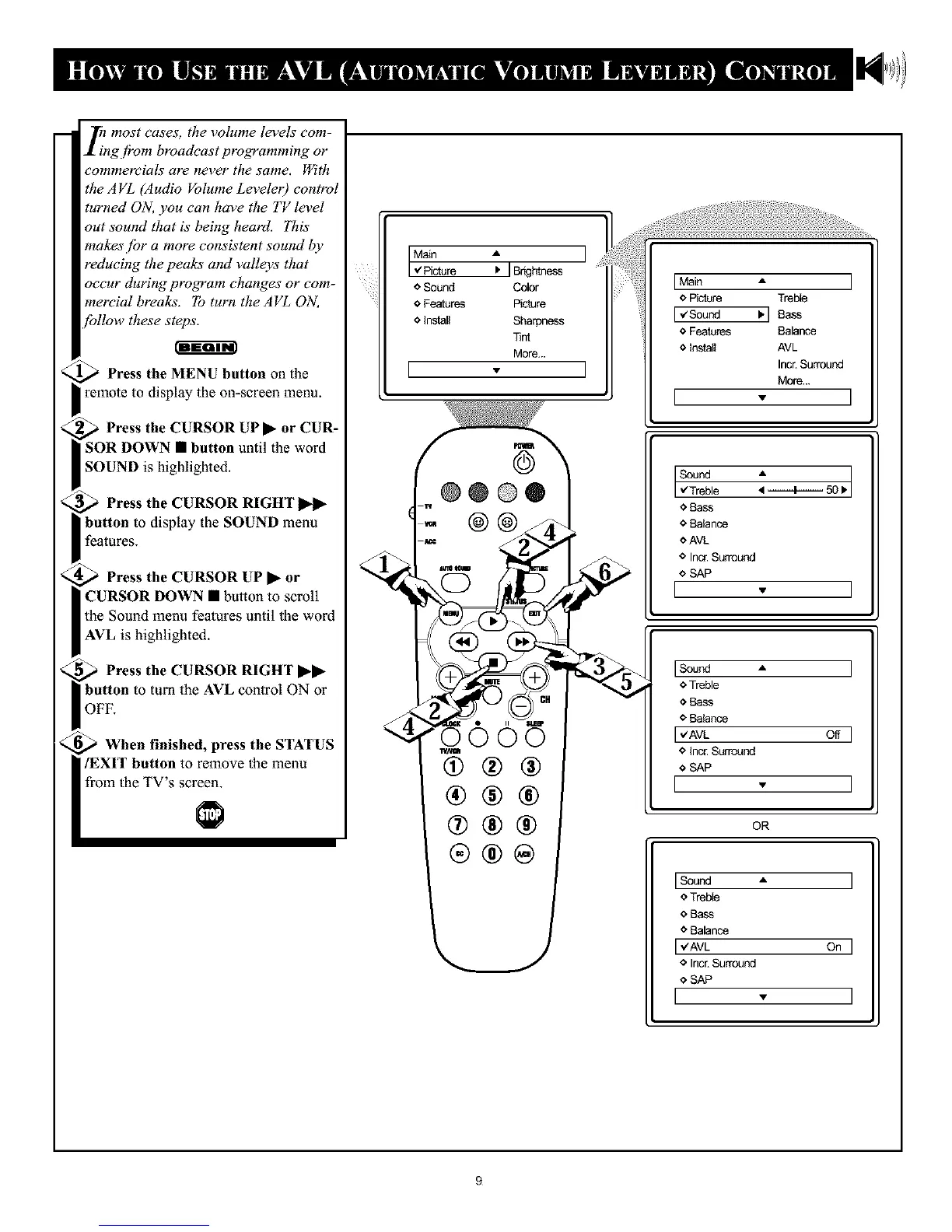
mercial breaks. To turn the AVL ON,
'bllow these steps.
_ Press the MENU button on the
_ remote to display the on-screen menu.
_ Press the CURSOR CUR-
uP•
or
SOR DOWN • button until the word
SOUND is highlighted.
Press the CURSOR RIGHT
button to display the SOUND menu
features.
Press the CURSOR UP • or
CURSOR DOWN • button to scroll
the Sound menu features until the word
AVL is highlighted.
Press the CURSOR RIGHT
button to turn the AVL control ON or
OFF.
When finished, press the STATUS
/EXIT button to remove the menu
from the TV's screen.
I Main A I
,4Picture I. IBrkJhtness
o Sound Color
o Features Picture
o Install Sharpness
Tint
More...
I * I
(
'k
4
©
@@@®
"0000
(9®®
®®®
®®@
[ Main A
o Picture Treble
[ _Sound Ib] Bass
o Features Balance
o Install AVL
Incr.Surround
More...
[ - ]
e
<_Bass
o Balance
oAVI_
o Incr.Surround
o SAP
[ . ]
* Treble
o Bass
e Balatw,e
* InccSurround
* SAP
[ . ]
OR
ISound ,, ]
o Treble
O Bass
o Balance
I,Aw On]
o Incr. Surround
o SAP
[ . ]
9










 To Next Page