Besides the normal volume level con-
trol, your TV also has Bass, Treble
and Balance sound controls. The TRE-
BLE control e[]_cts only the high j?e-
quencT sound comingjkom the TV
enhancing the highs," while the BASS
control e[]Octs only the low j?equencT
sound comingj?om the TV enhancing
the lows. The Balance control adjusts'
the sound level being heardj?om each
speaker
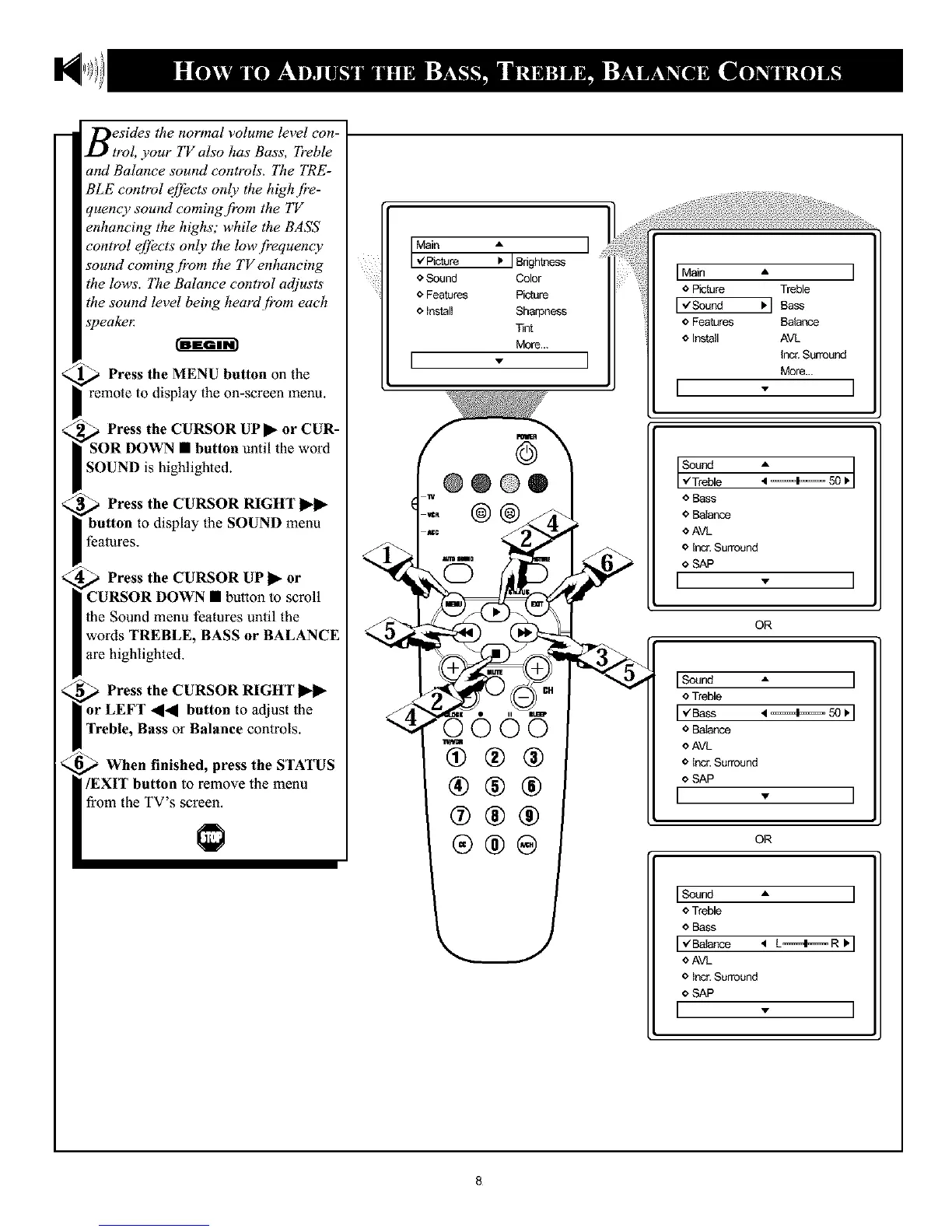
_ Press the MENU button the
01l
remote to display the on-screen menu.
,_ Press the CURSOR UPII_ or CUR-
SOR DOWN • button until the word
SOUND is highlighted.
Press the CURSOR RIGHT
button to display the SOUND menu
features.
Press the CURSOR UP
or
CURSOR DOWN • button to scroll
the Sound menu features until the
words TREBLE, BASS or BALANCE
are highlighted.
._ Press the CURSOR RIGHT
or LEFT ,, button to adjust the
Treble, Bass or Balance controls.
When finished, press the STATUS
/EXIT button to remove the menu
from the TV's screen.
:JOriohtoess]
o Sound Color
o Features Picture
o install Sharpness
Tint
More...
[ - 1
@@@®
@@
0005
@®®
®®®
@®®
®®®
Sound
","Treble
o Bass
o Balance
oAVL
o incr.Surround
o SAP
[ - I
OR
ISound A I
o Treble
[_Bass
o Baiance
o AVL
o incr.Surround
o SAP
[ .
OR
ISound A
o Treble
o Bass
[ _€Balance 'q L====41====R
o AVL
o Incr.Surround
o SAP
[ - I
8










 To Next Page