The Co.trast_m.ckStreteh_eo.-
rol helps to sharpen the picture
quality. The black portions of the pic-
ture become richer in darkness and the
whites become brighter:
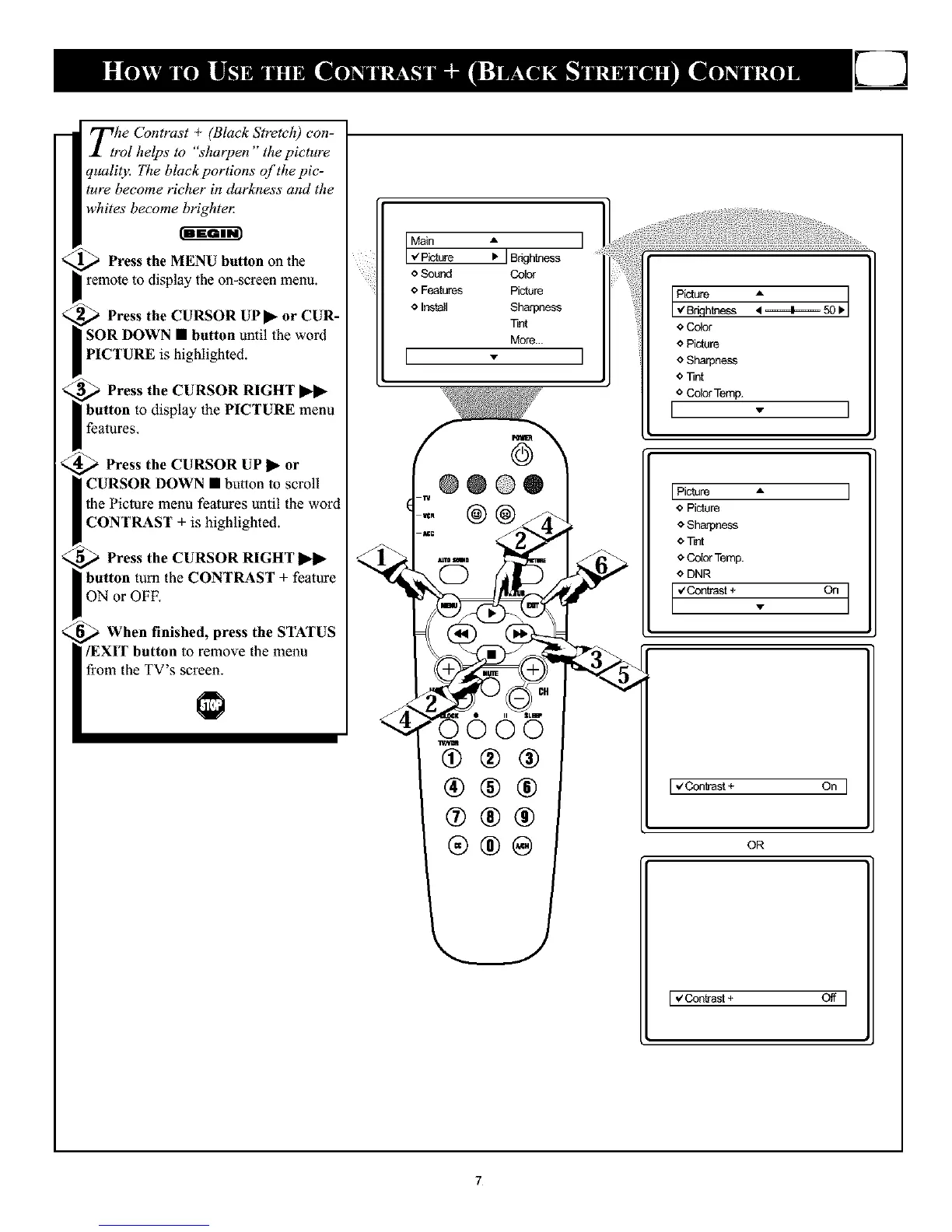
Press the MENU button on the
remote to display the on-screen menu.
Press the CURSOR UP I_-or CUR-
SOR DOWN • button until the word
PICTURE is highlighted.
Press the CURSOR RIGHT ,,
button to display the PICTURE menu
features.
Press the CURSOR UP 1_-or
CURSOR DOWN • button to scroll
the Picture menu fealures until the word
CONTRAST + is highlighted.
Press the CURSOR RIGHT
button tuna the CONTRAST + feature
ON or OFF.
When finished, press the STATUS
/EXIT button to remove the menu
from the TV's screen.
Main • ]
,z Picture • ] Brightness
o Sourd Co_
e Features Picture
o Install Sharpness
Tint
More...
[ - I
oO05
@@@
®@@
@®@
®®®
Picture A
I _ BdflhLqess _ ====I===== 50 IbI
*Color
o Picture
o Sharpnass
o Tint
o Color Temp.
I - I
IPicture A I
o Picture
o Sharpness
O Tint
6 Color Temp.
o DNR
°nI
[_ZContrast+ On ]
OR
[ €Contrast + Off ]
7










 To Next Page