yOpU can receive broadeast stereo TV
rograms. The TV has both an
ampl!fier and twin speakers through
which the stereo sound can be heard.
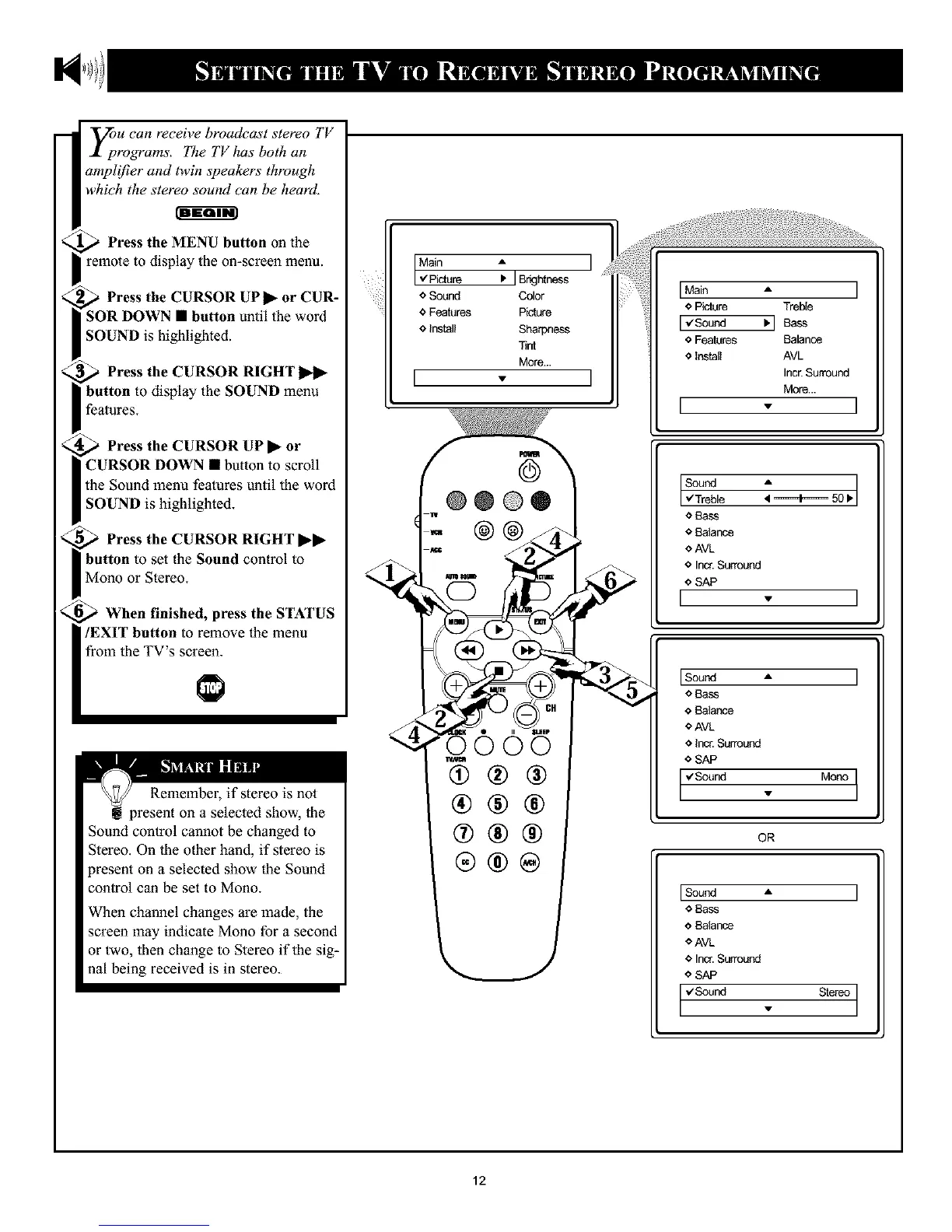
Press the MENU button oll the
remote to display the on-screen menu.
Press the CURSOR UP • or CUR-
SOR DOWN • button until the word
SOUND is highlighted.
Press the CURSOR RIGHT
button to display the SOUND menu
features.
Press the CURSOR UP • or
CURSOR DOWN • button to scroll
the Sound menu features until the word
SOUND is highlighted.
Press the CURSOR RIGHT ••
button to set the Sound control to
Mono or Stereo.
When finished, press the STATUS
/EXIT button to remove the menu
from the TV's screen.
Remember, if stereo is not
present on a selected show, the
Sound control cannot be changed to
Stereo. On the other hand, if stereo is
present on a selected show the Sound
control can be set to Mono.
When channel changes are made, the
screen may indicate Mono for a second
or two, then change to Stereo if the sig-
nal being received is in stereo.
Main A
,ZPicture I. J BrkJhtness
o Sound Color
¢ Features Picture
¢ Install Sharpness
Tint
More...
I
@
@@@®
w
0000
(!)®®
®®®
®®®
IMain I
¢ Picture Treble
I_Sound
¢ Features Balance
¢ Install AVL
Incr.Surround
More...
I ]
Sound
,/Treble
¢ Bass
€ Balance
oAVL
¢ Inor. Surround
I €SAP v I
Iso°nd " I
o Bass
o Balar_ce
* AVL
o Inc_ Surround
* SAP
Iv'sound . Mono]
OR
ISound • I
€ Bass
¢ Balance
OAVL
¢ Incr. Surround
o SAP
I 'vS°und . Stere°I
12










 To Next Page