T_o e Timer controls allow you to use
ur TV as an alarm clock !t'set to
turn itself'on and q[f at a specific time.
It also can be set to tune to a specific
channel at a speei[_c time.
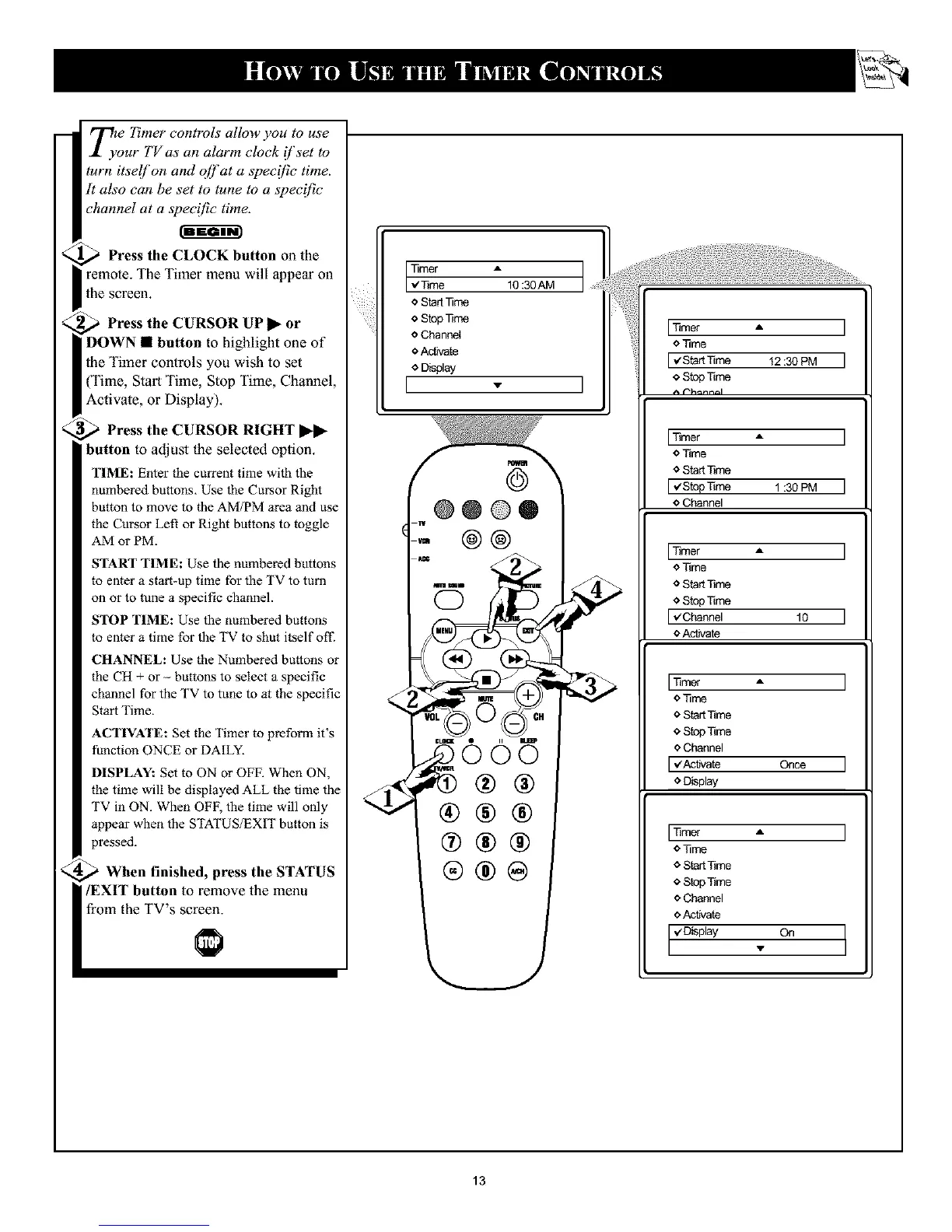
_ Press the CLOCK button on the
remote. The Timer menu will appear oll
the screen.
,_ Press the CURSOR UP
or
DOWN • button to highlight one of
the Timer controls you wish to set
(Time, Start Time, Stop Time, Channel,
Activate, or Display).
Press the CURSOR RIGHT _-_-
button to adjust the selected option.
TIME: Enter the current time with the
numbered buttons. Use the Cursor Right
button to move to the AM/PM area and use
the Cursor Left or Right buttons to toggle
AM or PM.
START TIME: Use the numbered buttons
to enter a start-up time for the TV to turn
on or to tune a specific channel.
STOP TIME: Use the numbered buttons
to enter a time for the TV to shut itself off"
CHANNEL: Use the Numbered buttons or
the CH + or -- buttons to select a specific
channel for the TV to tune to at the specific
Start Time.
ACTIVATE: Set the Timer to preform it's
function ONCE or DAILY.
DISPLAY: Set to ON or OFF. When ON,
the time will be displayed ALL the time the
TV in ON. When OFF, the time will only
appear when the STATUS;EXIT button is
pressed.
When finished, press the STATUS
/EXIT button to remove the menu
from the TV's screen.
Timer A
_e 10:30AM
o Star[Time
oStopTime
o Channel
o AcUte
o Display
[ - I
@
@@@®
@@
'=©©5
®®
®®®
®®@
ETimer A
o Time
o Star[Time
[,¢StopTime 1:30PM
o Channel
Timer A
o Time
o Star[Time
<_StopTime
[v'Channel 10
o Activate
Timer A
o Time
* Star[Time
* StopTime
o Channel
[v'AcNate Once
o D_splay
Timer A
o Time
* Star[Time
* StopTime
e Channel
e Activate
1,4D_splay On
13










 To Next Page