m
(JBECIIN
<
_e e S(upeO-Video connection on the
ar of the TVcan provide you with
better picture detail and clarity.[& the
playback of accessory sources such as
DBS (digital broadeast satellite), DVD
(digital video discs), video games, and
S-VHS VCR (video cassette recorder)
tapes titan the normal antenna picture
COVIVleetiovIS.
NOTE: The accessory device must
have an S-VIDEO OUT(puO jack in
orderjbr you to complete the connec-
tion on this page.
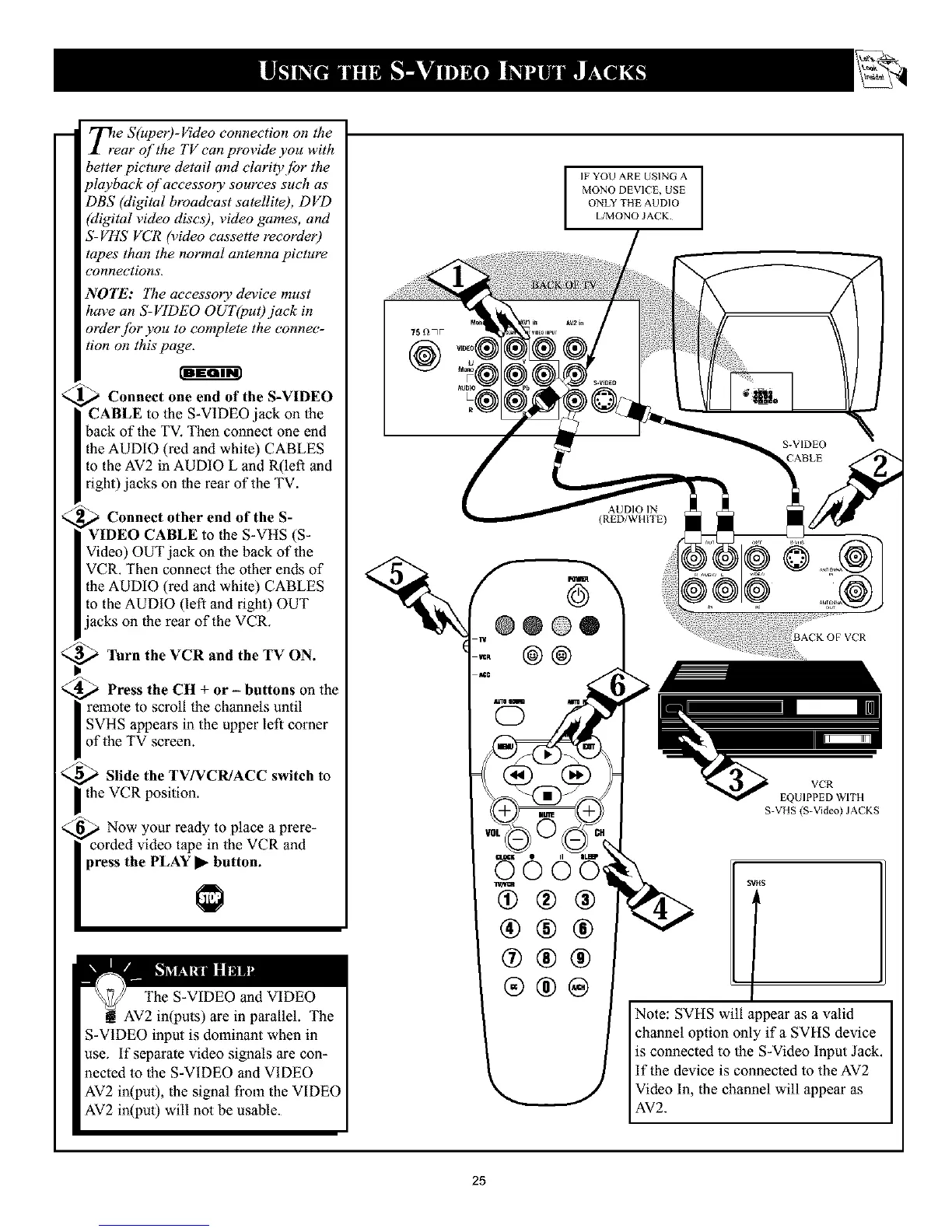
Connect one end of the S-VIDEO
CABLE to the S-VIDEO jack on the
back of the TV. Then connect one end
the AUDIO (red and white) CABLES
to the AV2 in AUDIO L and R(left and
right) jacks on the rear of the TV.
,_ Connect other end of the S-
VIDEO CABLE to the S-VHS (S-
Video) OUT jack oll the back of the
VCR. Then connect the other ends of
the AUDIO (red and white) CABLES
to the AUDIO (left and right) OUT
jacks on the rear of the VCR.
_ "lhrn the VCR and the TV ON.
_ Press the CH + or - buttons on the
| remote to scroll the channels until
I SVHS appears in the upper left corner
of the TV screen.
_ Slide the TV/VCR/ACC switch to
the VCR position.
_ Now your ready to place a prere-
corded video tape in the VCR and
press the PLAY • button.
The S-VIDEO and VIDEO
AV2 in(puts) are in parallel. The
S-VIDEO input is dominant when in
use. If separate video signals are con-
nected to the S-VIDEO and VIDEO
AV2 in(put), the signal from the VIDEO
AV2 in(put) will not be usable.
IFYOU ARE USING A
MONO DEVICE, USE
ONLY THE AUDIO
L/MONO JACK
751_7v
@
.. @@
@®®
®®®
@®®
®®®
>
VCR
EQUIPPED WITH
S-VHS (S-Video) JACKS
STtlS
f
Note: SVHS will appear as a valid
channel option only if a SVHS device
is connected to the S-Video Input Jack.
If the device is connected to the AV2
Video In, the channel will appear as
AV2.
25










 To Next Page