-- For your convenience, Audio/Video
Input jacks have been located on the
side t?['the TV eabinet. These jacks are
[br use with cameorders or rental
devices that are only to be connected
jbr a shortperiod of time. There also is
a headphone jack located on the side (_["
the TV when you're wanting to watch
TVwhile others in the room do not.
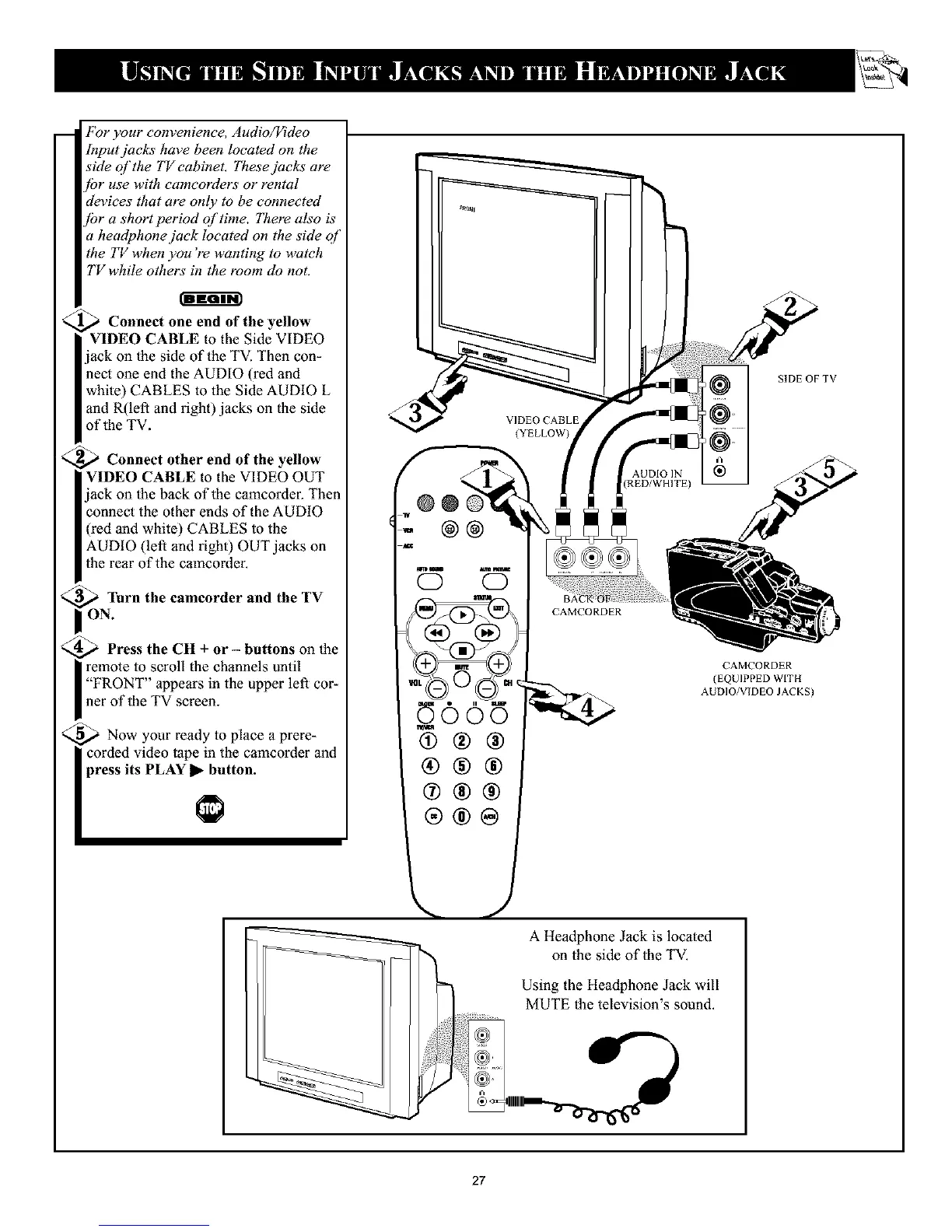
_ Connect one end of the yellow
I VIDEO CABLE to the Side VIDEO
jack on the side of the TV. Then con-
nect one end the AUDIO (red and
white) CABLES to the Side AUDIO L
and R(lefl and right) jacks on the side
of the TV.
_ Connect other end of the yellow
VIDEO CABLE to the VIDEO OUT
jack on the back of the camcorder. Then
connect the other ends of the AUDIO
(red and white) CABLES to the
AUDIO (left and right) OUT jacks on
the rear of the camcorder.
<_ Turn the cameorder and the TV
N.
_ Press the CH + or - buttons on the
remote to scroll the channels until
"FRONT" appears in the upper lef_ cor-
ner of the TV screen.
_ Now your ready to place a prere-
corded video tape in the camcorder and
press its PLAY I_ button.
SIDE OF TV
CAMCORDER
(EQUIPPED WITH
AUDIO/VIDEO JACKS)
A Headphone Jack is located
on the side of the TV.
Using the Headphone Jack will
MUTE the television's sound.
27










 To Next Page