Fatures fbr your televi-
ion can be adjusted from
within a MENU shown on the
TV_' screen. A MENU is
nothing more than an on-
sereen list q/i[batures. Some
qf the [batures have sub-
menus but each MENU item
can be adjusted or activated
(deactivated) by viewing the
screen and simply pressing
the proper button.
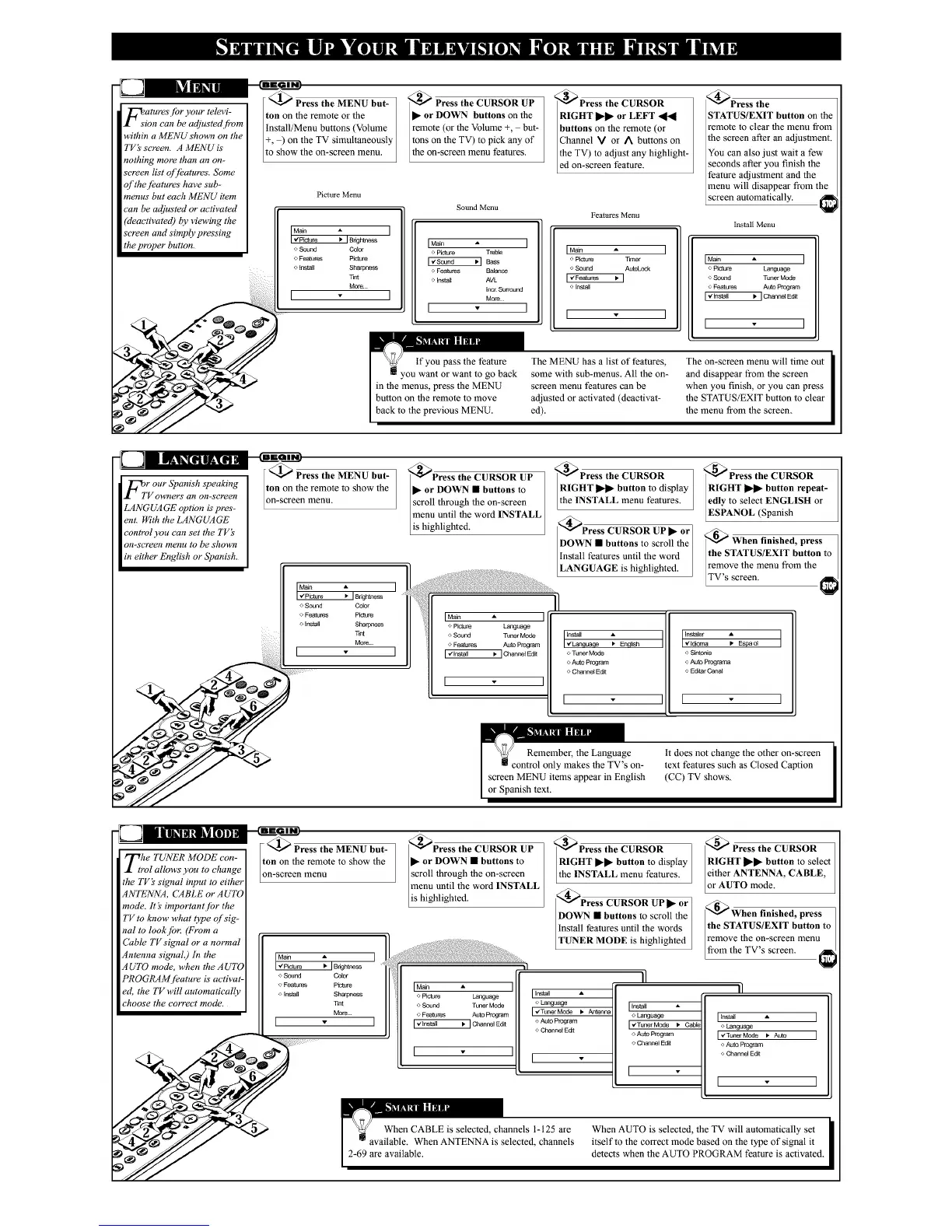
@_ Press the MENU but-
ton on lhe remote or the
install/Menu buttons (Volume
+, ) on the TV simultaneously
to show the on-screen menu.
Picture Menu
o Sound Color
o Features Picture
instal[ Sharpness
lint
More
I I
@)Press the CURSOR UP
• or DOWN buttons on the
remote (or the Volume +, but-
tons on the TV) to pick any of
the on-screen menu features.
Sound Menu
IMain I
o picture TreMe
o Features Balance
o Install AVL
tuc_Sunound
I • I
RIGHT _ or LEFT _l_l
buttons on the remote (or
Channel V or A buttons on
the TV) to adjust any highlight-
ed on-screen feature.
Features Menu
I Main _ I
o Picture Timer
o Sound AutoLock
[ -€Features
Install
I - ]
_@Press the
STATUS/EXIT button on the
remote to clear the menu from
the screen after an adjustment.
You can also just wait a few
seconds after you finish the
feature adjustment and the
menu will disappear from the
screen automatically.
Install Menu
IMain • I
o Picture Language
o Sound Tuner Mode
o Features AutoProgram
I "#Instell • I ChannelEdit
I I
in lhe menus, press the MENU
button on lhe remote to move
back to the previous MENU.
The MENU has a list of features,
some wilh sub-menus. All the on-
screen menu features can be
adjusted or activaled (deactivat-
ed).
The on-screen menu will time out
and disappear from the screen
when you finish, or you can press
the STATUS/EXIT button to clear
the menu from the screen.
I_IT r our Spanish speaking
V owners avi on-screen
LANGUAGE option is pres-
ent. With the LANGUAGE
control you can set the TVk
on-semen menu to be shown
in either English or Spanish.
<_ Press the MENU but-
ton on the remote to show the
on-screen lnenu.
o Sound
o Features
Install
_1Bdghtness
Color
Sharpness
T_nt
More..¸
)Press the CURSOR UP
• or DOWN" • buttons to
scroll through lhe on-screen
menu until the word INSTALL
]is highlighted.
IMa_ A I
o Pk_ture Language
o Sound TU_'_r Mode
o Features Auto Program
I,d[nstall _ I Channel Edit
I ]
_@Press the CURSOR
RIGHT _ button to display
the INSTALL menu features.
DOWN•buttonstoscrolItbe,
Install features until the word /
1
LANGUAGE is highlighted.
'_ Press the CURSOR
RIGHT _ button repeat-
ledly to select ENGLISH or
_ESPANOL (Spanish
<_ When finished, press
the STATUS/EXIT button to
remove the menu from the
LTVsscreen.
install •
_llnguage ) Eng_h
o Tuner Mode
o Auto Prcgram
o Channel Edi[
[ ,,
o Sintonia
o AUto Prograrna
o Eddar Canal
it does not change the other on-screen
text features such as Closed Caption
(CC) TV shows.
The TUNER MODE con-
rol allows you to change
the TV's signal input to either
ANTENNA, CABLE or AUTO
mode. It _' importantjbr the
TV to know what type of'sig-
nal to look./br (From a
Cable TVsignal or a normal
Antenna signal.) In the
AUTO mode, when the AUTO
PROGRAMjbature is activat-
ed, the TV will automatically
choose the eorreet mode.
@_ Press the MENU but-
on on the remote to show the
n-screen menu
•
__" .:i:iiii!ii!i:
o Sound COlOr
o Features Pk:ture
o Install Sharpness
_nt
More.
]
_Press the CURSOR UP
• or DOWN • buttons to
scroll lhrough lhe on-screen
menu until the word INSTALL
is highlighted.
o Picture Language
o Sound Tuner Mode
o Feat_res Auto Program
] Channel Ed_
L J
<_Press the CURSOR
RIGHT •• button to display
the INSTALL menu features.
<_Press CURSOR UP • or I
DOWN • buttons to scroll lhe I
Install features until the words
TUNER MODE is highlighted
Iinstall •
o Lang_
I,#Tuner Mode • Antanna
o Auto Program
o Channel Edit
_ Press the CURSOR
RIGHT 1_• button to select
eilher ANTENNA, CABLE,
or AUTO mode.
_When finished, press
the STATUS/EXIT button to
remove lhe on-screen menu
from the TV's screen.
o Language
I ,/Tuner Mode _ Cab_
o AutoProgram
o Channel Edi[
[ lnstell •
o Language
[,¢TunerMode I. Auto
o AutoProgram
o Channel Ed_
[
When AUTO is selected, the TV will automatically set
itself to the correct mode based on the type of signal it
detects when the AUTO PROGRAM feature is activated.



 To Next Page
 Loading...







