}/_ur TV can automatically
et itsel[i[br local area
(or Cable TV) channels'. This
makes it easyjbr you to
select only the TV stations in
your area when the CHAN-
NEL (+), (-) buttons are
)ressed.
Vote: Make sure tbe antenna
or cable signal connection has
been completed be[bre AUTO
PROGRAM is activated.
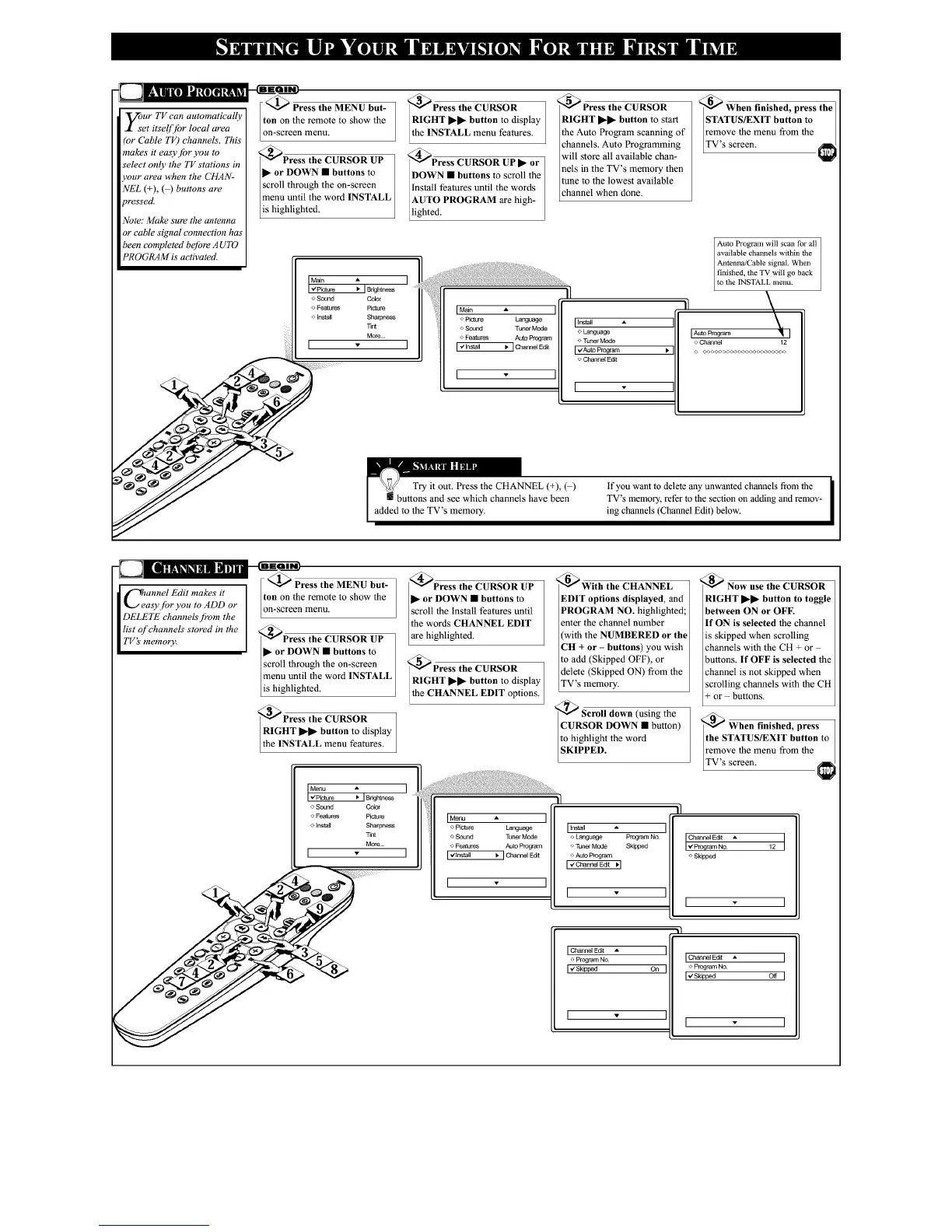
<_ Press the MENU but-
ton on the remote to show the
on-screen menu.
_Press the CURSOR UP
_- or DOWN • buttons to
scroll through the on-screen
menu until the word INSTALL
is highlighted.
_Press the CURSOR
RIGHT •• button to display
the INSTALL menu features.
_Press CURSOR UP • or
DOWN m buttons to scroll the
Install features until the words
AUTO PROGRAM are high-
[lighted.
IMain •
o Picture Language
o Sound TunerMode
o Features AutoProgram
I ,€install • I ChannelEd[[
I •
_Press the CURSOR
RIGHT •• button to start
the Auto Program scanning of
channels. Auto Programming
will store all available chan-
nels in the TV's memory then
tune to the lowest available
channel when done.
<_ When finished, press the
STATUS/EXIT button to
remove the menu from the
TV s screen.
[ [r_tall •
o Language
o Tuner Mode
[ _ZAu_o Program I,
o Channel Edit
[
Auto Program will scan for all
Iavailable channels wilhin the ]
]Antenna/Cable signal. When ]
finished, lhe TV will go back
tO lhe INSTALL menu. /
[AutoProgram
o Channel 12
© ©o o©© o© o<>_<><,_< >©_<>©<,oo_
if you want to delete rely unwmlted chmmels from the
TV's memory, refer to the section on adding and remov-
ing channels (Channel Edit) below.
Cannel Edit makes it
asy.[br you to ADD or
DELETE channels'.[?om the
list of channels stored in the
TV's memory.
_ Press the MENU but-
ton on the remote to show the
on-screen menu.
_Press the CURSOR UP
• or DOWN • buttons to
scroll through the on-screen
menu until the word INSTALL
is highlighted.
_Press the CURSOR
RIGHT _ button to display
the INSTALL menu features.
@Press the CURSOR UP
_- or DOWN • buttons to
scroll the install features until
the words CHANNEL EDIT
[are highlighted.
@Press the CURSOR
RIGHT _• button to display
Ithe CHANNEL EDIT options. I
I Menu A ]
v'Pkiture I, IBfighmess
o Sound Color
o Features Piel__re
o Install Sharpness
Tint
More..
I _- ]
Msnu • ]
o Piel__re Language
o Sound TunerMode
o Features Auto Program
[ v'tnslall _ Channel Edit
[ . ]
_With the CHANNEL
EDIT options displayed, and
PROGRAM NO. highlighted;
enter tile channel number
(with the NUMBERED or the
CH + or - buttons) you wish
to add (Skipped OFF), or
delete (Skipped ON) from the
TV's memory.
'_ Scroll down (using the
CURSOR DOWN • button)
to highlight the word
SKIPPED.
Iinstall
o Language Program No
o TunerMode Skipped
o Auto Prngram
[ _ ChannelEd_
IChannel Ed[[
o Program No
Iv'Skipped On
I •
_Now use the CURSOR
RIGHT •• button to toggle
between ON or OFF.
If ON is selected the channel
is skipped when scrolling
channels with the CH + or
buttons. If OFF is selected the
channel is not skipped when
scrolling channels with the CH
+ or - buttons.
'_ When finished, press 1
the STATUS/EXIT button to /
remove the menu from the /
TV s screen.
Channel Ed_ _.
©Skipped
[ ]
lChannel Edi[
© Program No
I,,'Skip_d O_










 To Next Page