5
2. Setting up the monitor
2. Setting up the
monitor
2.1 Installation
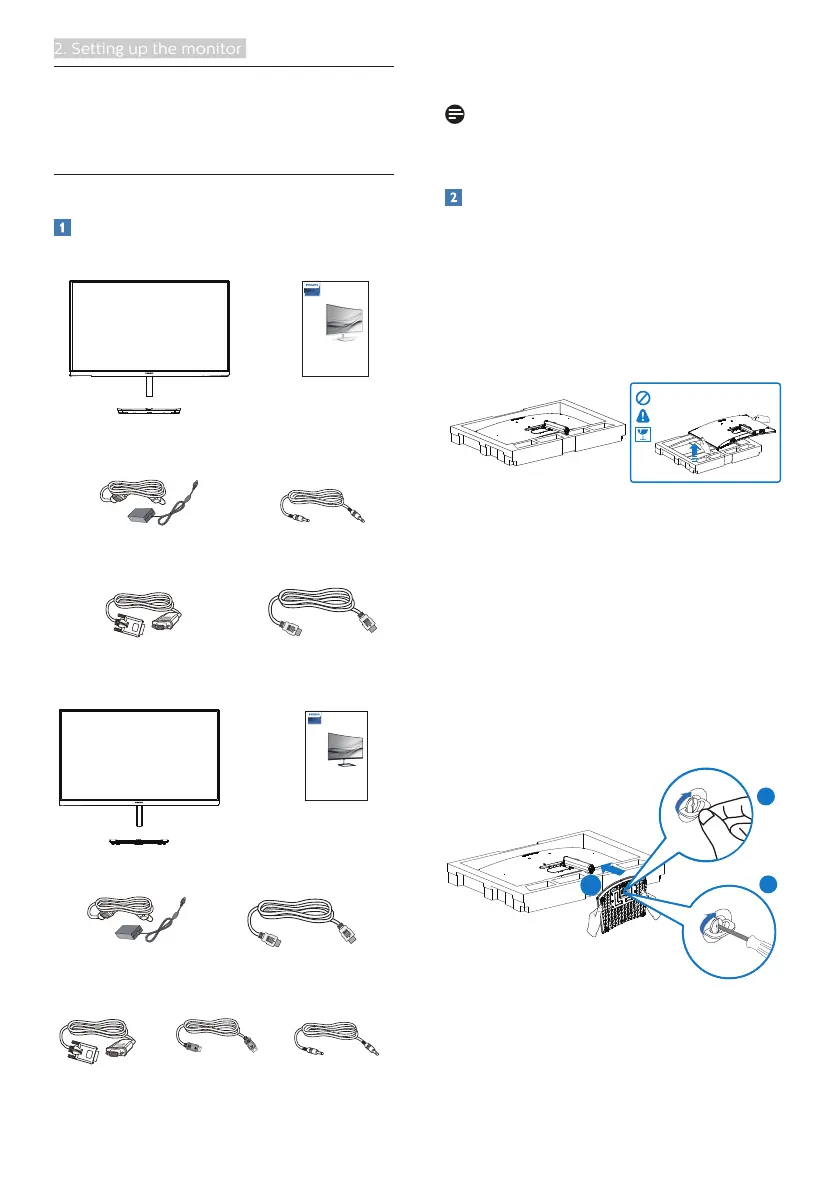
Package contents
27xE1SC
* Audio cable
E Line
27xE1S
* VGA * HDMI
AC/DC Adapter
Register your product and get support at
www.philips.com/welcome
Quick
Start
27xE1C
* VGA
* HDMI
AC/DC Adapter
* Audio cable
*
DP
E Line
27xE1
Register your product and get support at
www.philips.com/welcome
Quick
Start
* Different according to region.
Note
Use only the AC/DC adapter model:
Philips ADPC1945EX
Install base stand
27xE1SC
1. In order to well protect this monitor
and avoid scratching or damaging of
the monitor, keep the monitor face
down in the cushion for the base
installation.
2. (1) Hold the base stand with both
hands and firmly insert the base
stand into the base column.
(2) Use your fingers to tighten the
screw located at the bottom of
the base.
(3) Use screwdriver to tighten the
screw located at the bottom of
the base, and secure the base to
the column tightly.
2
1
3
3. After attaching the base, erect the
monitor with both hands on holding
the monitor together with styrofoam
firmly. Now you can pull out the


 To Next Page