5
2. Setting up the monitor
2. Setting up the monitor
2.1 Installation
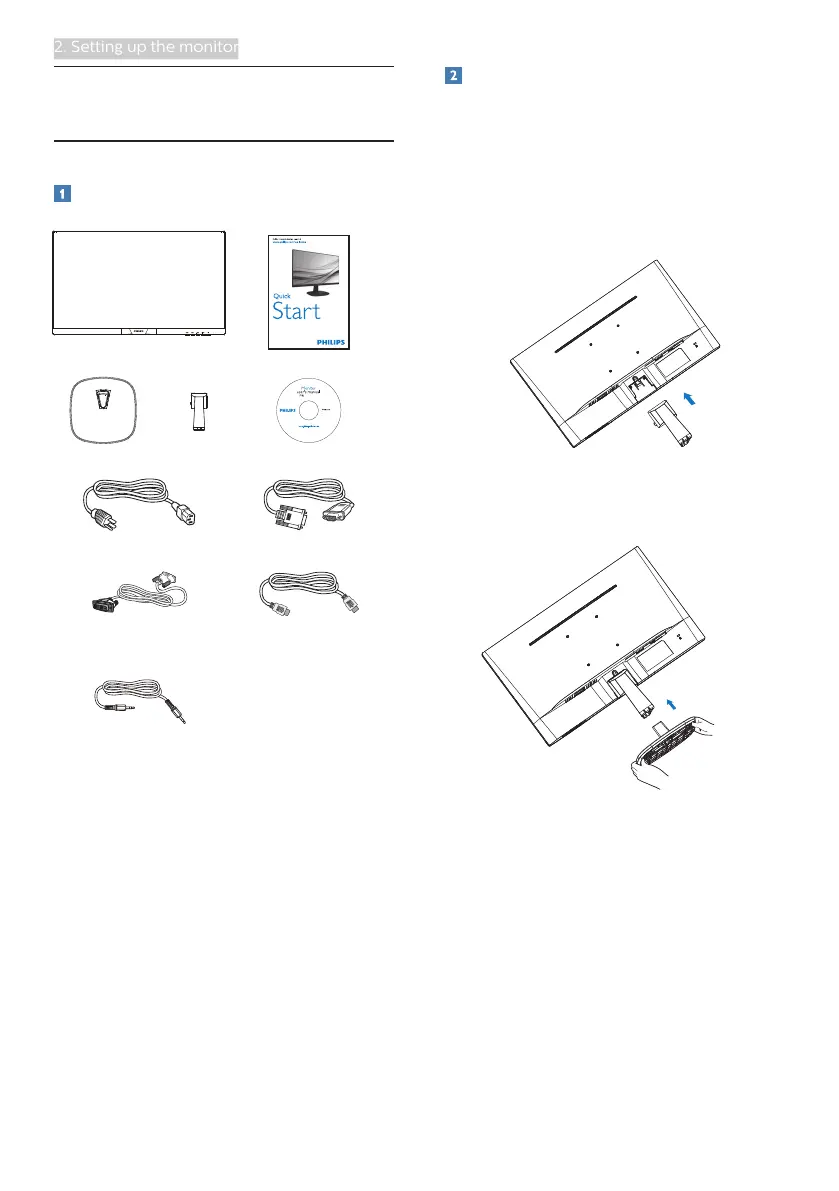
Package contents
223V7
243V7
273V7
©
2
0
1
6
K
o
n
i
n
k
l
i
j
k
e
P
h
i
l
i
p
s
N
.
V
.
A
l
l
r
i
g
h
t
s
r
e
s
e
r
v
e
d
.
U
n
a
u
t
h
o
r
i
z
e
d
d
u
p
l
i
c
a
t
i
o
n
i
s
a
v
i
o
l
a
t
i
o
n
o
f
a
p
p
l
i
c
a
b
l
e
l
a
w
s
.
M
a
d
e
a
n
d
p
r
i
n
t
e
d
i
n
C
h
i
n
a
.
V
e
r
s
i
o
n
Philips and the Philips’ Shield Emblem are registered trademarks of
Koninklijke Philips N.V. and are used under license from Koninklijke
Philips N.V.
Monitor drivers
User’s Manual
使用
前请阅读使用说明
保留备用
* CD
Power * VGA
* DVI
* HDMI
* Audio
* Different according to region.
Install base stand
1. Place the monitor face down on
soft and smooth surface taking care
to avoid scratching or damaging the
screen.
2. Attach/Slide the base column
with the monitor until it clicks into
position.
3. Hold the monitor base stand with
both hands and firmly insert the
base stand into the base column.


 To Next Page