14
4. Power Delivery and
Smart Power
(27E1N1900AE)
You can power your compatible device
with up to 65 Watts of power from this
monitor.
1
What is it?
Smart Power is an exclusive Philips
technology that provides flexible power
delivery options for various devices.
This is useful for recharging high
performance laptops with only one
cable.
With Smart Power, the monitor makes it
possible to deliver up to 65W of power
through the USBC port, compared to
the standard 45W.
To prevent damaging the device, Smart
Power enables protections to limit
current draw.
2
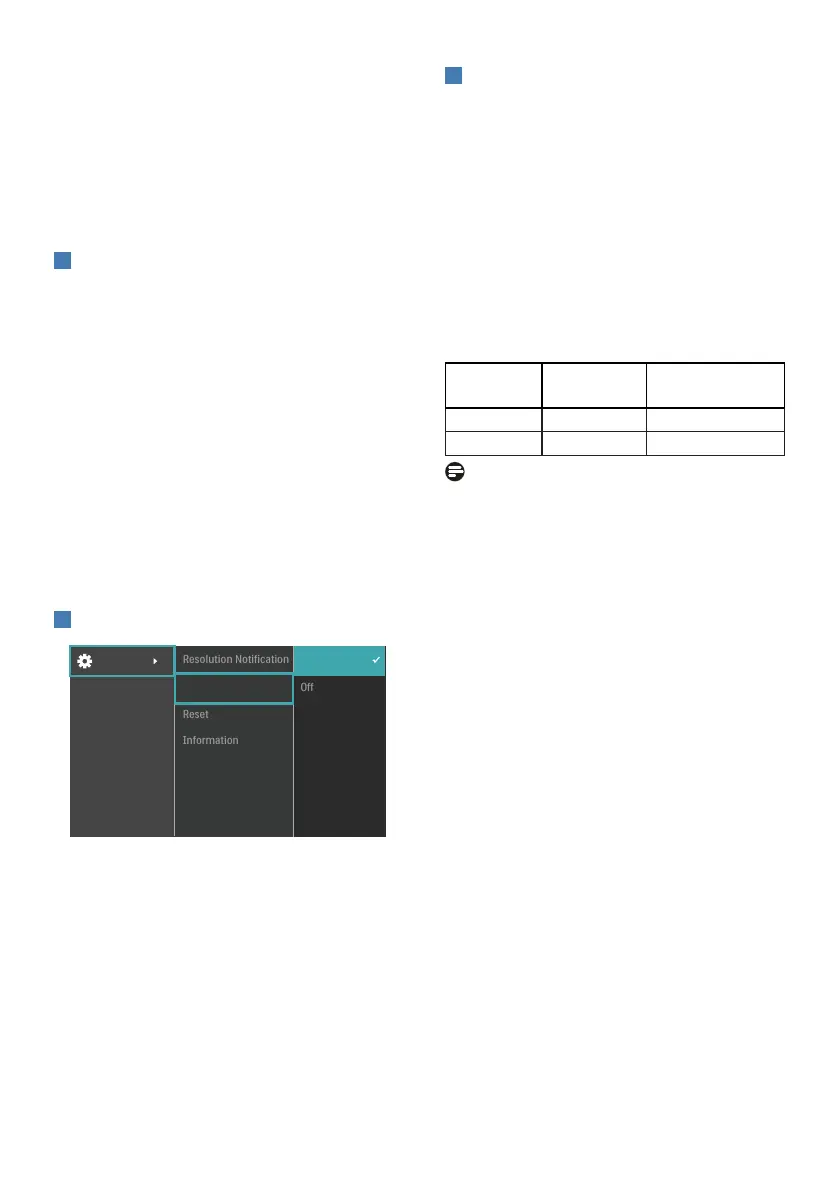
How to enable Smart Power?
1. Toggle to the right to enter OSD
Menu Screen.
2. Toggle to the up or down to select
main menu [Setup], then toggle to
the right to conrm.
3. Toggle to the up or down to turn on
or o the [Smart Power].
3
Power through USBC port:
1. Connect the device to the USBC port.
2. Turn on [Smart Power].
3. If [Smart Power] is on, and USBC
is used for power, then maximum
power delivery depends on the
brightness value of the monitor.
You may adjust the brightness value
manually to increase power delivery
from this monitor.
There are 2 power delivery levels:
Brightness
value
Power Delivery
from USBC
Level 1 0
~
70 65W
Level 2 71
~
100 45W
Note
• If [Smart Power] is on, and DFP
(Downstream Facing Port) is using
more than 5W, then USBC can only
deliver up to 45W.
• If [Smart Power] is off, then USBC
can only deliver up to 45W.


 To Next Page