8
Warning
USB 2.4Ghz wireless devices, such
as, wireless mouse, keyboard, and
headphones, maybe have interference
by the high-speed signal of USB3.2
devices, which may result in a decreased
eciency of the radio transmission.
Should this happen, please try the
following methods to help reduce the
eects of interference.
• Try to keep USB2.0 receivers away
from USB3.2 connection port.
• Use a standard USB extension cable
or USB hub to increase the space
between your wireless receiver and
the USB3.2 connection port.
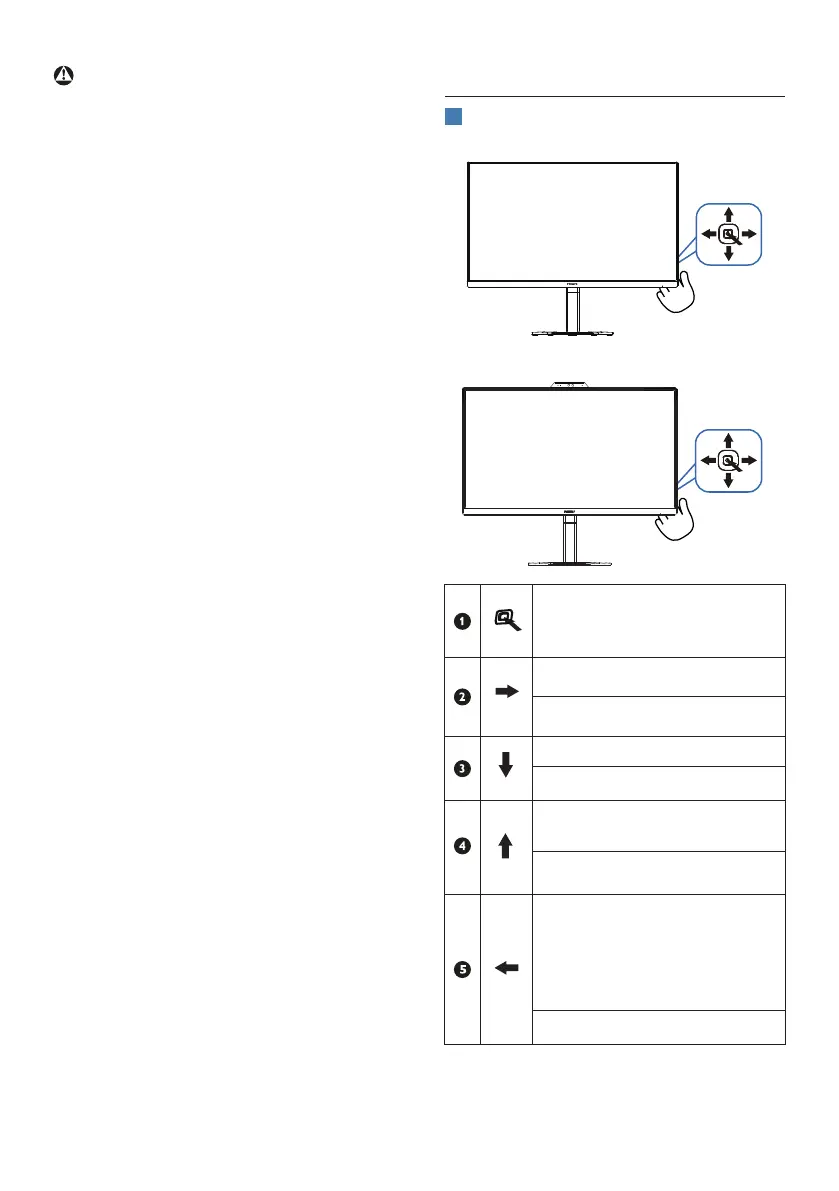
2.2 Operating the monitor
1
Description of the control buttons
27E1N5600HE
Press to switch power on.
Press more than 3 seconds to
switch power o.
Access the OSD menu
.
Conrm the OSD adjustment.
Adjust the speaker volume
Adjust the OSD menu.
Change the signal input
source.
Adjust the OSD menu.
SmartImage Game menu.
There are multiple selections:
FPS, Racing, RTS, Gamer 1,
Gamer 2, LowBlue Mode,
EasyRead and O.
Return to previous OSD level.


 To Next Page