13
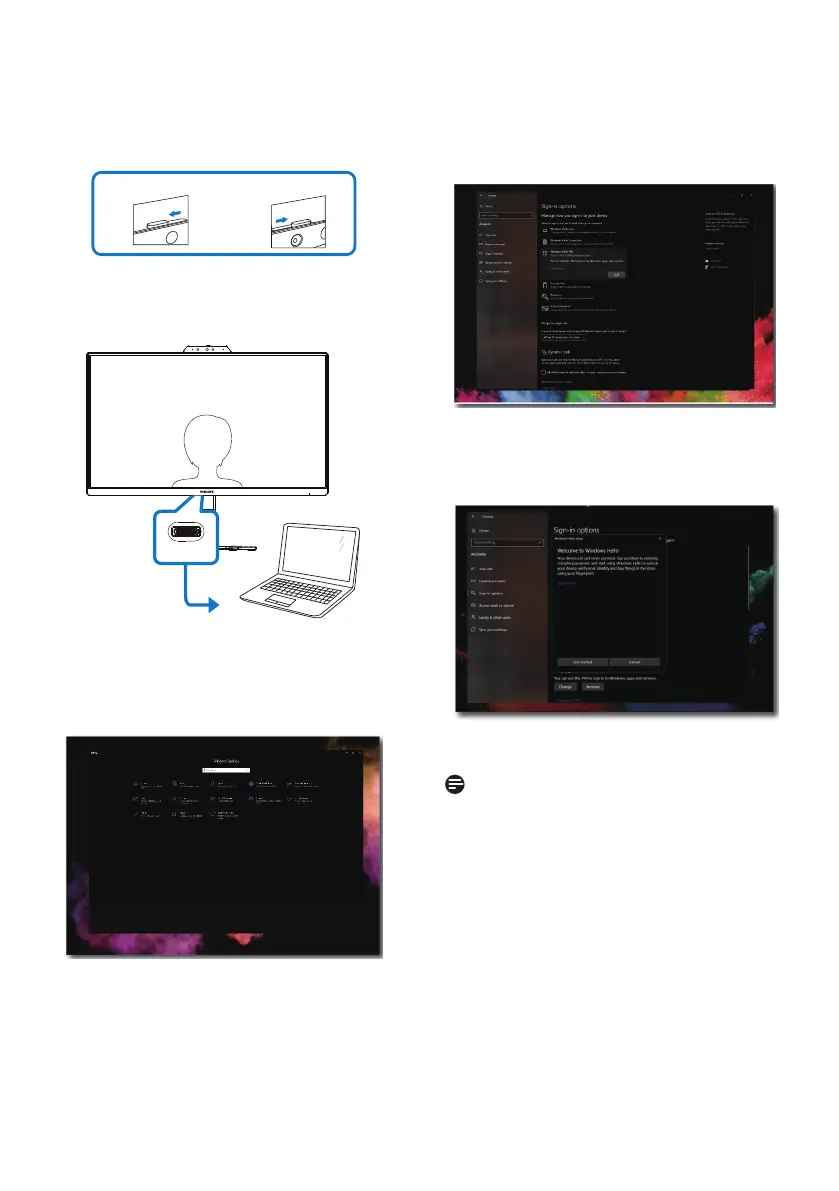
Please follow the steps for the setting:
1. Turn on the webcam at the top of
the display in the direction of the
key head.
camera is off camera is on
2. Simply connect the USB cable from
your PC to the “USB C” port of this
monitor.
USB C
3. Setting in Windows 10 for Windows
Hello.
a. In the settings app click on
accounts.
b. Click on sign-in options in the
sidebar.
c. You need to set up a PIN code
before you're allowed to use
Windows Hello. Once you've
added this, the option for Hello
will unlock.
d. You'll now see which options
are available to set up under
Windows Hello.
e. Click on "Get started." The setting
is complete.
Note
1. Please always go to Windows
ocial website to access the latest
information, the information in EDFU
is subject to change without further
notice.


 To Next Page