[
AutoLock TM offers the viewer other block-
ing f!,atures as well, With these Blocking
Options, the censoring can be turned ON or
OF£
[
2
3
4
5
6
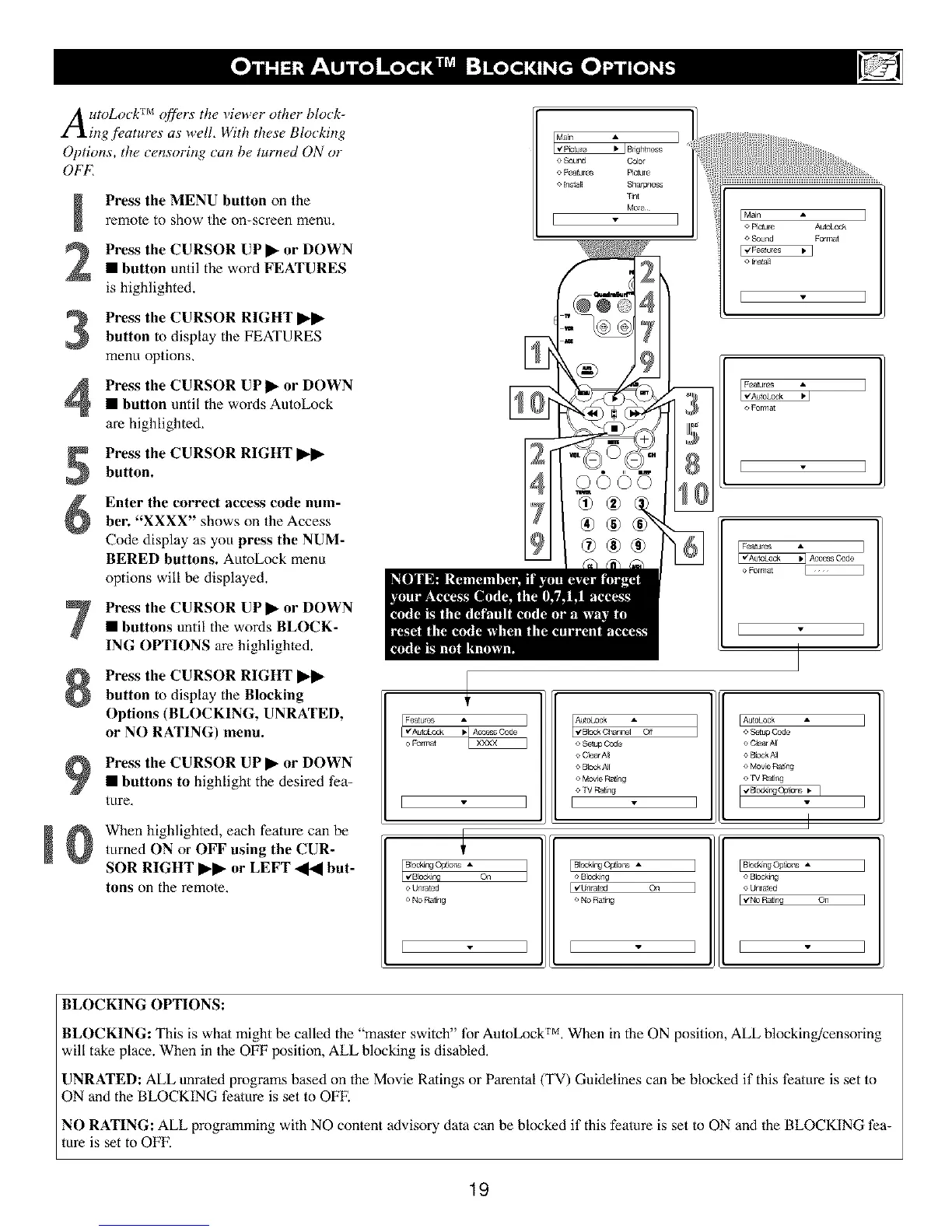
Press the MENU button on the
remote to show the on-screen menu,
Press the CURSOR UP • or DOWN
• button until the word FEATURES
is highlighted.
Press the CURSOR RIGHT ••
button to display the FEATURES
menu options,
Press the CURSOR UP• or DOWN
• button until the words AutoLock
are highlighted,
Press the CURSOR RIGHT ••
button.
Enter the correct access code num-
ber. "XXXX" shows on the Access
Code display as you press the NUM-
BERED buttons. AutoLock menu
options will be displayed.
Press the CURSOR UP• or DOWN
• buttons until the words BLOCK-
ING OPTIONS are highlighted.
Press the CURSOR RIGHT ••
button to display the Blocking
Options (BLOCKING, UNRATED,
or NO RATING) menu.
Press the CURSOR UP • or DOWN
• buttons to highlight the desired fea-
tEtre,
When highlighted, each feature can be
turned ON or OFF using the CUR-
SOR RIGHT •• or LEFT _ but-
tons on the remole,
o Sound Color
o Featum_ Picture
o in.all Shafpne&_
Tint
More
]
IMain A
o Picture AutoLock
o Sound Format
E'/F_tures • I
o install
o Format
E
10
[ Features
[ V'AutoLock _ Access Code ]
o Format
[ ]
I Features
F,,'AutoLoo_
o Format
]
Cn
o Unratod
o NO Rating
I I
o S{*tup Code
e ClearAll
o Blod4All
o MovieR_ng
o TV Rating
I ]
[ Block_qgOptions A
o Blocking
[ v'Unrated On
o No Ra_ng
[
IAutoLock
o SettLo Code
o C_ea/All
o B_cckNI
o MOV_ RatLng
o rV Rating
1
I
IBlock_gOg_ons A I
o Blocking
o Unrated
I_'NoR_ng On I
I I
BLOCKING OPTIONS:
BLOCKING: This is what might be called the "master switch" for AutoLock TM, When in the ON position, ALL blocking/censoring
will take place. When in the OFF Ix)sition, ALL blocking is disabled,
UNRATED: ALL unrated programs based on the Movie Ratings or Parental(TV) Guidelines can be blocked if this t?ature is set to
ON and the BLOCKING feature is set to OFF.
NO RATING: ALL programming with NO content advisory data can be blocked if this feature is set to ON and the BLOCKING t?a-
rare is set to OFF.
19





 To Next Page