T_e Active Control monitors and ac/iusts
ncoming video signals to help provide the
best picture quality,
When you choose to turn the Active Control
ON, the picture Brightness, Picture,
Shalpness, Contrast + and DNR (clvnami_
noise redu_ tion),f!,atures ar_ _ontrolled auto-
mati_ ally. Active Control a(/iusts these picture
settings continuously and automatically.
m
2
3
4
5
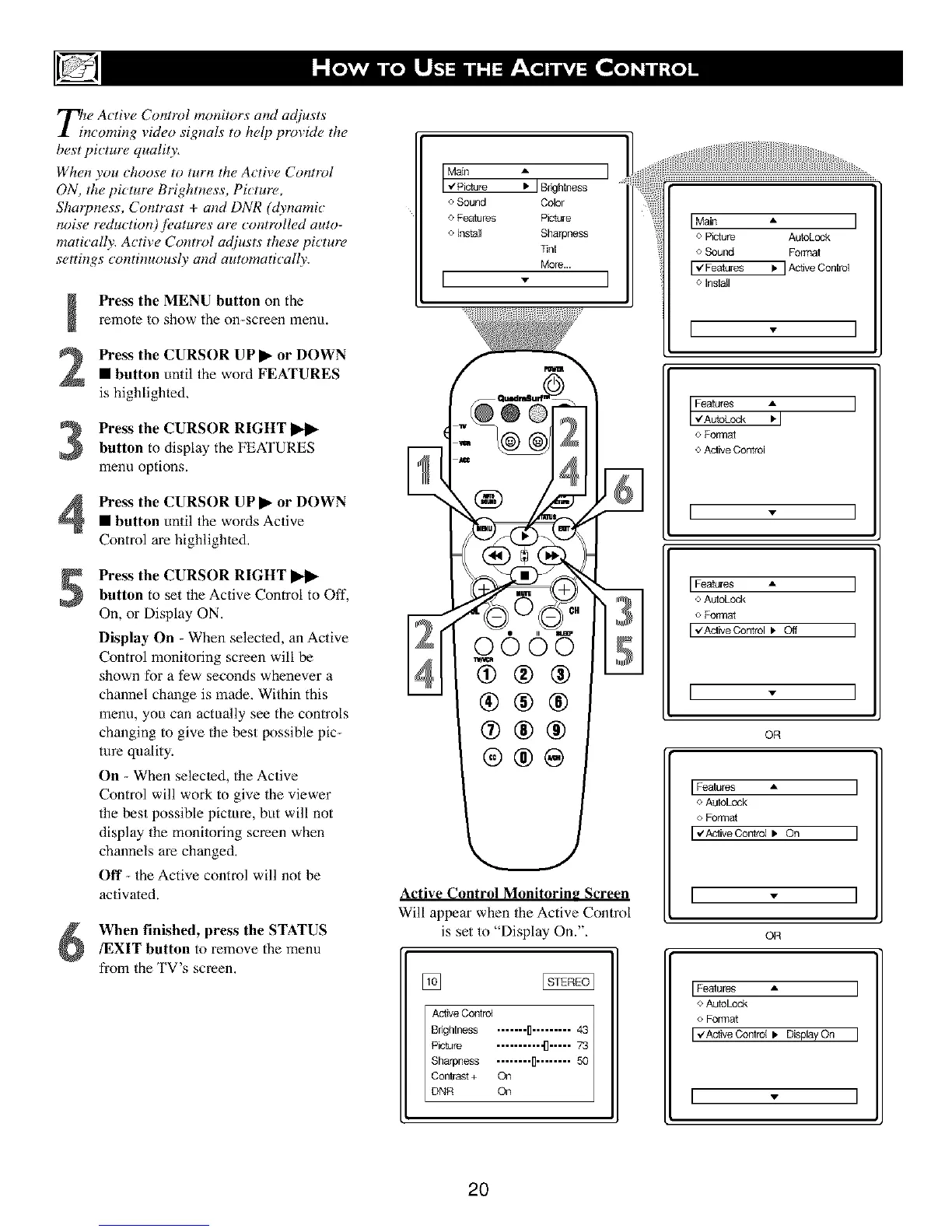
Press the MENU button on the
remote to show the on-screen menu.
Press the CURSOR UP I1_ or DOWN
• button until the word FEATURES
is highlighted,
Press the CURSOR RIGHT I_1_
button to display the FEATURES
menu options.
Press the CURSOR UP I_ or DOWN
• button until the words Active
Control are highlighted,
Press the CURSOR RIGHT I_l_
button to set the Active Control to Off,
On, or Display ON.
Display On - When selec/ed, an Active
Control monitoring screen will be
shown for a few seconds whenever a
channel change is made, Within this
menu, you can actually see the controls
changing to give the best possible pic-
ture quality:
On - When selec/ed, the Active
Control will work to give the viewer
the best possible picture, but will not
display the monitoring screen when
channels are changed,
Off - the Active control will not be
activated.
When finished, press the STATUS
/EXIT button to remove the menu
from the TV's screen,
Main A [
"4Picture • I Bnghlness
o Sound Color
o Features Picture
o Install Sharpness
]]nl
More...
I - I
Active Control Monitorin_ Screen
Will appear when the Active Control
is set to "Display On.",
Active ConlrC4
Bnghtness ....... D......... 43
Picture .......... ,.[]..... 73
Sharpness ........ I1........ 50
Cor4rast + On
DNR On
I Main • I
o Picture AutoLock
o Sound Formal
I _/Features I, I Active Control
o Install
[ . ]
IFe2tL%:l I
o Formal
o Aclive Control
I - I
IFeatures • I
o AuloLc_-k
o Format
I _ZAclivegontrol I, Off I
I - I
OR
I Features • I
o AuloLock
o Format
I ,#ActiveContrct Ib On I
[ - ]
OR
I Features • I
o AuloLOCk
o Format
I _/Active Conlrct k Display On I
I - I
2O





 To Next Page