Closed Captioning (CC) allows you to
read the voice content of television pro-
grams on the TV s_rc_en, Designed to hel l) the
hearing impaired, this f!,ature uses on-s_r(_en
"text boxes" to show dialogue and comersa-
tions while the TV program is in progress.
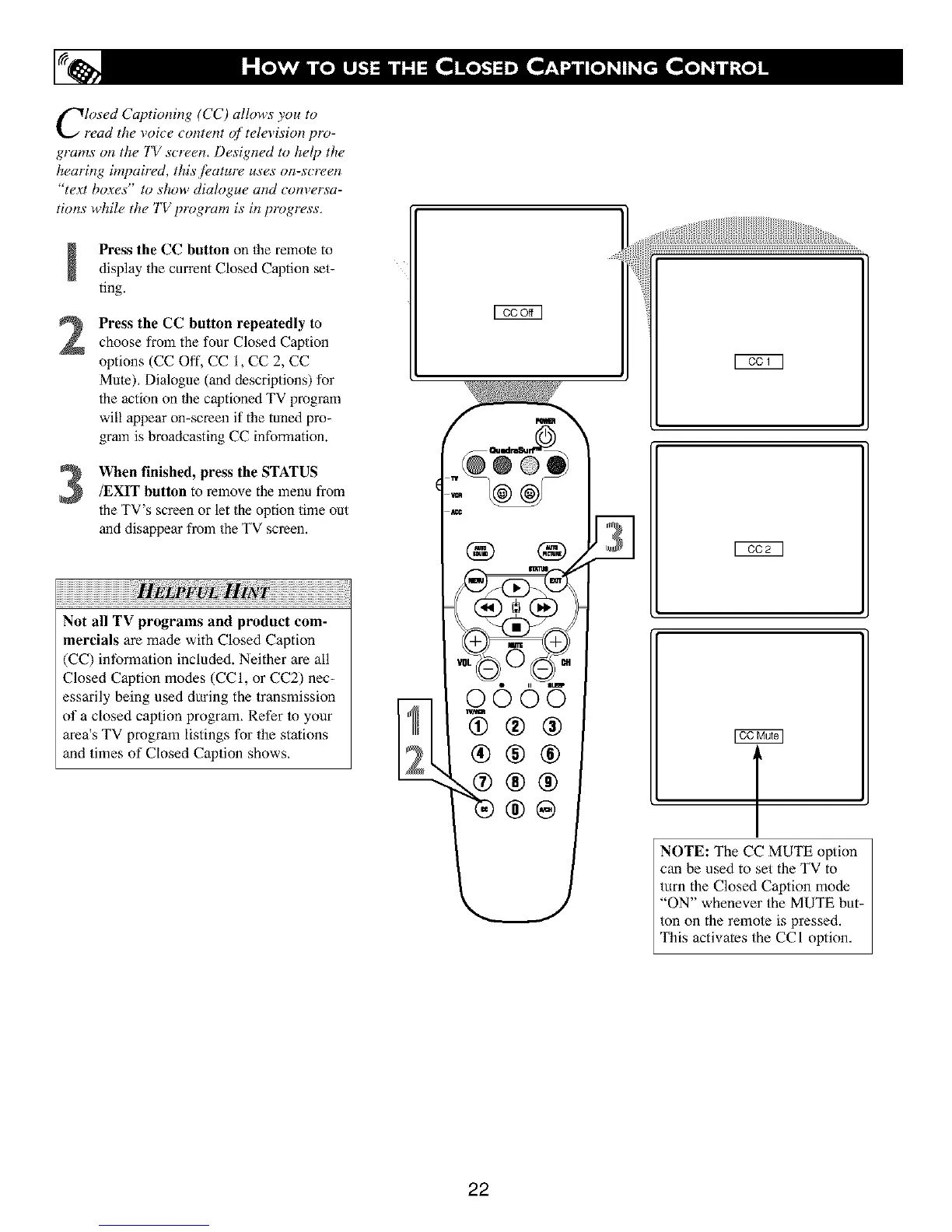
Press the CC button on the remote to
display the current Closed Caption set-
ting.
Press the CC button repeatedly to
choose from the four Closed Caption
options (CC Oft', CC 1, CC 2, CC
Mule), Dialogue (and descriptions) for
the action on 1he captioned TV program
will appear on-screen if the tuned pro-
gram is broadcasting CC information.
When finished, press the STATUS/EXIT button to remove the menu from
the TV's screen or let the option time out
and disappear from the TV screen.
Not all TV programs and product com-
mercials are made with Closed Caption
(CC) intbrma/ion included. Neither are all
Closed Caption modes (CCI, or CC2) nec-
essarily being used during the transmission
of a closed caption program, Refer to your
area's TV program listings for the stations
and times of Closed Caption shows,
@©
® J31
0005
®®®
NOTE: The CC MUTE option
can be used to set the TV to
turn the Closed Caption mode
"ON" whenever the MUTE but-
ton on the remote is pressed.
This activates the CCI option,
22





 To Next Page