y_ur TV remote can be set to work various
_ternal devices such as VCRs, Cable
Boxes, Satellite Receivers, DBS, DVD, etc. by
what is called the search method q{ remote
control programming.
If the "Remote Cod¢_" number method shown
on the previous page did not set your remot¢_
to work your external dmice, then,f!)llow the
easy stcT)s listed below,
Please r_ad steps l-4 b@Jre beginning.
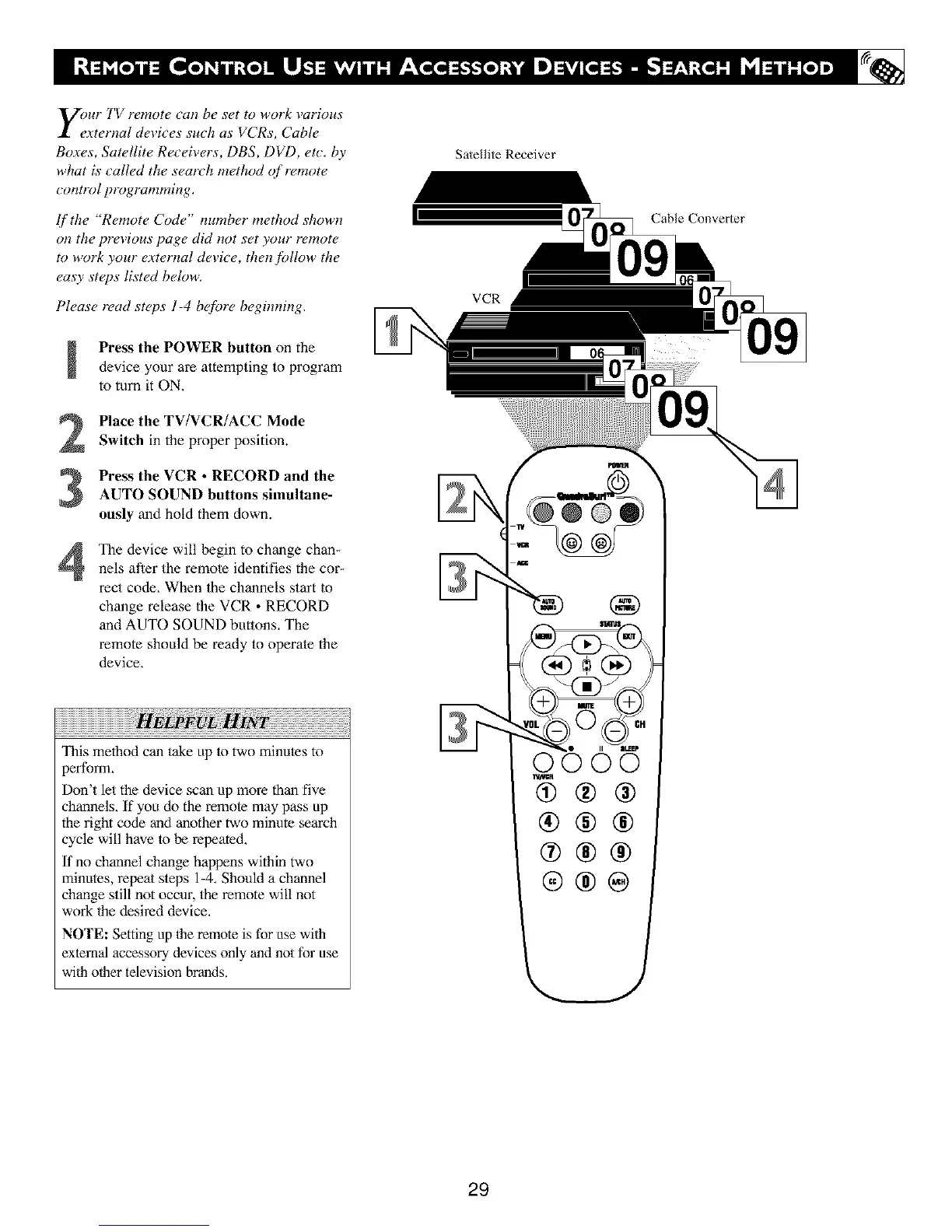
Press the POWER button on the
device your are attempting to program
to turn it ON,
2
3
4
Place the TV/VCR/ACC Mode
Switch in the properposition.
Press the VCR • RECORD and the
AUTO SOUND buttons simultane-
ously and hold them down.
The device will begin to change chan-
nels after the remole identifies the cor-
rect code, When the channels start to
change release the VCR • RECORD
and AUTO SOUND buttons. The
remote should be ready to operale the
device,
,vw
This method can take up to two minutes to
3erform,
Don't let the device scan up more than five
channels, If yoll do the remole may pass up
the right code and another two minute search
cycle will have lo be repeated,
If no channel change happens within two
minutes, repeat sleps 1-4. Should a channel
change still not occur, the remote will not
work 1he desired device.
NOTE: Setting up 1he remote is for use wfih
external accessory devices only and not for use
wfih other television brands.
Satellite Receiver
VCR
!
Cable Converter
29





 To Next Page