Nd w that you hm,e looked up the three-
igit Remote Code Number for your
brand of device, you are rt,ady to follow the
four simple steps below.
Please read through steps 1-4 b@)re begin-
ning.
m
2
3
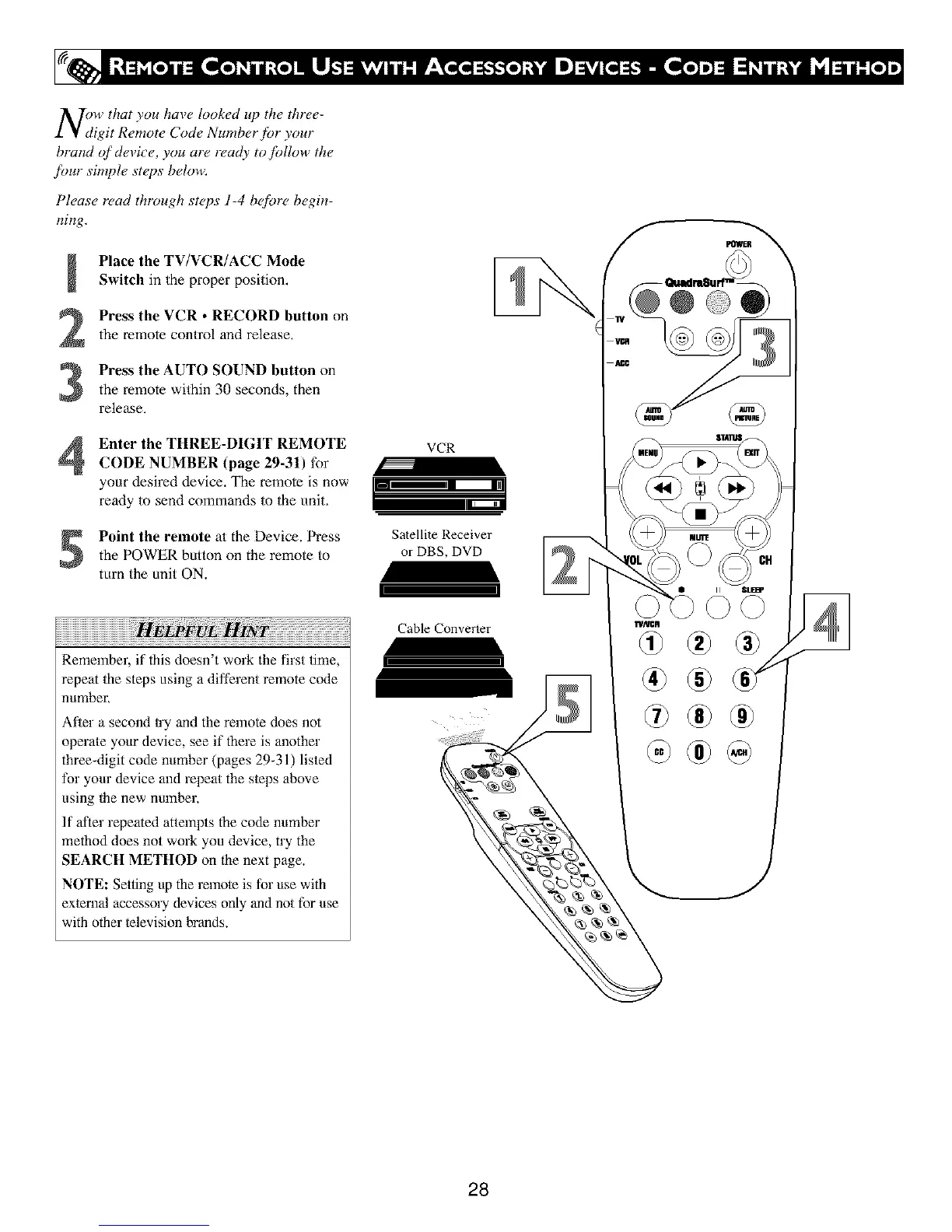
Place the TV/VCR/ACC Mode
Switch in the proper position,
Press the VCR • RECORD button on
the remote control and release,
Press the AUTO SOUND button on
the remote within 30 seconds, then
release,
Enter the THREE-DIGIT REMOTE
CODE NUMBER (page 29-31) for
your desired device. The remote is now
ready to send commands to the unit,
Point the remote at the Device. Pressthe POWER button on the remote to
turn the unit ON.
VCR
Satellite Receiver
or DBS, DVD
r
Cable Convener
rRemember, if this doesn't work the first time,
repeat the steps using a different remote code
number.
After a second u'y and the remote does not
operate your device, see if there is another
three-digit code number (pages 29_31) listed
for your device and repeat the s/eps above
using 1he new number.
If after repeated attempts the code number
method does not work you device, try the
SEARCH METHOD on the next page.
NOTE: Setting up the relnole is for use with
external accessory devices only and not for use
with other lelevision brands.
® ®
®
®®
®
28





 To Next Page