W_en using the "I'Vremote with a VCR.
rst make certain it is set to control
your VCR (by the REMOTE CODE or
SEARCH method).
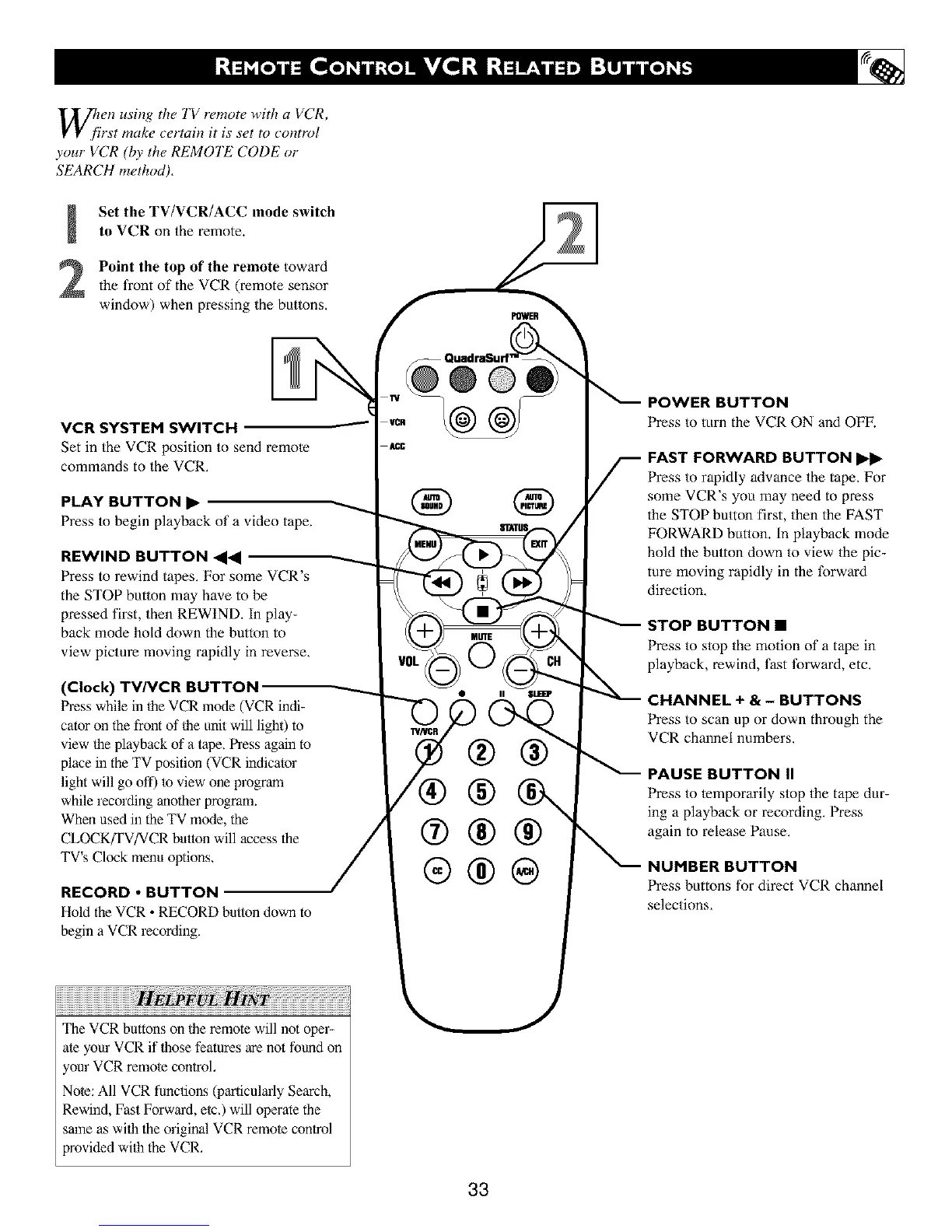
Set the TV/VCR/ACC mode switch
to VCR on the remote.
Point the top of the remote toward
the front of the VCR (remote sensor
window) when pressing the buttons,
POWER
VCR SYSTEM SWITCH
Set in the VCR position to send remote
commands to the VCR.
PLAY BUTTON I_
Press to begin playback of a video tape.
REWIND BUTTON <1<1
Press to rewind tapes. For some VCR's
the STOP button may have to be
pressed first, then REWIND. In play-
back mode hold down the button to
view picture moving rapidly in reverse.
(Clock) TV/VCR BUTTON
Press while in 1he VCR mode (VCR indi-
cator on the front of Ihe unit will lighO to
view 1he playback of a 1ape. Press again to
place in the TV position (VCR indicator
light will go off) to view one program
while recording another program.
When used in the TV mode, the
CLOCKfFV/VCR button will access the
TV's Clock menu options.
RECORD • BUTTON
Hold the VCR • RECORDbutton down to
begin a VCR recording.
@
®
®
®®
®
@
Press to turn the VCP, ON and OFF.
._ AST FORWARD BUTTON
Press to rapidly advance the tape. For
some VCR"s you may need to press
the STOP button first, then the FAST
FOP,WARD button. In playback mode
hold the button down to view the pic-
ture moving rapidly in the forward
direction.
STOP BUTTON •
Press to stop the motion of a tape in
playback, rewind, fast tbrward, etc.
CHANNEL + & - BUTTONS
Press to scan up or down through the
VCP, channel numbers.
PAUSE BUTTON II
Press to lemporarily stop the ta_ dur-
ing a playback or recording. Press
again to release Pause.
NUHBER BUTTON
Press buttons for direct VCP. channel
selections.
The VCR buttons on 1he remote will not oper-
ate your VCR if 1hose features are not found on
your VCR remole control,
Note: All VCR functions (parlicularly Search,
Rewind, Fast Forward, e/c,) will operate the
same as wilh the original VCR remole control
provided wilh the VCR,
33





 To Next Page