To adjust your TV pictur_, controls, select a
"hannel and fiUlow the stu)s shown below."
!
2
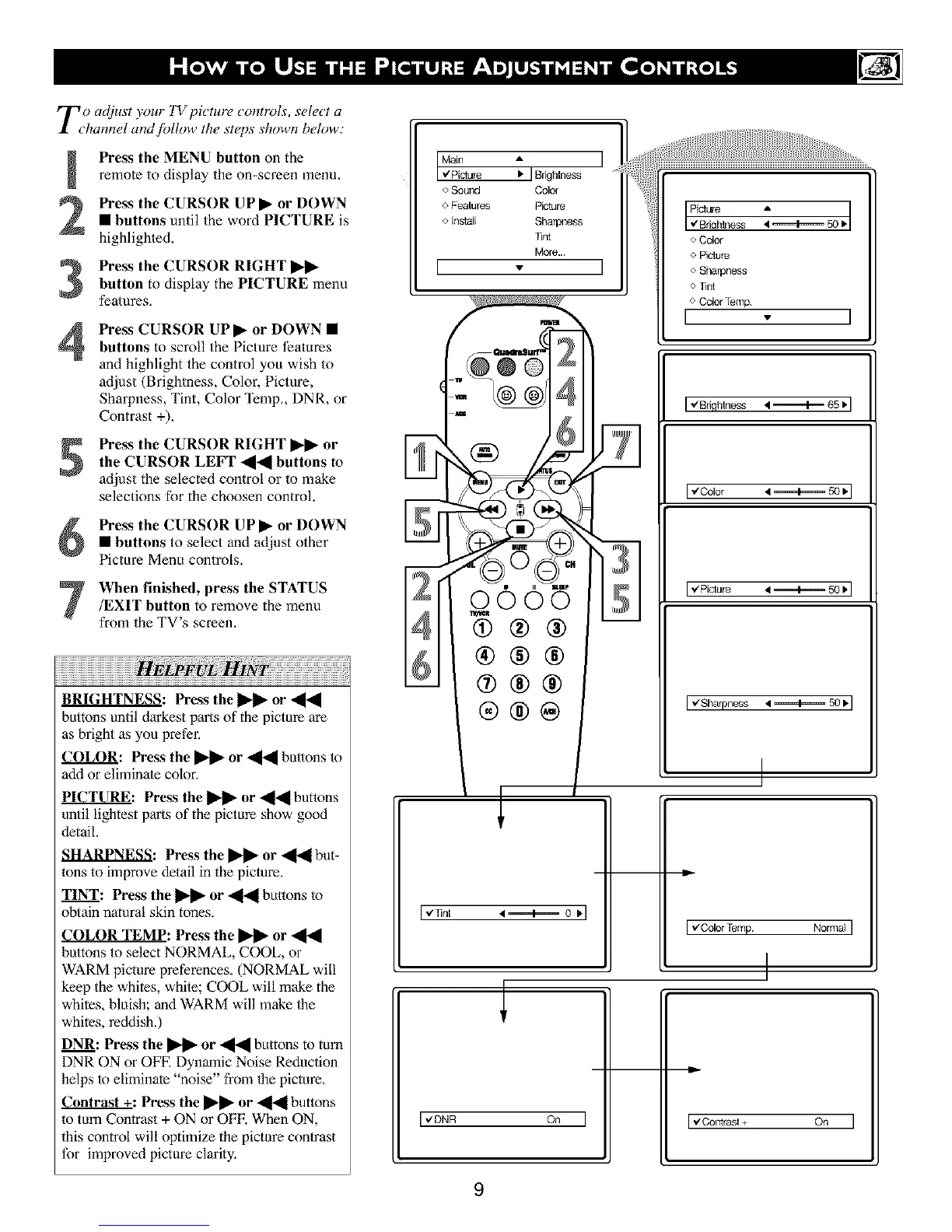
Press the MENU button on the
remote to display the on-screen menu,
Press the CURSOR UP I_ or DOWN
• buttons until the word PICTURE is
highlighted,
Press the CURSOR RIGHTI_I_
button to display the PICTURE menu
features,
4
Press CURSOR UPI_ or DOWN •
buttons to scroll the Picture Ieatnres
and highlight the control you wish to
adjust (Brightness, Color, Picture,
Sharpness, Tint, Color Temp,, DNR, or
Contrast +).
Press the CURSOR RIGHT I_1_ orthe CURSOR LEFT -_-_ buttons to
adjust the selected control or to make
selections fur the choosen control.
Press the CURSOR UPI_ or DOWN• buttons to select and adjust other
Picture Menu controls.
When finished, press the STATUS
/EXIT button to remove the menu
from the TV's screen,
BRIGHTNESS: Prass the _ or _1_
buttons until darkest parts of the pictnre are
as bright as you prefer,
COL(O: Press the _ or _ bu.ons tn
add or eliminate color,
PICTURE: Pre&s the _ or _1_1 buttons
until lightest parts of the pictnre show good
detail.
SHARPNESS: Press the li_ or _ but-
tons to improve detail in the picture.
TINT: Press the _ or _ bu.ons tn
obtain natural skin tones.
COLOR TEMP: Press the _ or
buttons to select NORMAL, COOL, or
WARM picture preferences, (NORMAL will
keep the whites, while; COOL will make the
whites, bluish; and WARM will make 1he
whites, reddish.)
DNR: Press the _ or _ buttons m tuIn
DNR ON or OFE Dynamic Noise Reduction
helps tn eliminate "noise" from the picture,
_: Pros the _ or ,_[ buttons
to tnm Contrast + ON or OFE When ON,
this control will optimize the pictnre contrast
for improved picture clarity.
[_i%re : IBdghlness I
o Sound Color
o Features Picture
o Install Sharpness
_nt
More...
[ - ]
I Picture •
w"Briqh_ess _ _ 50 •
o Color
o Piciure
oSharpness
o fird
o Color Temp.
I
I+ Biiflhlness 4_ 65•I
m
0005
®®®
®®®
®®@
Iel]hi 4_ o •l
I,ZDNR On I
LJ
[€Color
I _/Sharpness • ==========4=========50 • I
I
Iv'colorTemp. NormalI
I
[_/Contrasl + On I
9





 To Next Page