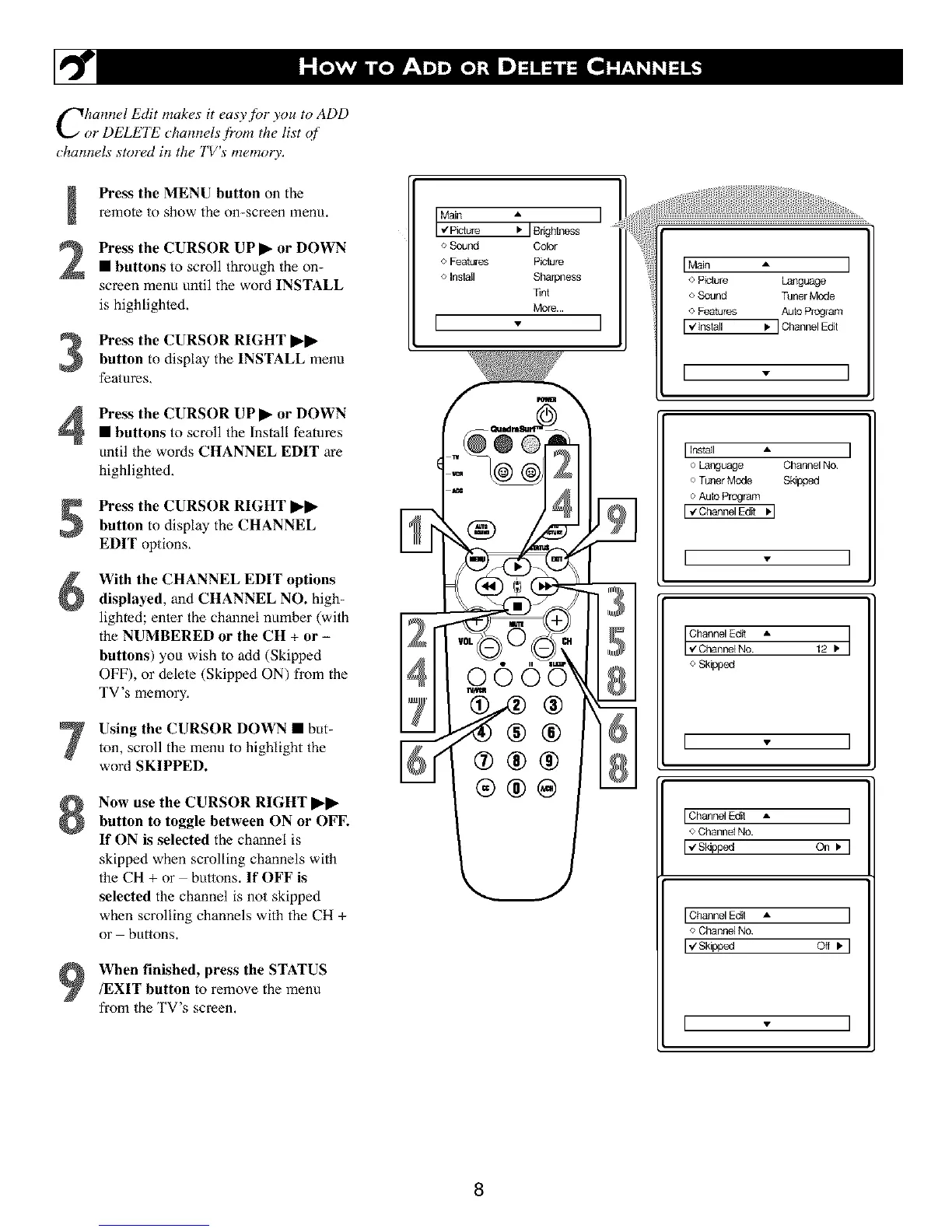
Chain+el Edit makes it easy+for you to ADD
or DELETE cham+els from the list of
chamwls stored in the TV's memory.
Press the MENU button on the
remote to show the on-screen menu.
Press the CURSOR UP I_ or DOWN
• buttons to scroll through the on-
screen menu until the word INSTALL
is highlighled,
Press the CURSOR RIGHT I_1_
button to display the INSTALL menu
features,
Press the CURSOR UPI_ or DOWN• buttons to scroll the Install features
until the words CHANNEL EDIT are
highlighted,
Press the CURSOR RIGHT I_ll_
button to display the CHANNEL
EDIT options,
With the CHANNEL EDIT options
displayed, and CHANNEL NO. high-
lighted; enler the channel number (with
the NUMBERED or the CH + or -
buttons) you wish to add (Skipped
OFF), or delete (Skipped ON) from the
TV's memory,
Using the CURSOR DOWN • but-ton, scroll the menu to highlight the
word SKIPPED.
Now use the CURSOR RIGHT I_l_
button to toggle between ON or OFF.
If ON is selected the channel is
skipped when scrolling channels with
the CH + or buttons. If OFF is
selected the channel is not skipped
when scrolling channels with the CH +
or buttons.
When finished, press the STATUS/EXIT button to remove the menu
from the TV's screen,
:I
o Sound Color
o Features Pisture
o Install Sharpness
Tint
More...
I
@
°1
8
]
Main A
Picture Language
o Sound Tuner Mode
o Features Auto Program
. ] Channel Edit
I ', I
I Install A
o Language Channel No
o Tuner Mode Sk_ppod
o Aulo Program
I "zChannel Edit '1
I - I
Channel Edit •
I '€ Channe+No. 12. I
o Skipped
I
] Channel Edit •
<>Channel No.
I € Sldpped On .
] Channel Edit A
4' Channel No
],,/Skipped Off .
I
8





 To Next Page