Emr TV can automatically set itse!f f!)r
ocal area (ol- Cable TV) channels, This
makes it easy f!)r you to select only the TV
stations in your area when the CHANNEL
(+), ( ) buttons are pr_,sse&
Note: Make sure the antem_a or cable sigllal
comwctio11 has been completed be_re AUTO
PROGRAM is activated,
5
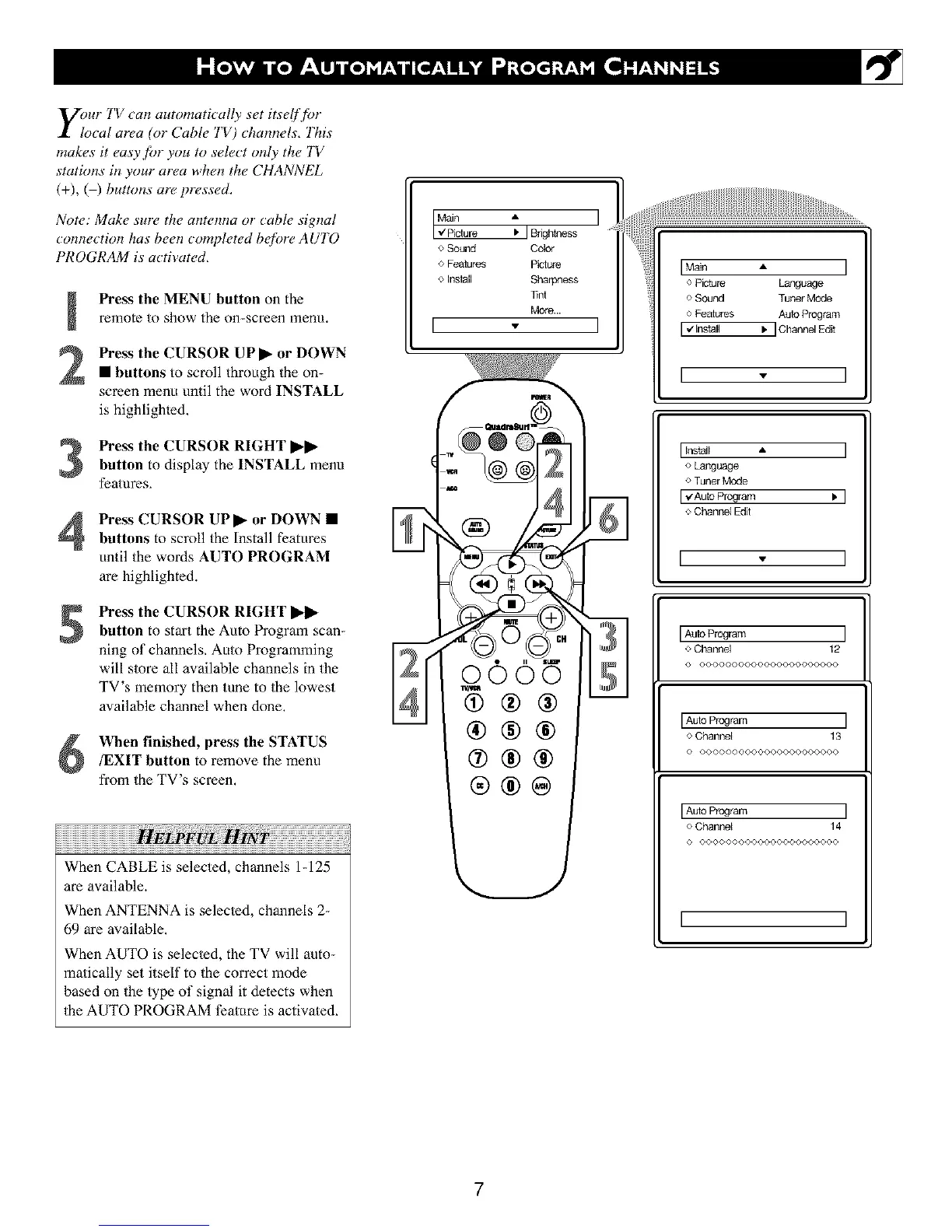
Press the MENU button on the
remote to show the on-screen menu.
Press the CURSOR UP I_ or DOWN
• buttons to scroll through the on-
screen menu until the word INSTALL
is highlighled,
Press the CURSOR RIGHT I_ll_
button to display the INSTALL menu
features,
Press CURSOR UPI_ or DOWN •
buttons to scroll the Install features
until the words AUTO PROGRAM
are highlighted.
Press the CURSOR RIGHT I_l_
button to start the Auto Program scan-
ning of channels, Auto Programming
will store all available channels in the
TV's memory then tune to Ihe lowest
available channel when done,
When finished, press the STATUS
/EXIT button to remove the menu
from the TV's screen,
When CABLE is selected, channels 1-125
are available.
When ANTENNA is selected, channels 2-
69 are available,
When AUTO is selec/ed, the TV will auto-
matically set itself to the correct mode
based on the type of signal it detects when
the AUTO PROGRAM ti_ature is activated,
o Sound Color
o Features Picture
o Install Sharpness
Tint
More ..
[ - ]
I Main A I
o Picture Language
o Sound Tuner Mode
o Features Auto Program
I,,/Install I.IChannelEdit
I v
I Install •
o Language
o Tuner Mode
I_AuIo Program Ib
o Channel Edit
I ', I
IAuto Program ]
o Channel 12
O O©©O0©O©©O0©©O(,O0(,©©©©
[Auto Program ]
o Channel 13
© ©O©O©OOO00©©O000000000
[Auto Program ]
o Channel 14
© OO0000©O0©(,O00©O©©O000
I I
7





 To Next Page