The TUNER MODE control allows you to
J_ange the TV's signal input to either
ANTENNA, CABLE or AUTO mode. It's"
important f!Jr the TV to know what type of
signal to Iook,_Jr: (From a Cable TV signal or
a normal Antenna signal,) In the AUTO
mod_c when the AUTO PROGRAM f!_ature is
activated, the TV will automatically _hoose
the correct mode.
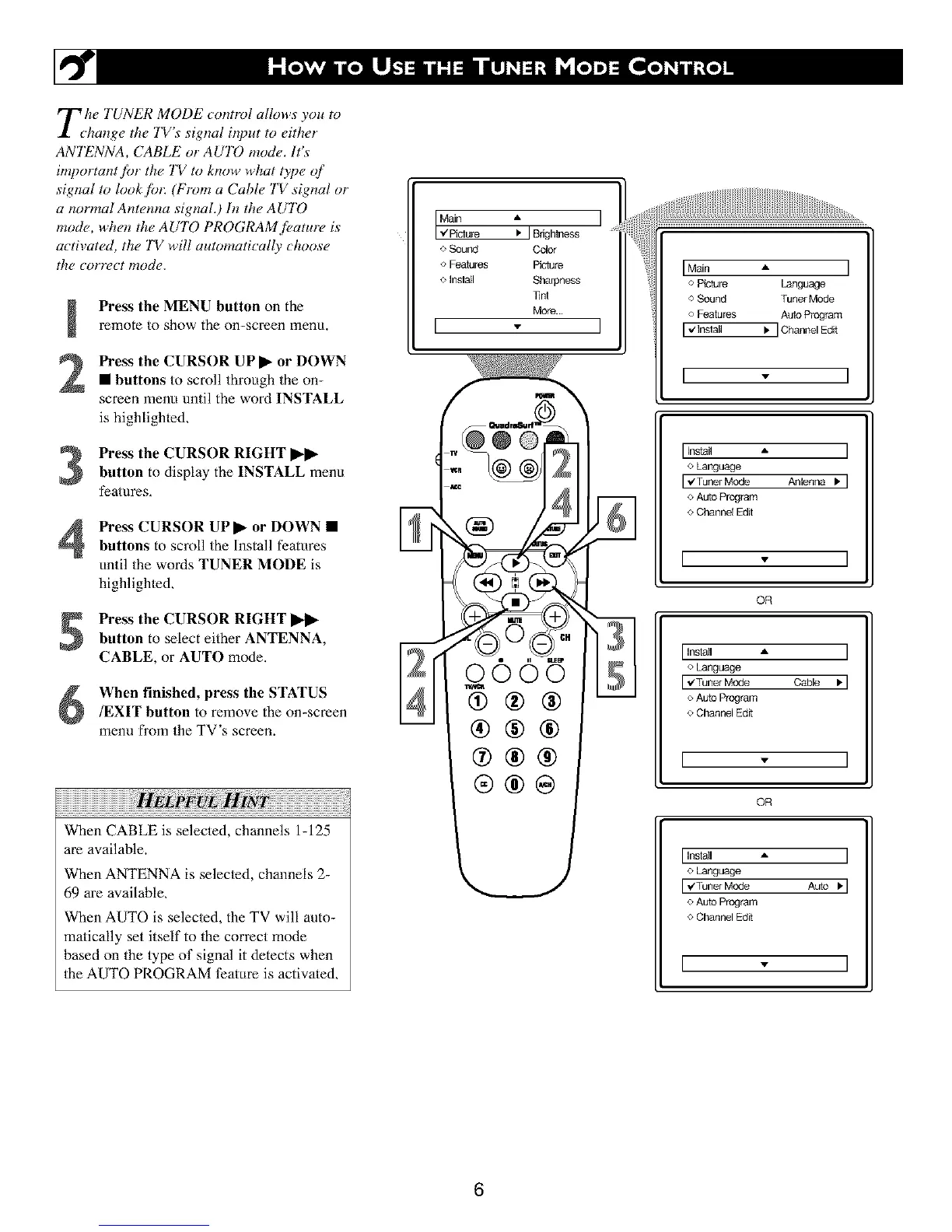
Press the MENU button on the
remote to show the on-screen menu.
Press the CURSOR UP I_ or DOWN
• buttons to scroll through the on-
screen menu until the word INSTALL
is highlighled,
Press the CURSOR RIGHT I_
button to display the INSTALL menu
features,
Press CURSOR UPI_ or DOWN •
buttons to scroll the Install features
until the words TUNER MODE is
highlighted,
Press the CURSOR RIGHT I_ll*
button to select either ANTENNA,
CABLE, or AUTO mode.
When finished, press the STATUS
/EXIT button to remove the on-screen
menu from the TV's screen.
When CABLE is selected, channels 1-125
are available.
When ANTENNA is selected, channels 2-
69 are available,
When AUTO is selec/ed, the TV will auto-
matically set itself to the correct mode
based on the type of signal it detects when
the AUTO PROGRAM ti_ature is activated,
o Sound Color
o Features Piciure
o Inslall Sharpness
]inl
More...
[
I Main A I
o Picture Language
o Sound Tuner Mode
o Features Auto Program
[ ,JInslall I, ] Channel Edit
I * I
Install • ]
o Language
r_'TunerMode Anlenna,1
o Auto Program
o Channel Edit
[ - ]
OR
[Install -- ]
o Language
[ _Tuner Mode Cable ,1
o Auto Program
o Channel Edit
[ - ]
OR
Inslall A ]
o Language
I ,¢TunerMode Auto I, I
e Auto Program
o Channel Edit
[ . ]
6





 To Next Page