i _ _ in -" [o]L','B I[e]ieJ-1:11 i: 1:11II eJ_I:l ;il _ [e) l] :lLe[e) _ i i ;{e] I
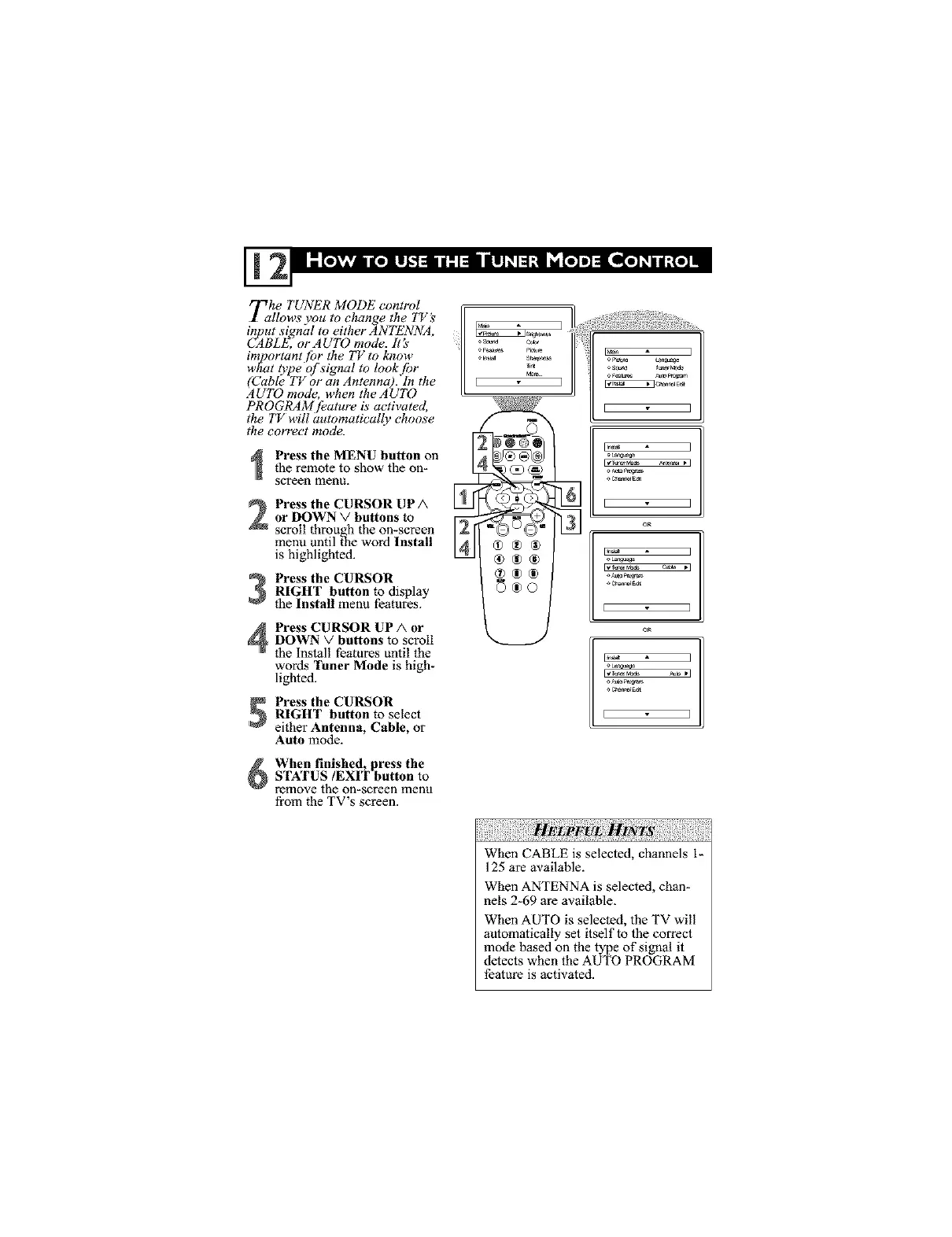
Tahe TUNER MODE control ,
llows you to change the TVs
input _ignal to either ANTENNA,
CABLE, or AUTO mode. lt:s'
important [br the TV to know
what type of signal to Iook,f!)r
(Cable TV or an Antenna). in the
AUTO mode, when the AUTO
PROGI_tM [_ature is activated,
the TV will automatically choose
the correct mode.
Press the MENU button on
the remote to show the on-
screen menu.
Press the CURSOR UP A
or DOWN V buttons to
scroll through the on-screen ILl
menu until the word Install
N
is highlighted.
Press the CURSORRIGHT button to display
the Install menu features.
Press CURSOR UP A or
DOWN V buttons to scroll
the Install features until the
wolds Tuner Mode is high-
lighted.
Press the CURSOR
RIGHT button to select
either Antenna, Cable, or
Auto mode.
l] ........
®®®
_®o
k..__.,
%
E I
E I
E I
oR
E I
When finished, press the
STATUS/EXIT button to
remove the on-screen menu
from the TV's screen.
When CABLE is selected, channels I-
125 are available.
When ANTENNA is selected, chan-
nels 2-69 are available.
When AUTO is selected, the TV will
automatically set itself to the correct
mode based on the type of signal it
detects when the AUTO PROGRAM
feature is activated.



 To Next Page