After the TVk clock has been
set, you can use your TV as a
clock. The Di.wloy control allows
I
you to permanently display the
time in the upper right corner of
the screen.
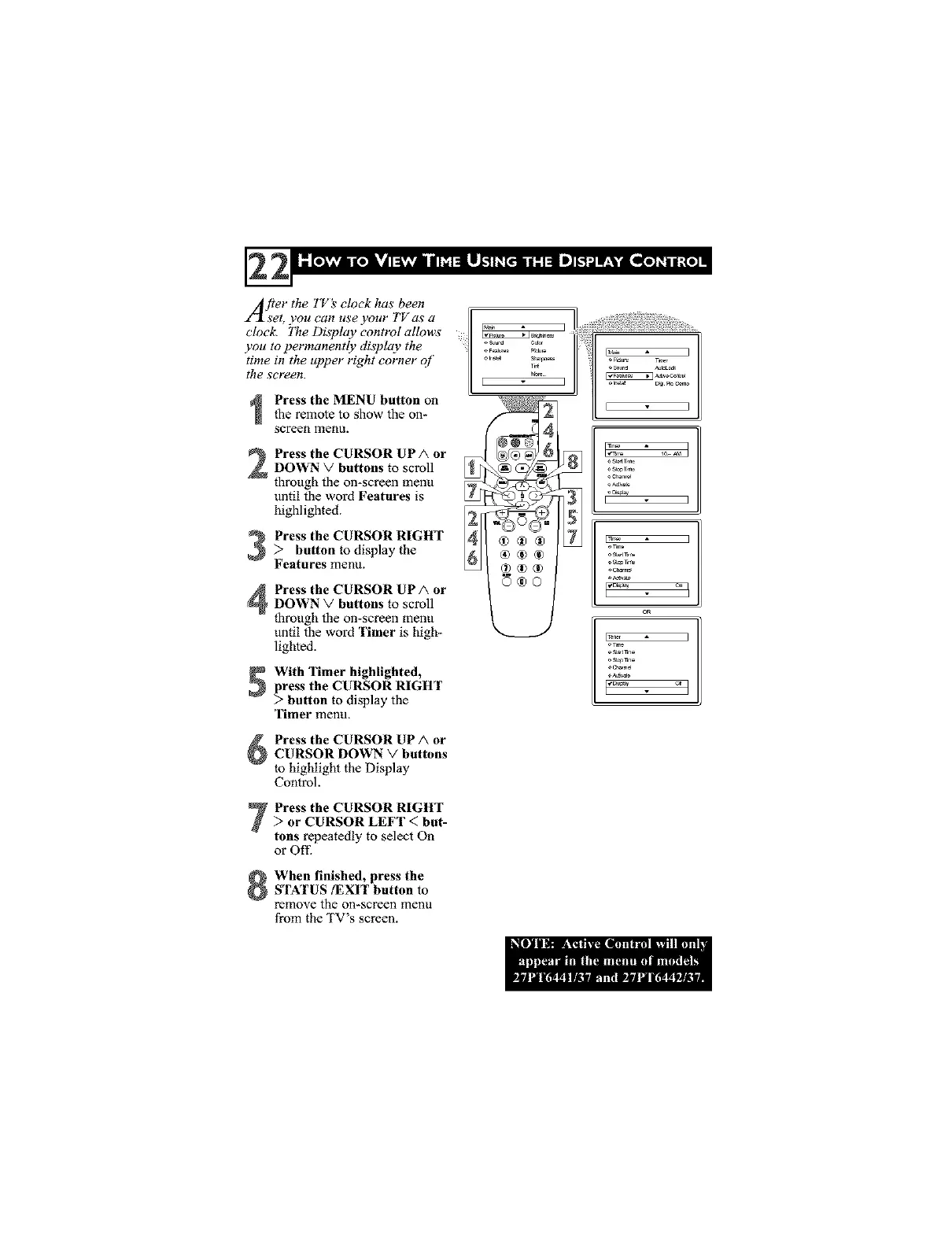
Press the MENU button on
the remote to show the on-
screen menu.
Press the CURSOR UPA or
DOWN V buttons to scroll _
through the on-screen menu
vntil the word Features is g[_
highlighted. _42Press the CURSOR RIGHT> button to display the
Features menu.
Press the CURSOR UPA orDOWN V buttons to scroll
through the on-screen menu
until the word Timer is high-
lighted.
With 'rimer highlighted,
press the CURSOR RIGHT
> button to display the
Timer menu.
Press the CURSOR UP A or
CURSOR DOWN V buttons
to highlight the Display
Control.
Press the CURSOR RIGHT> or CURSOR LEFT < but-
tons repeatedly to select On
or Ofl_
When finished, press the
STNrUS/EXIT button to
remove the on-screen menu
from the TV's screen.
®®®
_®®
0®0
[ ]
o_
E ]
o st_r_n_
CR
]



 To Next Page