After your personal access code
has been set (see previous
page), you are now ready to select
the channels or the A/V Inputs you
want to block out or censor
Once you're entered your access
code and the AutoLock'rMJbatures
are displayed on the screen:
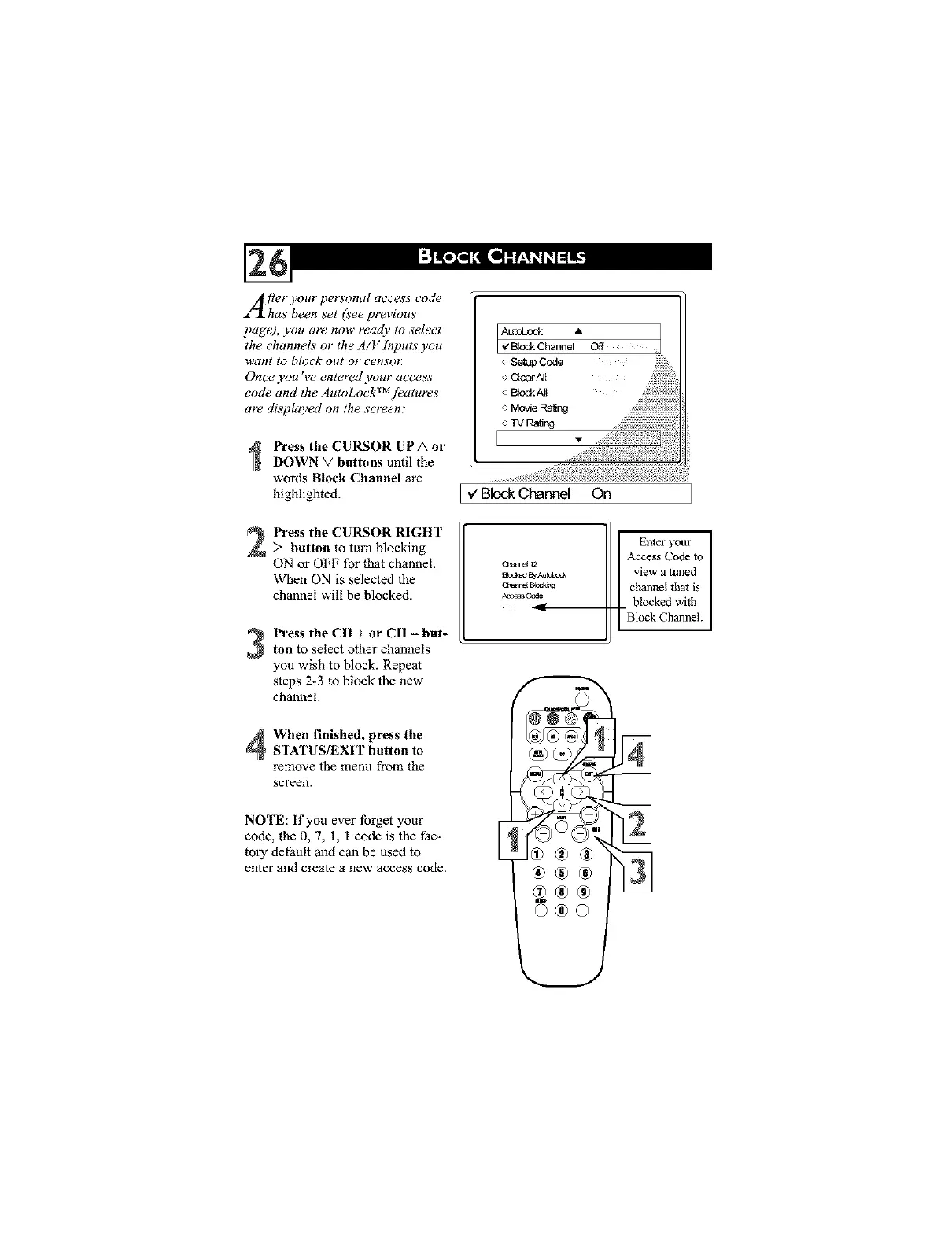
Press the CURSOR UP A or
DOWN V buttons until the
words Block Channel are
highlighted.
Press the CURSOR RIGHT
> button to turn blocking
ON or OFF for that channel.
When ON is selected the
channel will be blocked.
Press the CH + or CH - but-ton to select other channels
you wish to block. Repeat
steps 2-3 to block the new
channel.
When finished, press theSTATUS/EXIT button to
remove the menu from the
screen.
NOTE: if you ever forget your
code, the 0, 7, 1, I code is the thc-
tory default and can be used to
enter and create a new access code.
[ v' Block Channel On
Enter your
Access Code to
C.has_ 12
sc_ss By_L_ view a limed
ch_ _o=_g channel that is
Access Ccde
.... _ blocked with
Block Chmmel.




 To Next Page