7
Preset the switch-on volume
1 EnterthePBSsetupmenu.
2 Press toselect[Switch On
Settings]
>[Switch On Vol].Selectone
ofthefollowingoptions:
• [Last Status](Laststatus):Select
[Off](Off)toswitchtheTVonat
auserdenedvolume.Select[On]
(On)toswitchtheTVonatthelast
volumesetting.
• [User Dened](Userdened):Press
tosetthevolumethatisused
whentheTVisswitchedon.
3 Press toreturntothepreviousscreen.
Preset the maximum volume
1 EnterthePBSsetupmenu.
2 Press toselectandenter[Switch
On Settings]
>[Max Volume].
3 Press tosetthemaximumvolume
thataguestcanselect.
4 Press toreturntothepreviousscreen.
Preset the switch-on channel
1 EnterthePBSsetupmenu.
2 Press toselect[Switch On
Settings]
>[Switch On Ch].Selectone
ofthefollowingoptions:
• [Last Status](Laststatus):Select
[Off](Off)toswitchtheTVonat
auserdenedchannel.Select[On]
(On)toswitchtheTVonatthelast
viewedchannel.
• [User Dened](Userdened):
Press tosetthechannelthatis
displayedwhentheTVisswitched
on.
3 Press toreturntothepreviousscreen.
Congure the settings for
switch-on
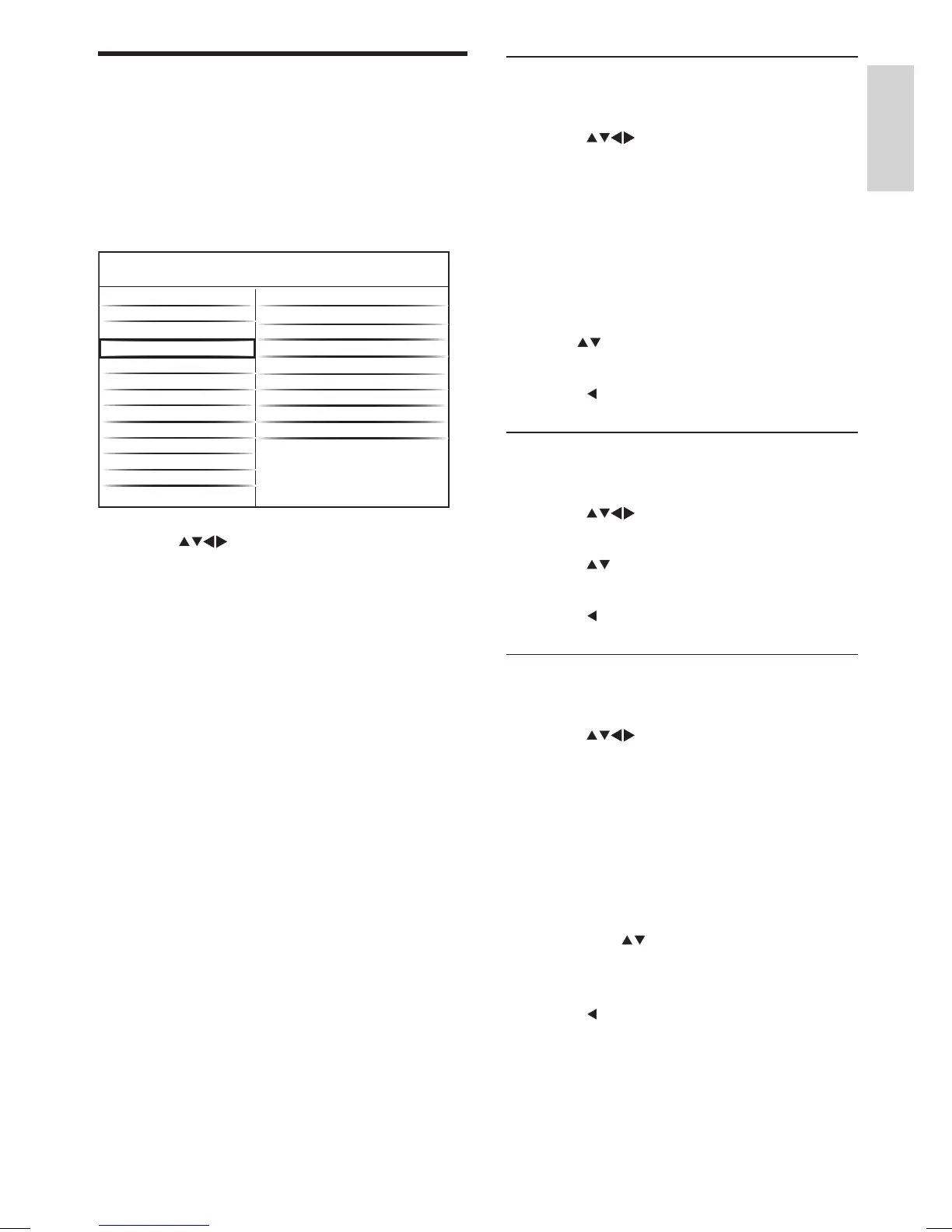
Youcanconguresettings(suchasvolume,
channel,pictureformat,etc)thatareusedas
default,whentheTVisswitchedon.
1 EnterthePBSsetupmenu.
2 Press toselect[Switch On Settings]
(Switchonsetting).Selectoneofthe
followingoptions:
• [Switch On Vol](Switchonvolume):
Presetsthevolume.
• [Max Volume](Maximumvolume):
Presetsthemaximumvolumethata
guestcanselect.
• [Switch On Ch](Switchonchannel):
Presetsthechannelthatisdisplayed
whentheTVisswitchedon.
• [Picture Format](Pictureformat):
Presetsthepictureformat.
• [Power On](Poweron):Presetsthe
powermode.
• [Smart Power](Smartpower):Presets
thepowersavingsmode.
• [Display Msg](Displaymessage):
Enablesordisablesthedisplayofa
welcomemessage.
• [Welcome Msg](Welcomemessage):
Speciesawelcomemessage.
• [Set ID](SetID):SpeciesanID
forsignageapplications.Thisoption
appearsonlyifyouselect[Application]
>[Signage]fromthePBSsetupmenu.
Application
Blank Channel
Pay-tv Setup
Switch On Vol
PBS Menu
Consumer Setup
Control Settings
Multi RC
Smart RC
Store
USB to TV
TV to USB
Reset
Max Volume
PBS Mode
Switch On Settings
Picture Format
Switch On Ch
Power On
Smart Power
Display Msg
Welcome Msg
Set ID
English
EN





 To Next Page