Home
Philips
LCD TV
32PFL8605H
Page 91
Philips 32PFL8605H - Page 91
387 pages
Manual
Save Page as PDF
To Next Page
To Next Page
To Previous Page
To Previous Page
Loading...
2.2.4
Adjust
s
1/5
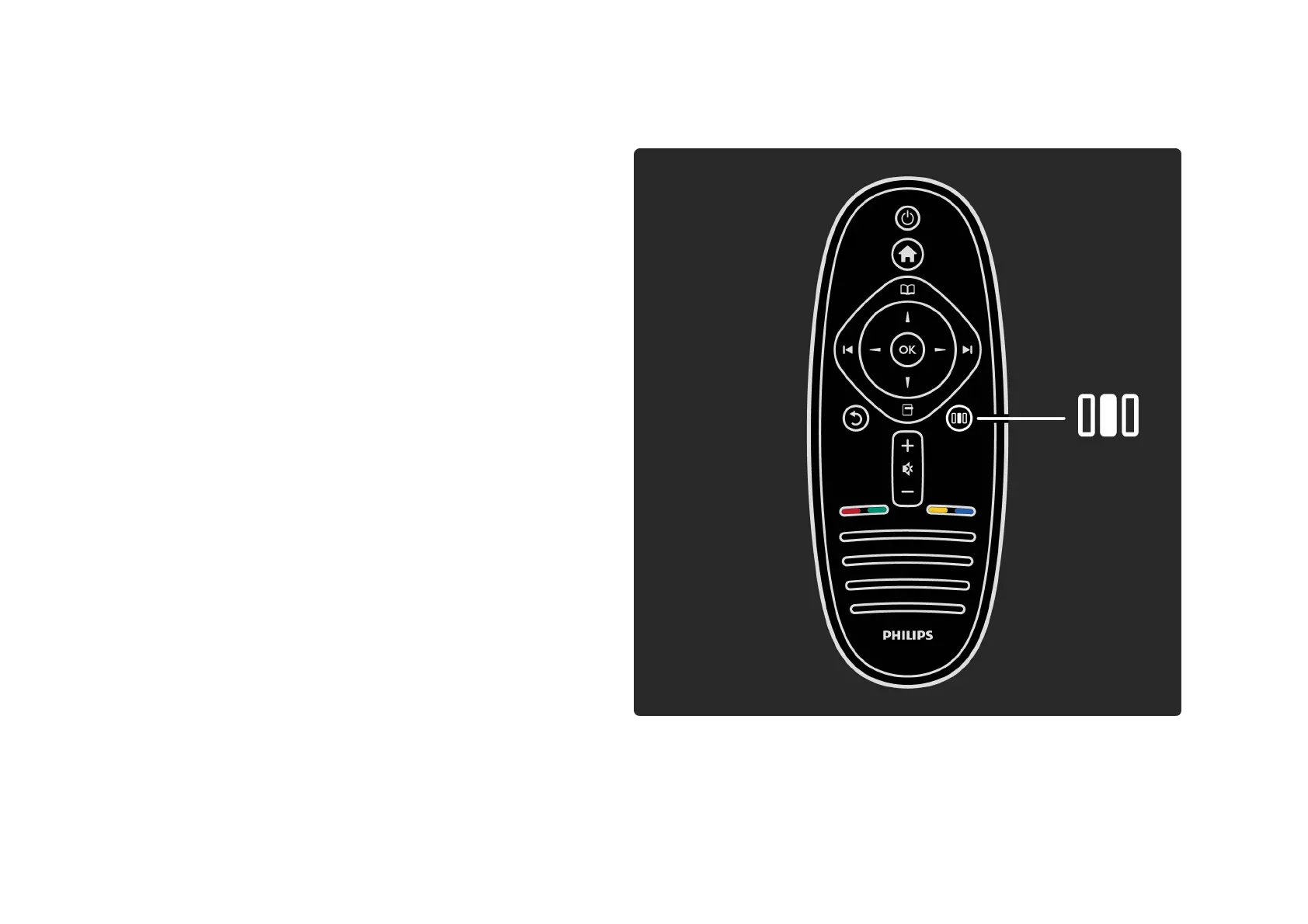
With the Adjust menu, you can adjust picture, sound and
Ambilight settings quickly.
Press
s
to open the Adjust menu.
Select your choice with the navigation keys and press OK.
To close the Adjust menu, press
s
again.
. . .
90
92
Table of Contents
Main Page
Contact Information
2
The Remote Control
3
Connecting Devices
21
High Definition TV
24
Wall Mounting
29
Positioning the TV
41
Viewing Distance
42
Screen Care
48
Power Switch
49
Register Your TV
55
Online Support
58
Contact Philips
59
Open Source Licences
60
Remote Control Overview
61
Switch Channels
96
Favourite Channels
102
Programme Guide
104
Picture Format
113
Switch to Standby
116
Select a Device
117
Use the Remote Control
118
What Is Net TV
129
What You Need
133
First Use
135
Browse Net TV
140
Text Setup
171
Text Options
172
Browse USB
179
Sleep Timer
196
Audio Languages
201
Hearing Impaired
205
Visually Impaired
207
Smart Settings
210
Eco Settings
221
Update Channels
224
DVB-T or DVB-C
227
Reinstall Channels
229
Clock Settings
236
What You Need
238
Wired Installation
241
Network Settings
243
PC Media Server Settings
244
Add a New Device
257
Current Software Info
268
Update with USB
271
Power Cable
276
Antenna Cable
278
Cable Quality
279
Ypbpr - Component Video
284
Game Console
311
Photo Camera
315
Wired Network Connection
325
SD Card Preparation
331
Insert an Sd Card
332
Conditional Access Module - CAM
333
Contact Information
338
TV and Remote Control
340
Picture and Sound
345
Software Version
358
Open Source Software
359
Environmental Efforts
364
Display and Sound
372
Supported Display Resolutions
374
Dimensions and Weights
380
Related product manuals
Philips 32PFL3404
3 pages
Philips 32PFL5404
3 pages
Philips 32PFL5604H
3 pages
Philips 32PFL5606H
3 pages
Philips 32PFL5403H
3 pages
Philips 32PFL4606H
3 pages
Philips 32PFL3606H
3 pages
Philips 32PFL5403D
46 pages
Philips 32PFL5405H
65 pages
Philips 32PFL3514D
41 pages
Philips 32PFL3605/77
36 pages
Philips 32PFL3506/F7
15 pages







 To Next Page