12
Connections
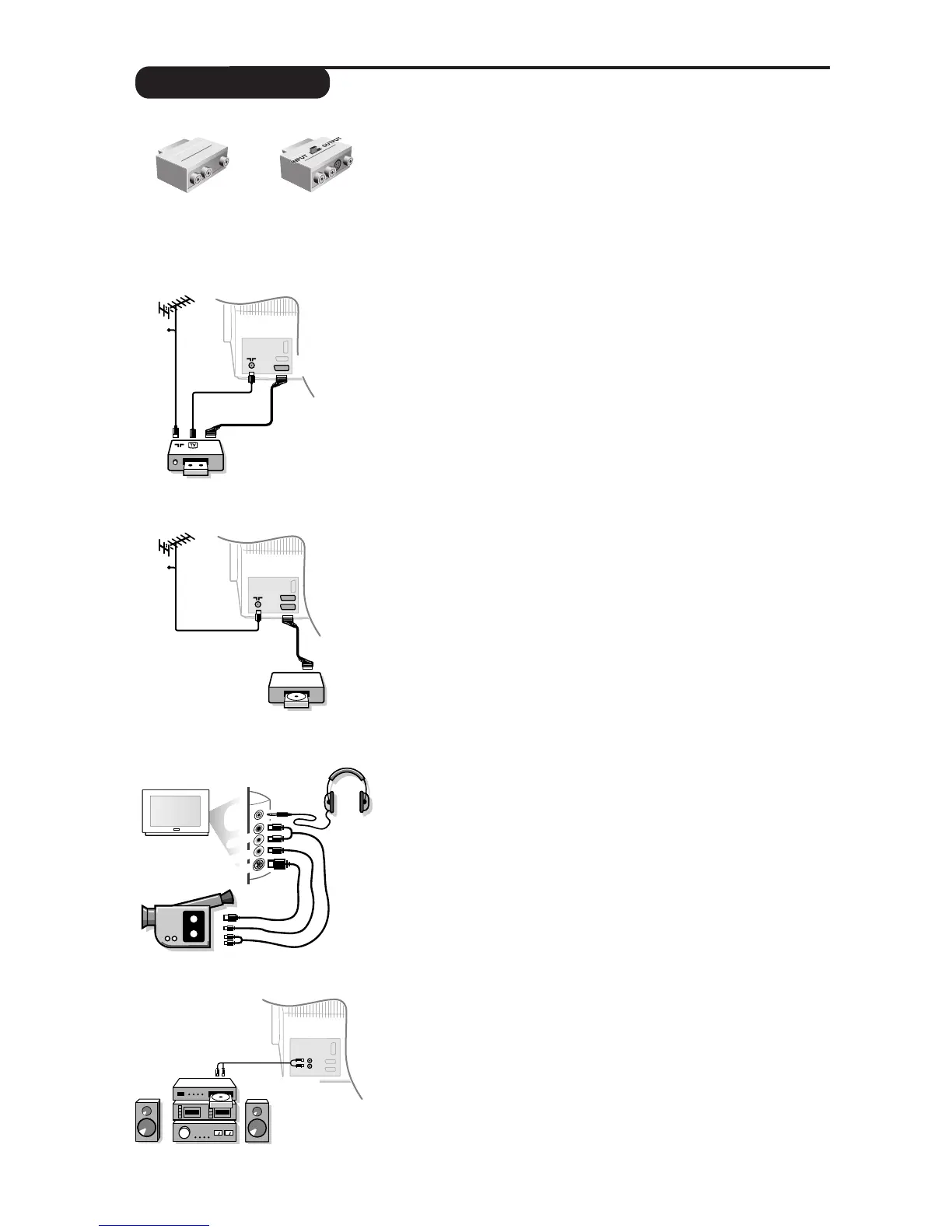
Depending on the versions, the TV set is equipped with 2 or 3
SCART connectors EXT1, EXT2 and EXT3 located on the rear.
Tw o special adaptors (scart to cinch) are provided with your TV.
Connect the adaptor with
INPUT
/
OUTPUT
switch to EXT2 and the
other adaptor to EXT1 or EXT3.
The EXT1 connector has audio video inputs/outputs and RGB inputs.
The EXT2 connector has audio video inputs/outputs and S-VHS inputs.
The EXT3 connector has audio video inputs.
Carry out the connections featured opposite. Use
the adaptor
with
INPUT
/
OUTPUT
switch setted in the
INPUT
position.
If you are using a mono video recorder, connect only the VIDEO
and AUDIO L sockets. If you are using a S-VHS video recorder,
connect the S-VIDEO cable to the S-VIDEO input.
If your video recorder does not have a SCART connector, the only possible
connection is via the aerial cable.You will therefore need to tune in your
video recorder’s test signal and assign it programme number 0 (refer to
manual installation p.5).To reproduce the video recorder picture, press 0.
Video recorder
Satellite receiver, decoder, DVD, games, etc.
Carry out the connections featured opposite. Use the
special
adaptor (scart to cinch) provided with your TV.
If you have a DVD player with S-video, use the EXT2 socket and
connect the S-VIDEO cable to the S-VIDEO input.
For digital
equipment or a decoder, go to the
SETUP menu settings (see
next page).
To select connected equipment
Press
n to select EXT1 or EXT2 (or EXT3). Most equipment
(decoder, video recorder) carries out this switching automatically (via
the SCART connector).
Make the connections as shown opposite.With the key
n,
select FRONT.
For a monophonic device, connect the audio signal to the AUDIO L
input. Use the
e key to reproduce the sound on the left and right
speakers of the TV set.
Headphones
The @”#keys are used to adjust the volume. Press the
m key to mute the sound on the TV set (see also sound
settings, page 6).
The headphone impedance must be between 8 and 4000 ohms.
Other equipment
Side connections











 To Next Page