12
TPT1.2A LA
4. Mechanical Instructions
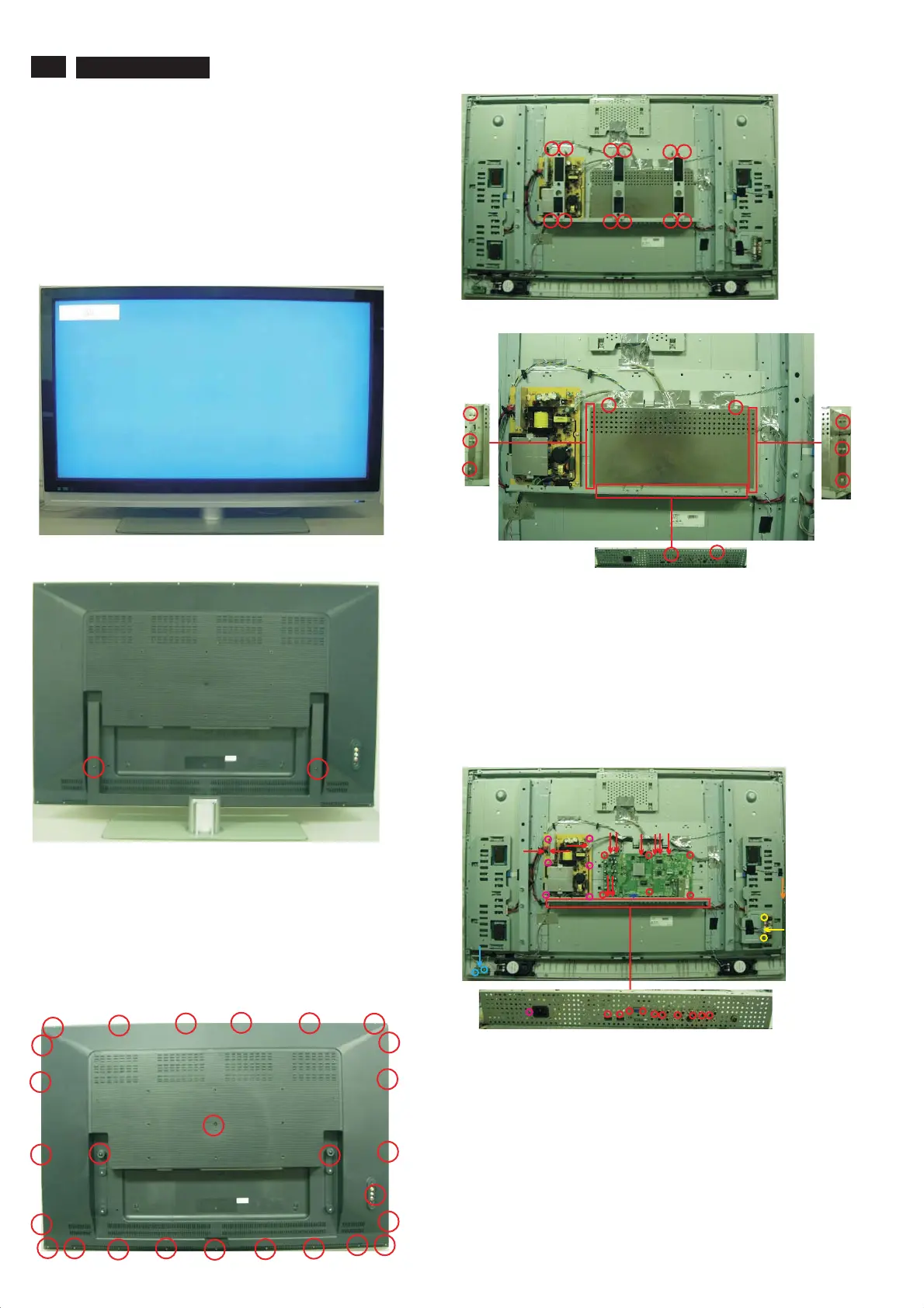
Front view
Back view
Step 1. Remove the Base.
Remove the 2 screws as Fig.2.
Fig.2
Fig.1
Step 2. Remove the Back cover and as Fig.3~5.
a.
SHIELD-MAIN
emove the back cover as Fig.3
b. Remove the 12 screws , then remove 3 BRACKET-WALL
MOUNT SIDE as Fig.4.
c. Remove the 10 screws , then remove SHIELD-MAIN as Fig.5.
Remove the 27 screws, then r .
Fig.6
Step 3. Remove the Scaler, Power, IR, Key and Side AV board as Fig.6.
a. Remove the 16 screws and disconnect the 8 cables to remove the
scaler board .
b. Remove the 7 screws and disconnect the 3 cables to remove the
Power board.
c. Remove the 2 screws and disconnect the 1 cable to remove the IR
board.
d
e
. Remove the 2 screws and disconnect the 1 cable to remove the Side
AV board.
. Disconnect the 1 cable to remove the Key board.
Fig.4
Fig.5
4. Mechanical Instructions
Index of this chapter:
4.1 Assy/Panel Removal
4.2 Set Re-assembly
4.1 Assy/Panel Removal
Notes: Please put your machine on soft material to avoid to scrape
panel when you disassemble it.
Fig.3
Step 4. Remove the speakers and as Fig.7~8.the Frame assy
Remove the 6 screws and disconnect 3 cables to remove the Frame
PCB as Fig.7.
b Remove the 8 screws and disconnect 3 cables to remove the Speaker
as Fig.7.
c Remove the 12 screws to remove BRACKET-BRIDGE-L/R as Fig.8.
a.
.
.




 To Next Page