5
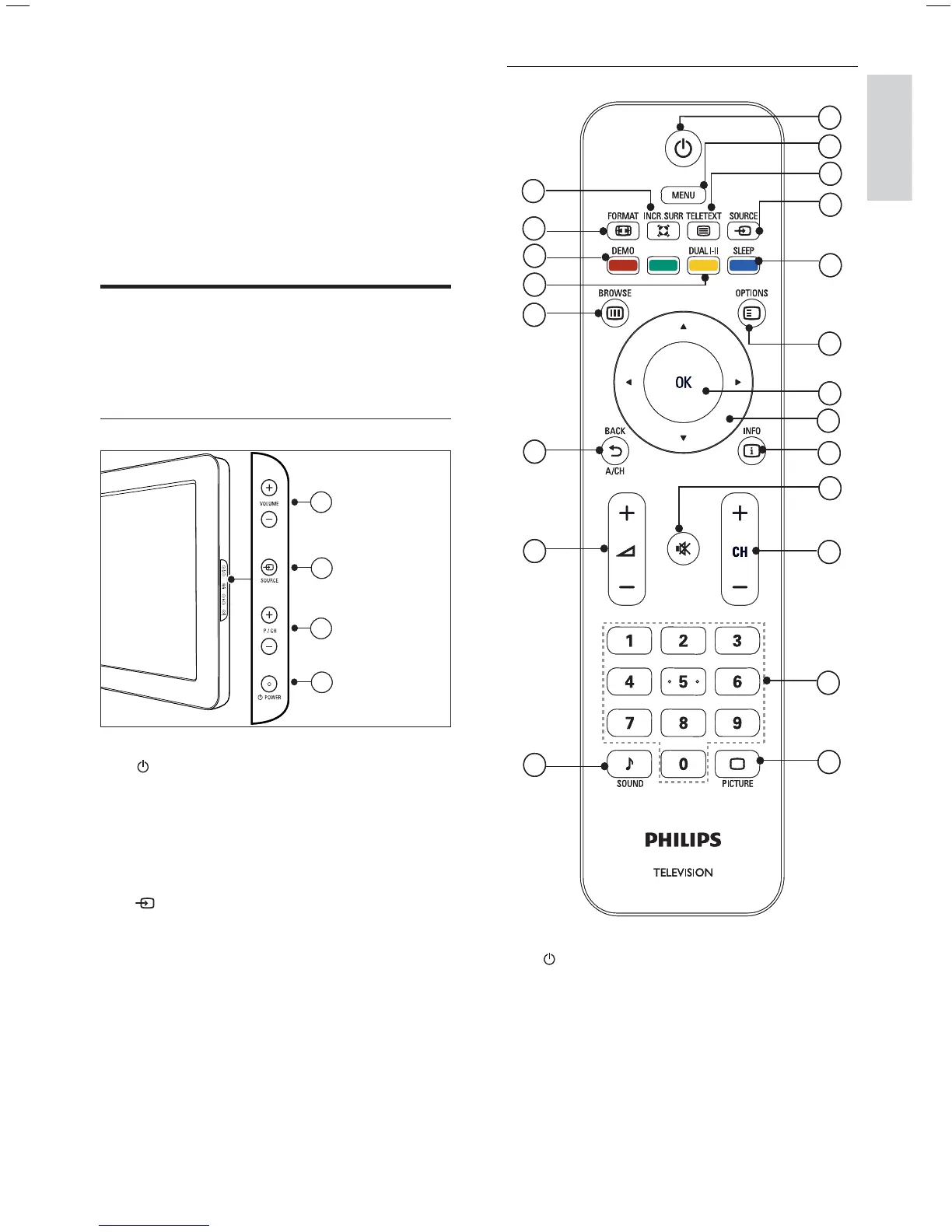
Remote control
a ( Standby-On )
Switches the TV to standby if the TV
is on.
Switches the TV on if the TV is in
standby.
b MENU
Toggles the main menu on or off.
•
•
1
2
3
4
6
7
8
9
10
13
14
17
19
20
18
15
16
21
12
11
5
1
2
3
4
6
7
8
9
10
13
14
17
19
20
18
15
16
21
12
11
5
3 Your product
Congratulations on your purchase, and
welcome to Philips! To fully bene t from the
support that Philips offers; register your product
at www.philips.com/welcome.
TV overview
This section gives you an overview of
commonly used TV controls and functions.
Side controls and indicators
a POWER : Switches the TV on or off.
The TV is not powered off completely
unless it is physically unplugged.
b P/CH +/- : Switches to the next or
previous channel.
c
SOURCE : Selects connected devices.
d VOLUME +/- : Increases or decreases
volume.
3
4
2
1
3
4
2
1
English
EN









 To Next Page