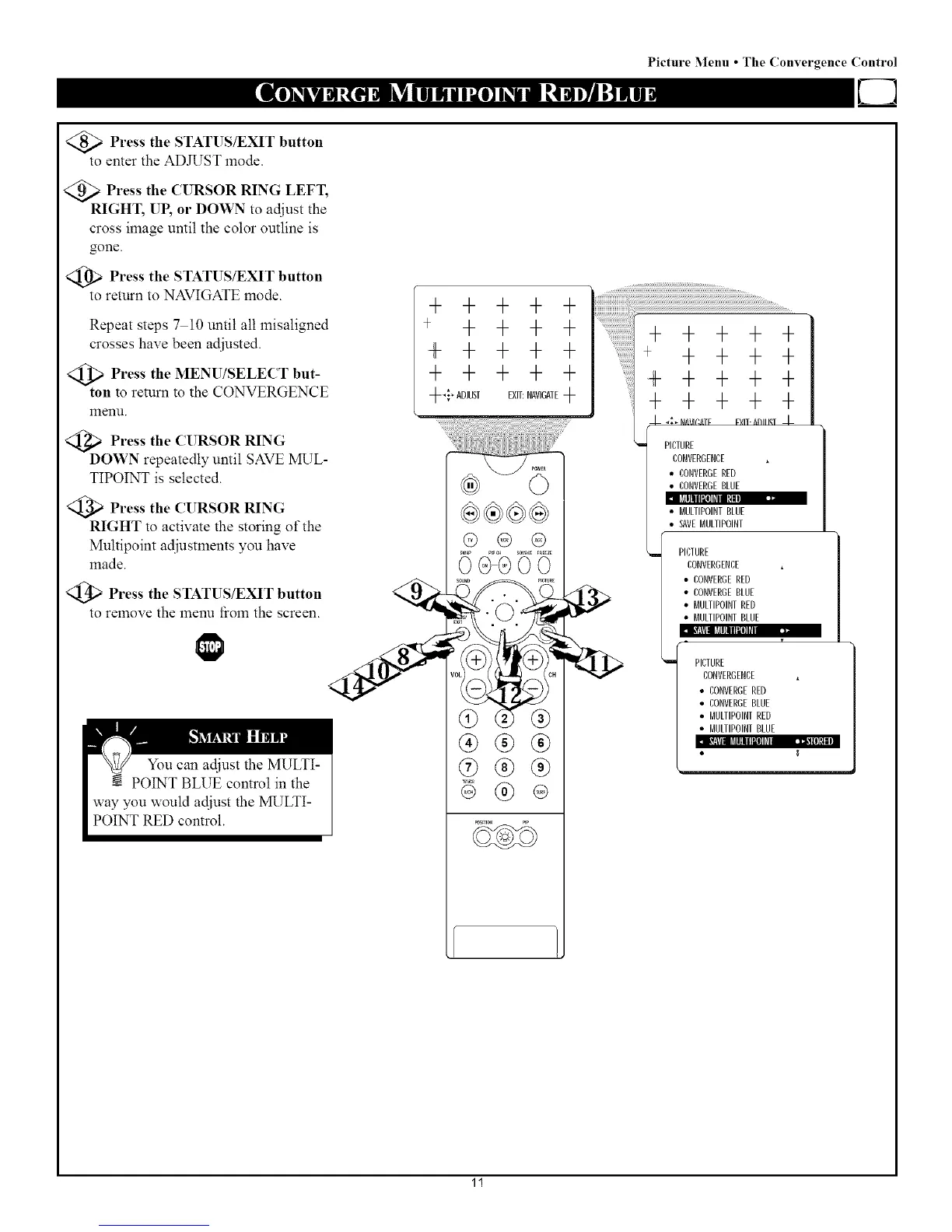
Press the STATUS/EXIT button
to enter the ADJUST mode.
Press the CURSOR RING LEFT,
RIGHT, UP, or DOWN to adjust the
cross image until the color outline is
gone.
<_ Press the STATUS/EXIT button
to return to NAVIGATE mode.
Repeat steps 7 10 until all misaligned
crosses have been adjusted.
Press the MENU/SELECT but-
ton to return to the CONVERGENCE
menu.
Press the CURSOR RING
DOWN repeatedly until SAVE 1VRYL-
TIPOINT is selected.
Press the CURSOR RING
RIGHT to activate the storing of the
Multipoint adjustments you have
made.
Press the STATUS/EXIT button
to remove the menu fioln the screen.
Picture :Menu • The Convergence Control
+ + + + +
+ + + + +
+ + + + +
+ + + + +
++ADJUSTEXIT:NAVIGATE+
I_J[lllII[I]l_llll!II.
®®®
@®®
® ®
ii ii ii i!i!ili`¸¸¸¸¸¸¸¸¸¸¸¸¸¸iiiiiiiiiiiiiiiiiiiiiiiiiiiiiiiiiiiiiiiiiiiiiiiiiiiiiiiiiiiiiiiiiiiiiiiiiiiiiiiiiiiiiiiiiiiiiiiiiiiii ii ii ii ii ii ii ii ii ii ii ii ii ii i i i i i i i i i
7 + 7 + 7
+ + + + +
+ + + + +
+ + + + +
_- _{% _IM/I(;fiTF F'_IT. ,_l/lllqT J,-
PICTURE
CONVERGENCE
• CONVERGERED
• CONVERGEBLUE
BULIIPOINT BLUE
SAVEMULIIPOINT
PICTURE
CONVERGENCE
• CONVERGERED
• CONVERGEBLUE
• MULTIPOINT RED
• MULTIPOINT BLUE
i
ij
PICTURE
CONVERGENCE
• CONVERGERED
• CONVERGEBLUE
• BULTIPOINT RED
• BULTIPOINT BLUE
11


 To Next Page
 Loading...







