Picture Menu • The Convergence Control
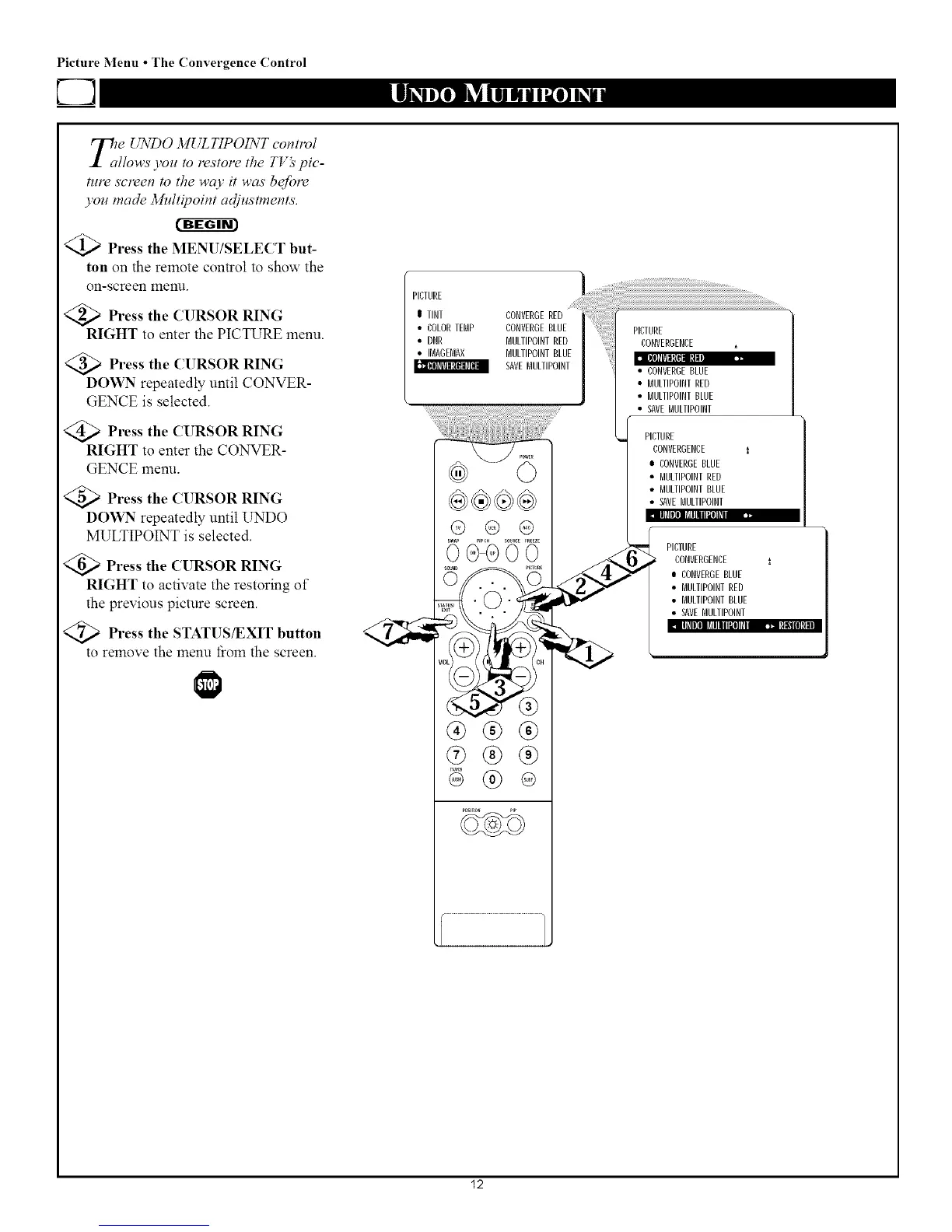
_1te UNDO MUL TIPOINT tlvl
Cfl_
flows you to restore the T_ spie-
rare screen to the wcO' it was beJore
you made 3/hdtipoint adjustments.
@Press the MENU/SELECT but-
ton on the remote control to show the
on-screen 1ylenu.
<_ Press the CURSOR RING
RIGHT to enter the PICTURE menu.
_ Press the CURSOR RING
DOWN repeatedly until CONVER-
GENCE is selected.
@Press the CURSOR RING
RIGHT to enter the CONVER-
GENCE menu.
Press the CURSOR RING
DOWN repeatedly until UNDO
MULTIPOINT is selected.
<_; Press the CURSOR RING
RIGHT to activate the restoring of
the previous picture screen.
<Q_ Press the STATUS/EXIT button
to remove the menu _om the screen.
PICTURE
• IlfllIl] _illlIIl_¿llOh
I TINT
• COLORTEBP
• DNR
• IBAGEBAX
.....il!!ilii ili;
@ @ @
0d_VV
®®®
@®®
®
• BULTIPOINTRED
• BULTIPOINTBLUE
• SAVEMULTIPOINT
PICTURE
CONVERGENCE i
o CONVERGEBLUE
• BULTIPOINTRED
• BULTIPOINTBLUE
• SAVEBULIIPOINT
l PICTURE
CONVERGENCE l
• CONVERGEBLUE
• MULTIPOINTRED
• MULTIPOINTBLUE
• SAVEMULIIPOINT
[llfllIl] I_illllll_l]l_iI _]_t_!111[tl
12



 To Next Page