FeaturesMenu• The Timer Control
W
yOsm" television comes with an on-
creen c/ock. During norma/ opera-
#o17,the clock appea1_ o17the screen
when the STATUfTEXIT button ispressed
or f the TIMER DISPLAY control is"
trowed()!'v_
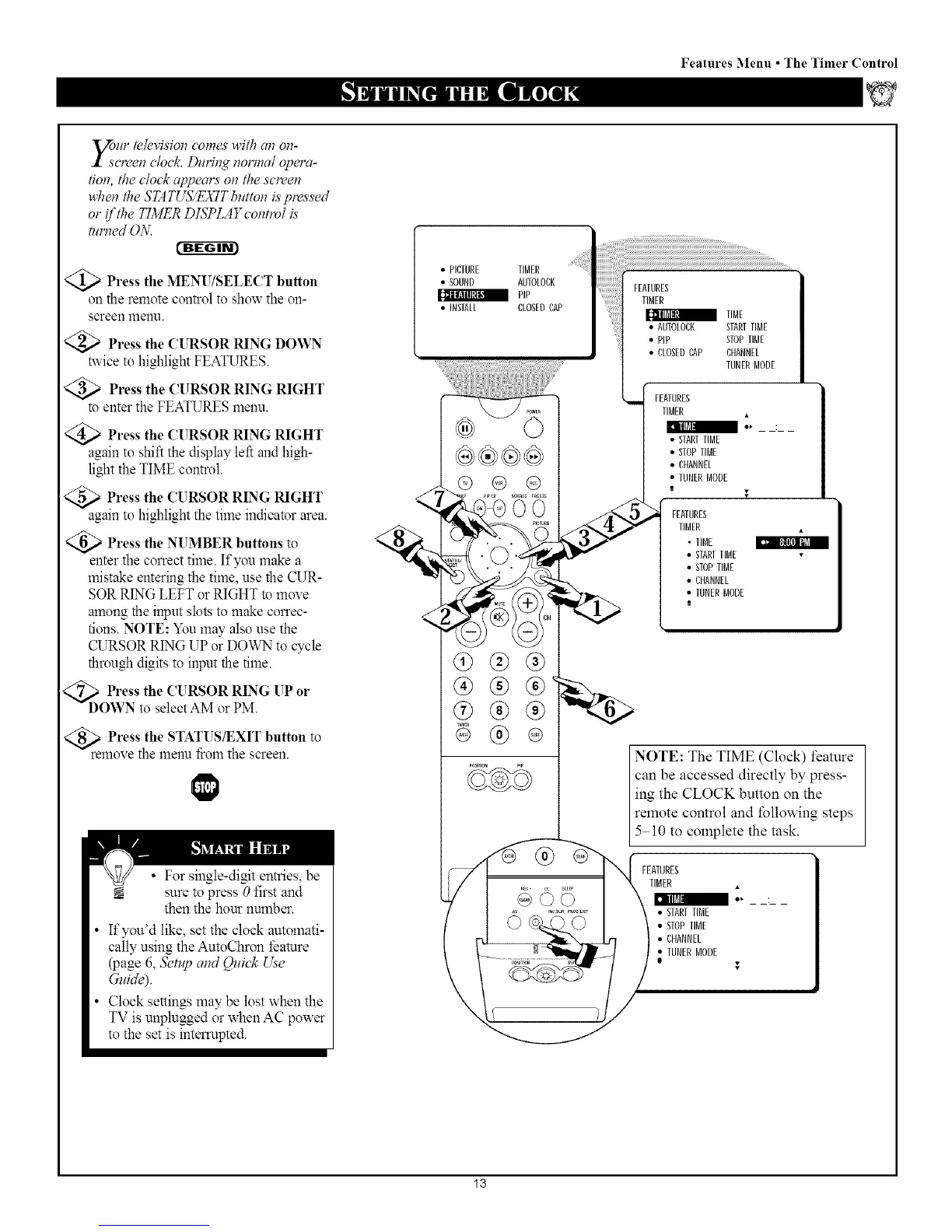
@)Press the MENU/SELECT button
on the remote control to show the on-
screen menu.
Press the CURSOR RING DOWN
twice to highlight FEATURES.
Press the CURSOR RING RIGHT
to enter the FEATURES menu.
Press the CURSOR RING RIGHT
again to shift the display left and high-
light the TIME control.
Press the CURSOR RING RIGHT
again to highlight the time indicator area.
Press the NUMBER buttons to
enter the correct time. If you make a
mistake entering the time, use the CUR-
SOR RING LEFT or RIGHT to move
among the input slots to make correc-
tions. NOTE: You may also use the
CURSOR RING UP or DOWN to cycle
through digits to input the time.
<_DOPress the CURSOR RING UP
or
WN to select AM or PM.
rePress the STATUS/EXIT button to
move the menu from the screen.
• For single-digit entries, be
sure to press 0 first and
then the hour nmnber.
• If you'd like, set the clock automati-
cally using the AutoChron/_ature
(page 6, 5'etl_ and Qui& Use
Guide).
• Clock settings may be lost when the
TV is unplugged or when AC power
to the set is interrupted.
• PICTURE TIMER
• SOUND AUTOLORK
PiP
• INSTALL CLOSEDCAP
®®@®
@ ® @
O0
q}@®
@ @
@
TUNERMODE
FEATURES
i
TIMER
• STARTTIME
• STOPTIME
• CHANNEL
• TUNERMODE
NOTE: The TIME (Clock) feature
can be accessed directly by press-
ing the CLOCK button on the
remote control and following steps
5 10 to complete the task.
FEATURES
TIMER
• STARTTIME
• STOPTIME
• CHANNEL
• TUNERMODE
13



 To Next Page