Features :Menu • The Timer Control
ou can set the TV to turn itse(f on
t a specific time, just as you
would an alm_m cIocl_ Follow these
steps to set the Start Time.
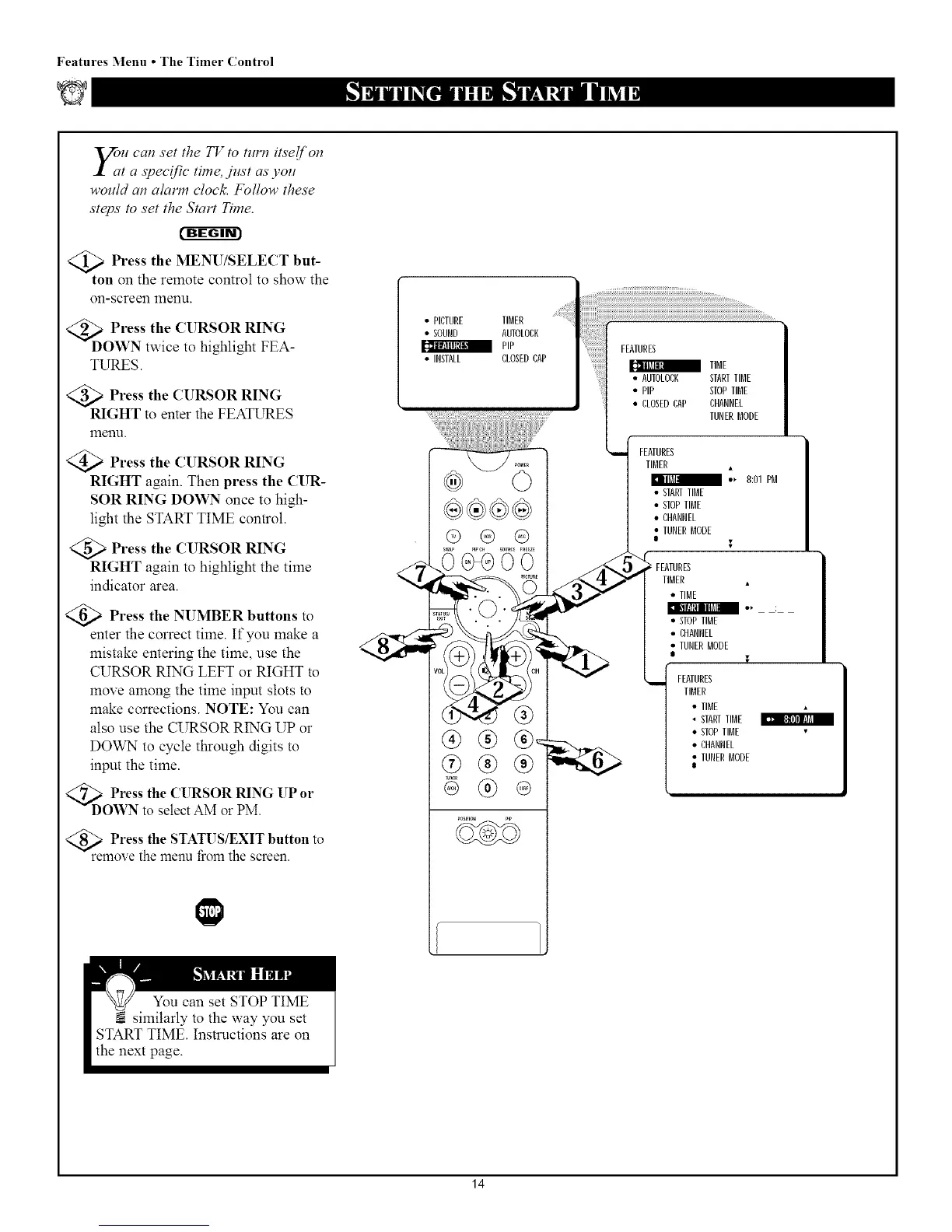
Press the MENU/SELECT but-
ton on the remote control to show the
on-screen menu.
<_D Press the CURSOR RING
OWN twice to highlight FEA-
TURES.
<_ Press the CURSOR RING
RIGHT to enter the FEATURES
menu.
Press the CURSOR RING
RIGHT again. Then press the CUR-
SOR RING DOWN once to high-
light the START TIME control.
Press the CURSOR RING
RIGHT again to highlight the time
indicator area.
Press the NUMBER buttons
to
enter the correct time. ffyou make a
mistake entering the time, use the
CURSOR RING LEFT or RIGHT to
move among the time input slots to
make corrections. NOTE: You can
also use the CURSOR RING UP or
DOWN to cycle through digits to
input the time.
<_ Press the CURSOR RING UP or
DOWN to select AM or PM.
Press the STATUS/EXIT button to
remove the menu from the screen.
I
• PICTURE TIMER
• SOUND AUTOLORK
_ PiP
• INSTALL CLOSEDCAP
@®®
®
!!i!i!ii!!!!!!!!!!!!!!!i!J!!i!i!i!!ilFEATURES
_ tiMe
AUTOLORK STARTTIME
_il;_ • PIp STOPTIME
• cLOSEDcAP cHANNEL
TUNERMODE
FEATURES
TIMER
• _ 8:01PM
• STARTTIME
• STOPTIME
• CHANNEL
• TUNERMODE
FEATURES
TIMER •
• TIME
•STOP TIME
• CHANNEL
• TUNER MODE
I
FEATURES
TIMER
• TIME
STARTTIME
• STOPTIME
• CHANNEL
• TUNER MODE
I
14



 To Next Page