Features :Menu • The Timer Control
'e the START TIME control to
'el the T_ to turn itselfon at a
specific lime (see the previous page).
TheJbllowing steps will guide you in
setting the TV to tmw itse!f o[L
t'-g-_grm
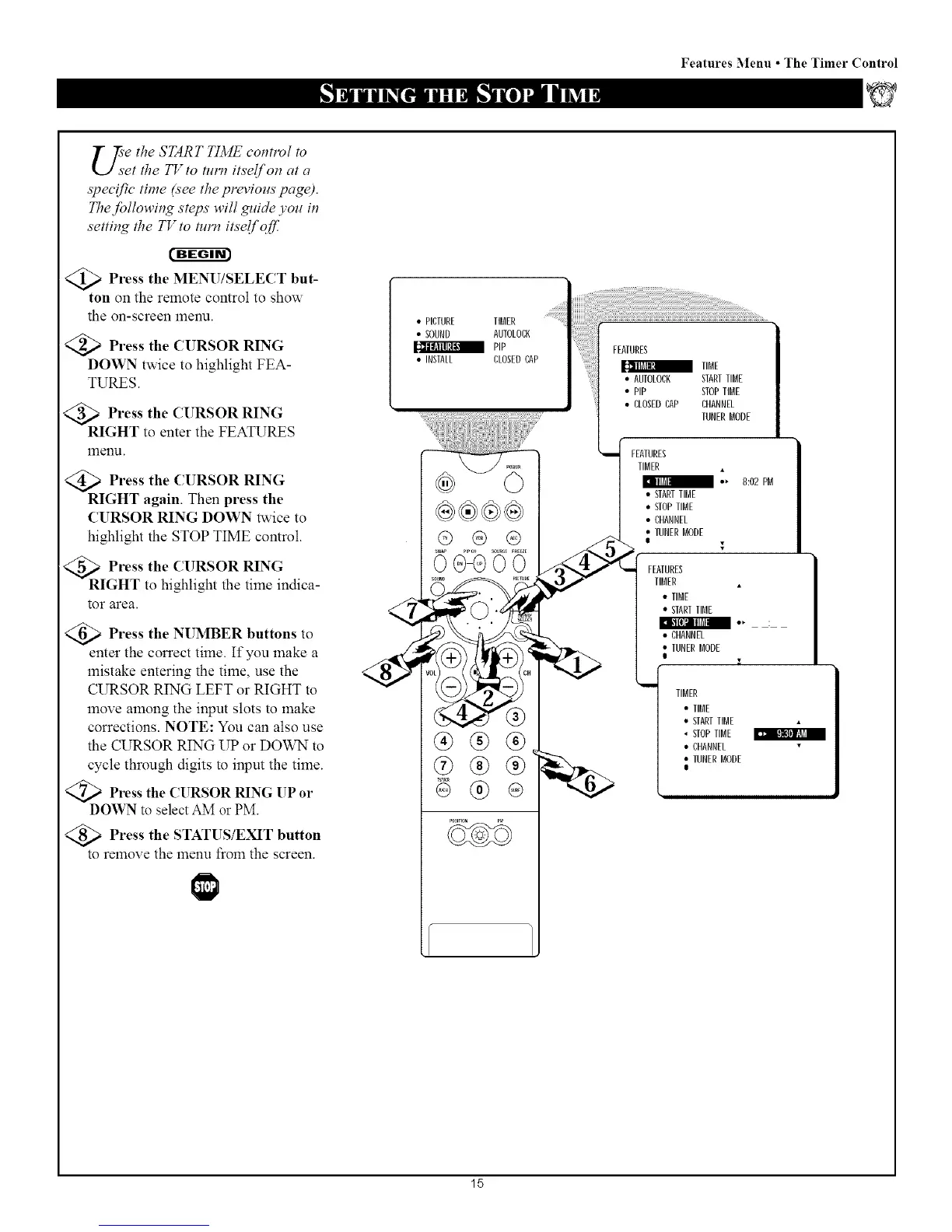
>Press the MENU/SELECT but-
ton on the remote control to show
the on-screen menu.
<_ Press the CURSOR RING
DOWN twice to highlight FEA-
TURES.
@>Press the CURSOR RING
RIGHT to enter the FEATURES
menu.
<_ Press the CURSOR RING
RIGHT again. Then press the
CURSOR RING DOWN twice to
highlight the STOP TIME control.
R Press the CURSOR RING
IGHT to highlight the time indica-
tor area.
Press the NUMBER buttons to
enter the correct time. If you make a
mistake entering the time, use the
CURSOR RING LEFT or RIGHT to
move among the input slots to make
corrections. NOTE: You can also use
the CURSOR RING UP or DOWN to
cycle through digits to input the time.
<_ Press the CURSOR RING UP or
DOWN to select AM or PM.
Press the STATUS/EXIT button
to remove the menu from the screen.
• PICTURE TIBER
• SOUND AUIOLOCK
PIP
• INSTAL[ CLOSEDCAP
00GO0
®®®
IIBE
• AUIOLOCK STARTTIRE
• PiP STOPIIBE
• CLOSEDCAP CHANNEL
TUNERBODE
FCAIURES
TIBER •
I -, 8:02 PB
• STARTTIME
• STOPTIRE
• CHANNEL
• TUNERBODE
I IIBER
] eIIRE
] CHANNEL "
L TUNERBODE .
TIBER
• TIBE
• STARTTIBE
_;a I!gtl] BB
• STOPTIBE
• CHANNEL
• IUNER BBDE
I
15


 To Next Page
 Loading...







