Features Menu • The AutoLock Control
yOpU also blockprograms by
Cal?7
ecific T_ ratings. Follow these
simple steps.
cg-ggr_
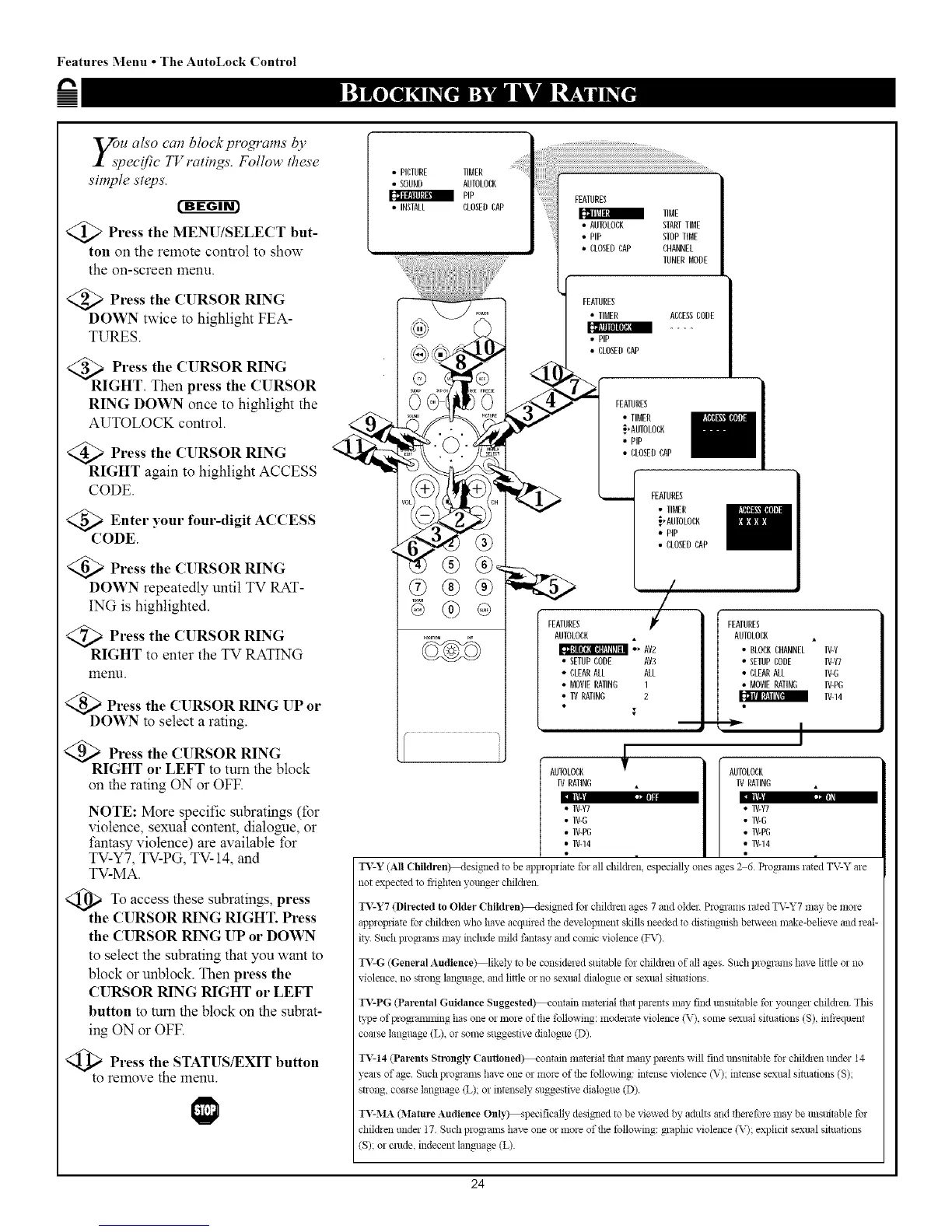
>Press the MENU/SELECT but-
ton on the remote control to show
the on-screen menu.
@>Press the CURSOR RING
DOWN twice to highlight FEA-
TURES.
Press the CURSOR RING
GHT. Then press the CURSOR
RING DOWN once to highlight the
AUTOLOCK control.
>Press the CURSOR RING
RIGHT again to highlight ACCESS
CODE.
@Enter your four-digit
ACCESS
CODE
)Press the CURSOR RING
DOWN repeatedly until TV RAT-
ING is highlighted.
<Q_ Press the CURSOR RING
RIGHT to enter the TV RATING
menu.
DOPress the CURSOR RING UP or
WN to select a rating.
Press the CURSOR RING
IGHT or LEFT to turn the block
on the rating ON or OFF.
I1!1 ,: ,,
NOTE: More specific subratings (for
violence, sexual content, dial%role, or
fantasy violence) are available for
TV-YT, TV-PG, TV-14, and
TV-MA.
_TO access subratings, press
these
the CURSOR RING RIGHT. Press
the CURSOR RING UP or DOWN
to select the subrating that you want to
block or unblock. Then press the
CURSOR RING RIGHT or LEFT
button to mm the block on the subrat-
ing ON or OFF.
Press the STATUS/EXIT button
to remove the menu.
• PICEURE TIMER
• SOUND AUIOLOCK
PIP
• INSEALL CLOSEDCAP
®®®
®
EUNER MODE
FEATURES
• TIMER ACCESSCODE
• PiP
• CLOSEDCAP
FEATURES I
• TIMER
._,AUTOLOCK
• PiP
• CLOSEDCAP
FEATURES
AUTOLOBK
•_ AV2
• SETUPCODE AV3
• CLEARALL ALL
• MOVIERATING 1
• IV RATIN(; 2
I
FEATURES
• TIMER
;.,ANEOLOCK
• PIP
• CLOSEDCAP
/ .
i
i
FEATURES
AUEOLOCK
• BLOCKCHANNEL IV-Y
• SEIUPCODE IV-g]
• CLEARAEL IV-(;
• MOVIERATING IV-P(;
IV-14
I
AUTOLOCK _ ] I AUTOLOCK
IV RATIND • IV RATING ,
• IV-V7
l[)J ': '_]l
• IV-Y7
• IV-(; • IV-(;
• IV-P(; • IV-PG
• IV-14 • IV-14
TV-Y (All Children_.lesigaled to be applopliate for all chil&en especially ones ages 26. Pro_ams lmed TV-Y are
not expected m fiighten younger children.
IV-Y7 (Directed to Older Children_.tesig_ed for children ages 7 and older. ProNams rated TV-Y7 may be more
appropriate for children who have acquired the development skills needed to distingaish between make-believe and ieal-
ily. Such plo_alns may indude mild fantasy and comic violence (FV).
TV-G (General Audience) likely to be considered suitable for children of all ages. Such ploNams have lit@ o1 no
violence, no strong language, and little or no sexual dialogue or sexual situations.
I_:PG (Parental Guidance Suggested_ontain material that parents ilmy find lmsuitable for younger children. This
B:pe ofprogaamn_ing has one oi more of the following: moderate violence (V), some sexual situations (S), infrequent
coarse language (L), or some suggestive dialogue (D).
IV-14 (Parents Strongly Cautioned_ontam I_mtelial that maW parents will find lmsaitable for children lmdel 14
years of age. Such programs have one or more of the following: intense violence (V); intense sexual sittlations (S);
strong, coarse language (L); or intelisely suggestive dialogue (D).
TV-MA (Mature Audience Onl)%-specifically desim_ed to be viewed by adults and therefore may be tmsaitable for
clfil&eli raider 17. Such plx_gaams have one or more of the following: _aphic violence (V); explicit sexual situations
(S); or crude, indecent language (L).
24


 To Next Page
 Loading...








