FeaturesMenu*TheAutoLockControl
t_
lheBLO(7_NG control can be
ought of as the "master switch"
Jor AutoLock. Use it to turn on or off
all of the settings you have chosen to
block programming.
t-g-cgr_
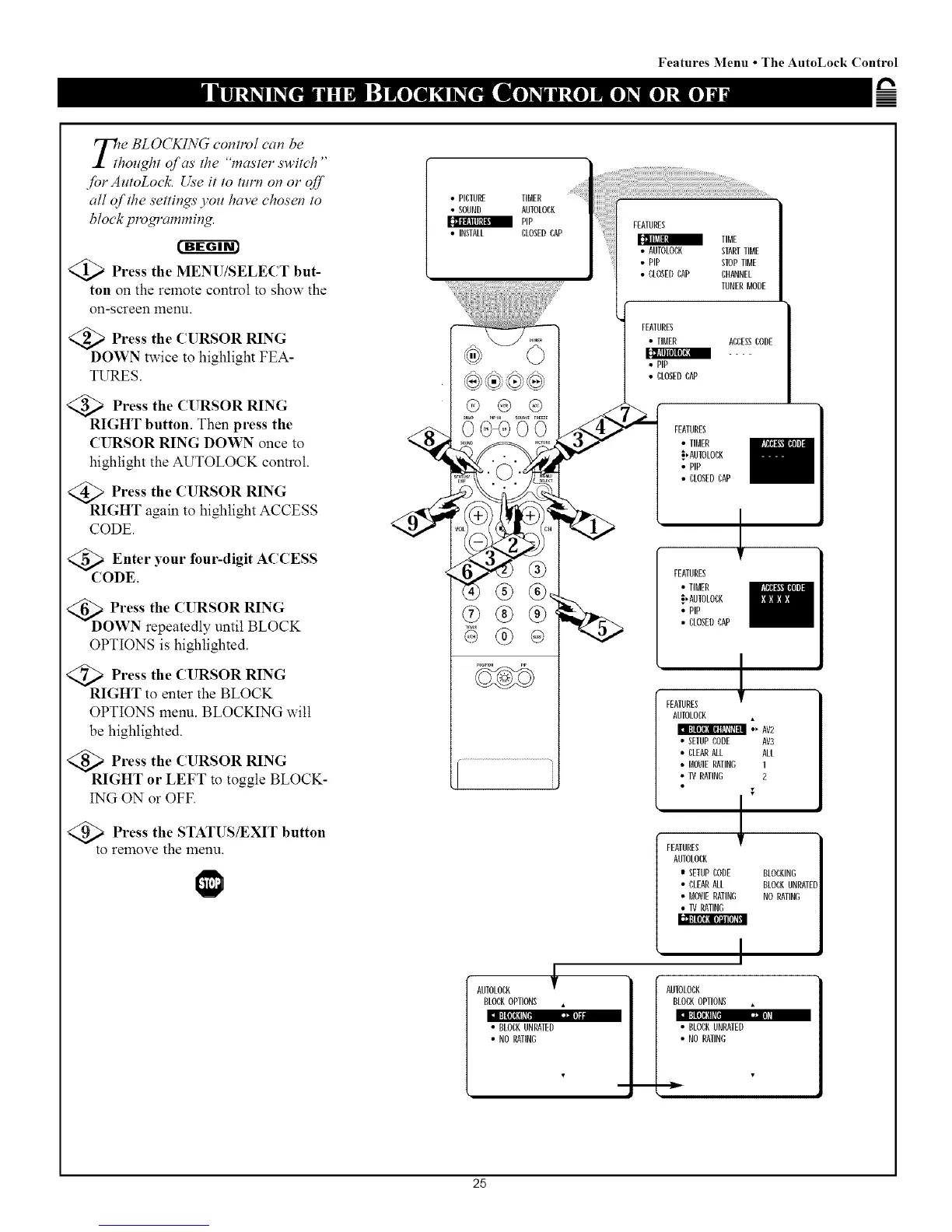
@>Press the MENU/SELECT but-
ton on the remote control to show the
on-screen menu.
:a Press the CURSOR RING
DOWN twice to highlight FEA-
TURES.
Press the (l RSOR RING
RIGHT button. Then press the
CURSOR RING DOWN once to
highlight the AUTOLOCK control.
>Press the CURSOR RING
RIGHT again to highlight ACCESS
CODE.
<_ Enter your four-digit
ACCESS
CODE
@D O_7 rteh_a(t_eUdIRSOtiRlRILN;%K
OPTIONS is highlighted.
<Q_ Press the CURSOR RING
RIGHT to enter the BLOCK
OPTIONS menu. BLOCKING will
be highlighted.
@Press the CURSOR RING
RIGHT or LEFT to toggle BLOCK-
ING ON or OFF.
Press the STATUS/EXIT button
to remove the menu.
• PIDEURE TIMER
• SOUND AUIOLODK
PIP
• INSTALL CLOSEDCAP
"+6". _I
• CLOSEDCAP CHANNEL
TUNERMODE
FEAIURES
• ELMER ACCESSLODE
[C_AII [11[lI


 To Next Page