Features Menu • The AutoLock Control
Zg addition to blocking rated pro-
rams o1"cham_eIs, you m@,also
choose to block all plvgramming that
is unrated.
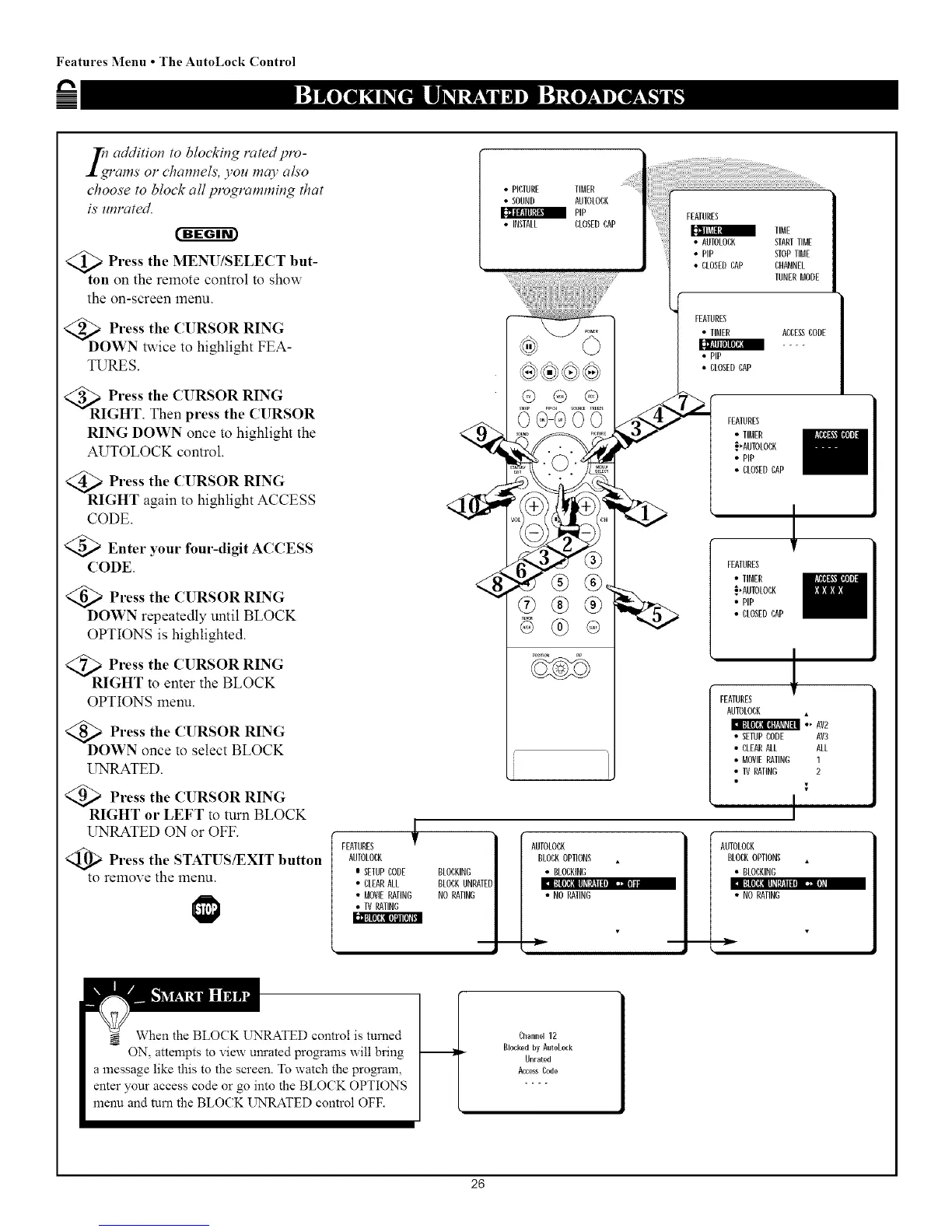
@>Press the MENU/SELECT but-
ton on the remote control to show
the on-screen menu.
<_DoPress the CURSOR RING
WN twice to highlight FEA-
TURES.
<_ Press the CURSOR RING
RIGHT. Then press the CURSOR
RING DOWN once to highlight the
AUTOLOCK control.
<_ Press the CURSOR RING
RIGHT again to highlight ACCESS
CODE.
<_ Enter your four-digit ACCESS
CODE
<_ Press the CURSOR RING
DOWN repeatedly until BLOCK
OPTIONS is highlighted.
<_R Press the CURSOR RING
IGHT to enter the BLOCK
OPTIONS menu.
<_ Press the CURSOR RING
DOWN once to select BLOCK
UNRATED.
>Press the CURSOR RING
RIGHT or LEFT to turn BLOCK
UNRATED ON or OFF.
Press the STATUS/EXIT button
to remove the menu.
FEATURES _'
AUIOLOCA
0 SETUPLODE BLOCKING
• CLEARALL BLOCKUNRATE
• MOVIERATING NO RATING
• TV RATING
• PICTURE TIMER
• SOUND AUDLOBK
PiP
• INSTALL CLOSEDCAP
• CLOSEDLAP
FEATURES
• TIMER
• PIp
• CLOSEDLAP
LHANNEL
TUNERMODE
ABLE_ CODE
FEATURES
• TIMER
_'AUTOLOCK
• PIP
• CLOSEDLAP
,l
FEATURES
• TIMER
_,AUTOLOCA
• PiP
• CLOSEDLAP
FEATURES
AUTOLOCK
•_ AV2
• SETUPCODE AV3
• CLEARALL ALL
• MOVIERATING 1
• 11/ RATING 2
I
AUTOLOCA
BLOCKOPTIONS
• BLOLKIND
I:][lI_[llll_[_:ulu _JJ IF
• NO RATING
AUTOLOCA
BLOCAOPTIONS
• BLOCKING
Inl it[lI_',lllOl_ll! IIIII1:_11:,
• NO RATING
When the BLOCK UNRATED comrol is turned
-- ON, attempts to view unrated programs will bring
a message like this to the screen. To watch the program,
enter your access code or go into the BLOCK OPTIONS
menu and turn the BLOCK UNRATED control OFF.
Channel12
Blocked byAutoLock
Unrated
AccessLode
26



 To Next Page