FeaturesMenu• The AutoLock Control
i
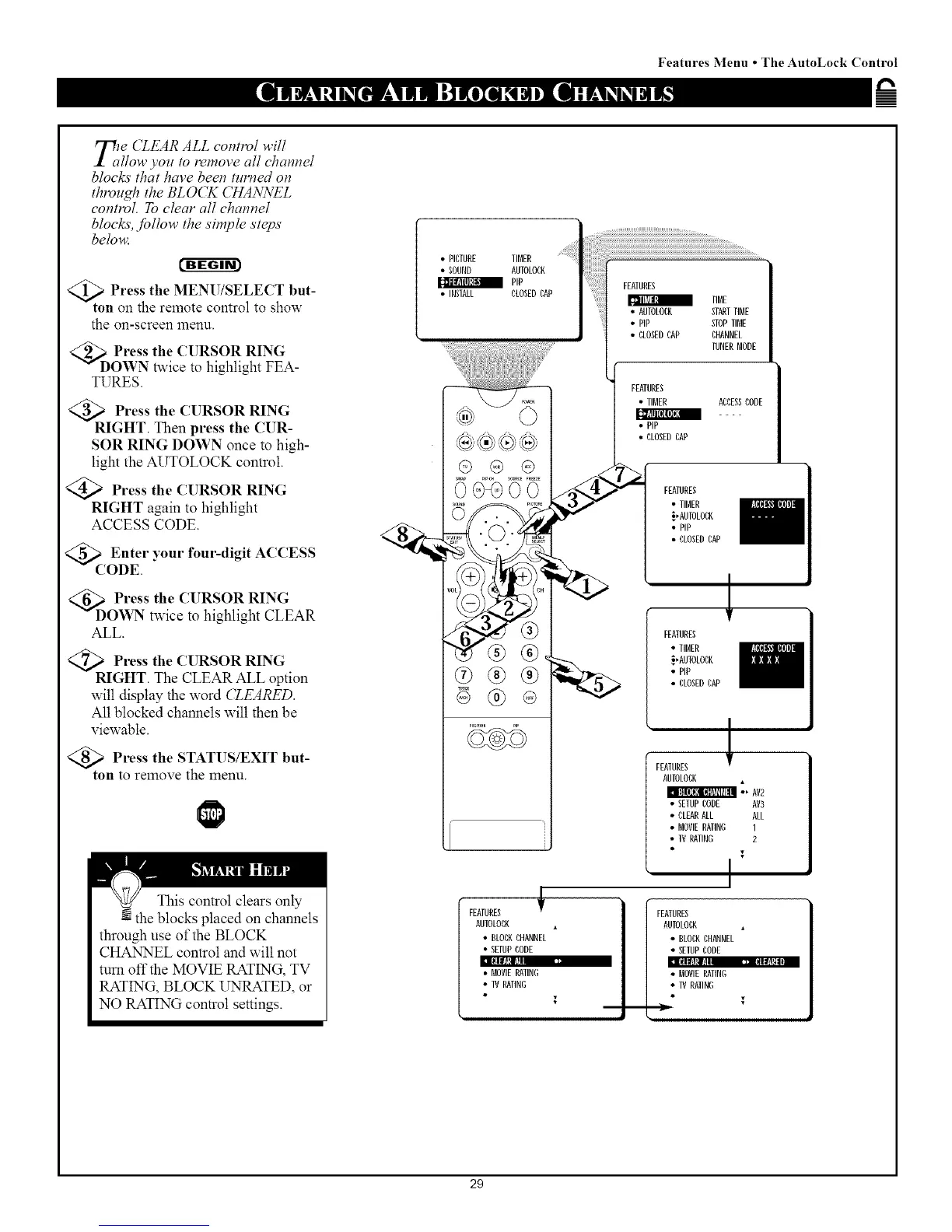
le (ZEAR ALL conttvl will
llow you to remove all channel
blocks that have been turned on
thro,gh the BLOCK CHANNEL
control. To clear all channel
blocks, Jbllow the simple steps
below.
t'-ag-6r_
<Q_ Press the MENU/SELE(T but-
ton on the remote control to show
the on-screen menu.
Press the (l RSOR RING
Y DOWN twice to highlight FEA-
TURES.
_R Press the CURSOR RING
IGHT. Then press the CUR-
SOR RING DOWN once to high-
light the AUTOLOCK control.
Press the CURSOR RING
RIGHT again to highlight
ACCESS CODE.
<_( Enter your four-digit
ACCESS
?ODE.
<_D Press the CURSOR RING
OWN twice to highlight CLEAR
ALL.
Press the CURSOR RING
GHT. The CLEAR ALL option
will display the word (ZEARED.
All blocked channels wilt then be
viewable.
Press the STATUS/EXIT but-
ton to remove the menu.
This control clears only
N the blocks placed on channels
through use of the BLOCK
CHANNEL control and will not
turn off the MOVIE RATING, TV
RATING, BLOCK UNRATED, or
NO RATING control settings.
• PICTURE IIMEff
• SOUND AUIOLOCK
PIP
• INSEALL CLOSEDCAP
plC,Um
®®®
FEATURES
FEATURES
• AUEOLOBK STARTTIME
PIP STOPTIME
• CLOSEDCAP CHANNEL
TUNERNODE
FEATURES
• IINEff ACCESSCODE
[_i_ll LI]l[lI_:|
• PiP
• CLOSEDCAP
_ FEATURES
• IINEff
_,ANEOLOBK
• PiP
• CLOSEDCAP
--
FEAEUffES
• TIMEff
_,ANTOLOCK
• PIP
• CLOSEDCAP
,L
FEAEURES
AUEOLOBK
• _ AV2
• SEEUPCODE AV3
• CLEANALL ALL
• MOVIERATING 1
• IV RATING 2
I
AUTOLOCK
• BLOCKCHANNEL
• SETUPCODE
r
• NOVIERATING
• 1v RATING
i
i
FRAEUffES
AUEOLOBK
• BLOCKCHANNEL
• SEIUPCODE
• MOVIERAIING
• IV RAIIND
29



 To Next Page