Sound Menu • AVL (Audio Volume Leveler)
ou mcO, have noticed the peaks
nd valleys of sound that occur
between ptvgram changes or at com-
mercial breaks. The volume levels
often val T considerably. By turning
ON the A_Z (Audio Voh_me Levele19
control, you can make your TVpro-
duce a more consistent voh_me level.
Follow these steps to turn the A_Z
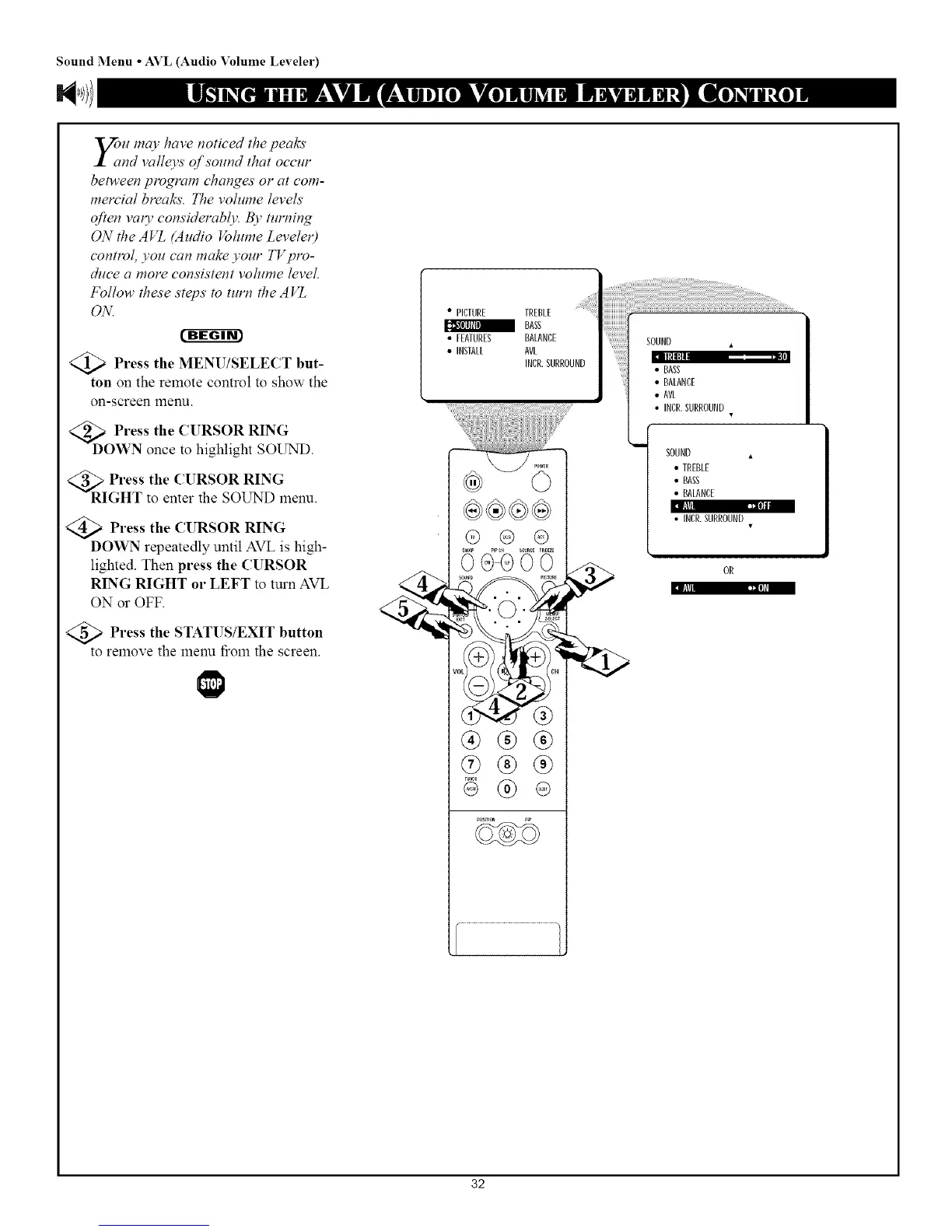
Press the MENU/SELECT but-
ton on the remote control to show the
on-screen menu.
<_E oPress the CURSOR RING
WN once to highlight SOUND.
Press the CURSOR RING
GHT to enter the SOUND menu.
Press the CURSOR RING
DOWN repeatedly until AVL is high-
lighted. Then press the CURSOR
RING RIGHT or LEFT to turn AVL
ON or OFF.
PAtti r"P'J+o]aa
IATAI tllo];I
<_ Press the STATUSIEXIT button
to remove the menu *_romthe screen.
• PICTURE TREBLE
BASS
• FEATURES BALANCE
• INSTALL AVI
INCR.SURROUND
@ @ @
@@00
sound m_u
_Er m
®®®
®®®
® ®
•INCR. SURROUND
i
SOUND •
• TREBLE
• BASS
• BALANCE
• INCR.SURROUND
OR
32



 To Next Page