Sound Menu • Incredible Surround
e Incredible Sm_l_oundJbature
ill boost the T_ s sound by mak-
ing it broader andJhllet_ Set the
INCREDIBLE SURROUND control to
INCLUDIBLE SURROUND to
enhance stereo ptvgrams. Or set the
IN('REDIBLE SURROUND control to
SPATIAL to give a "surround" effect
to mono ptvgrams.
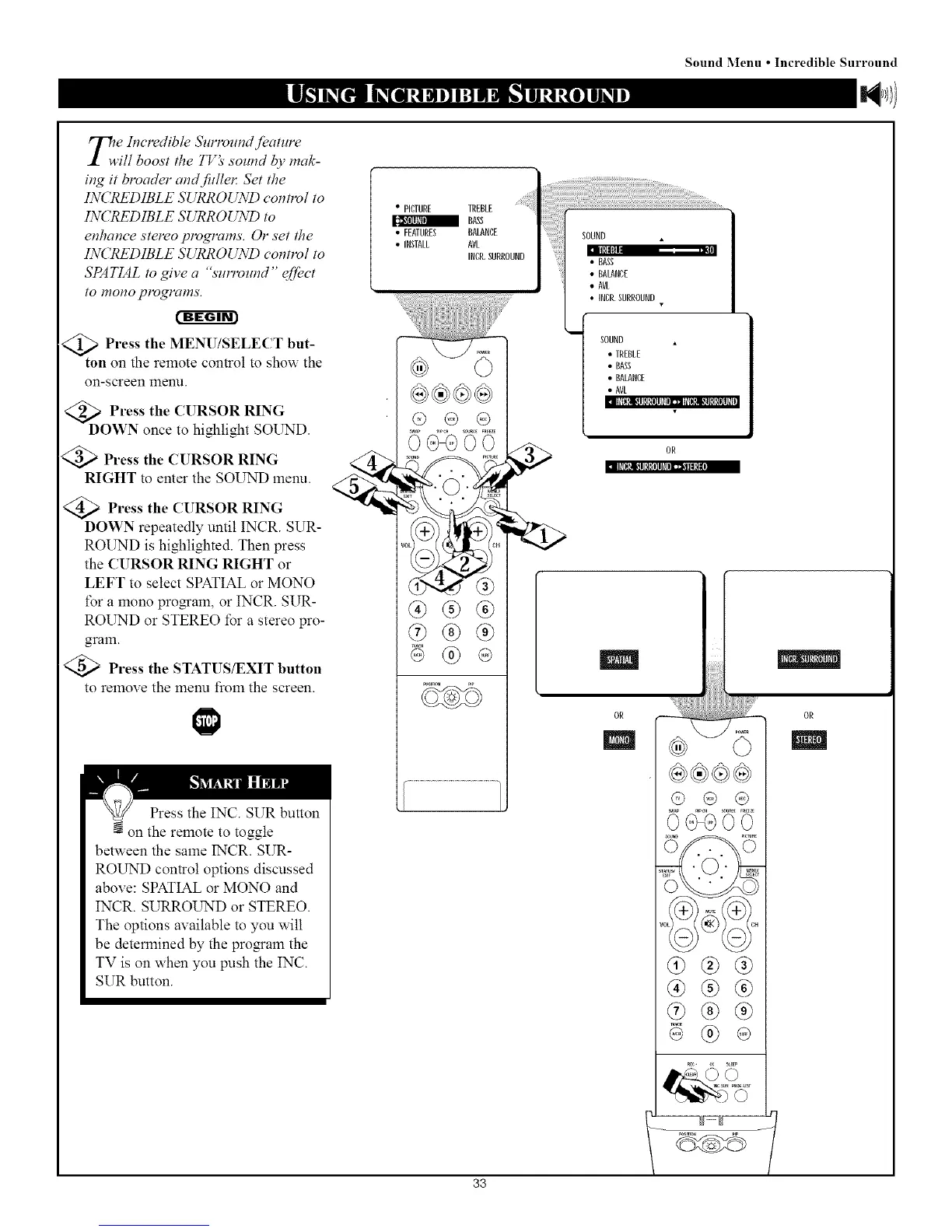
Press the MENU/SELECT but-
<i>
ton on the remote control to shou Tthe
on-screen menu.
<_ oPress the CURSOR RING
WN once to highlight SOUND.
Press the CURSOR RING
RIGHT to enter the SOUND menu.
<_ Press the CURSOR RING
DOWN repeatedly until INCR. SUR-
ROUND is highlighted. Then press
the CURSOR RING RIGHT or
LEFT to select SPATIAL or MONO
for a mono program, or INCR. SUR-
ROUND or STEREO for a stereo pro-
gram.
Press the STATUS/EXIT button
to remove the menu froln the screen.
Press the INC. SUR button
N on the remote to toggle
between the same INCR. SUR-
ROUND control options discussed
above: SPATIAL or MONO and
INCR. SURROUND or STEREO.
The options available to you will
be determined by the pro_am the
TV is on when you push the INC.
SUR button.
• PICTURE TREBLE
BASS
• FEATURES BALANCE
• INSTALL AVL
INCR.SURROUND
s_AP _i_ _R_E F_EZE
0G000
_ND P_,UF
®®(6)
(b®®
@
33
......
SOUND
• =qI
• BASS
• BALANCE
• AVL
•INCR. SURROUND
SOUND •
• EREBLE
• BASS
• BALANCE
• AVL
OR
|
OR
m
0@GO0
@®®
(a)@@
® (_) (9)
®
0B



 To Next Page