Sound Menu • The Audio Out Control
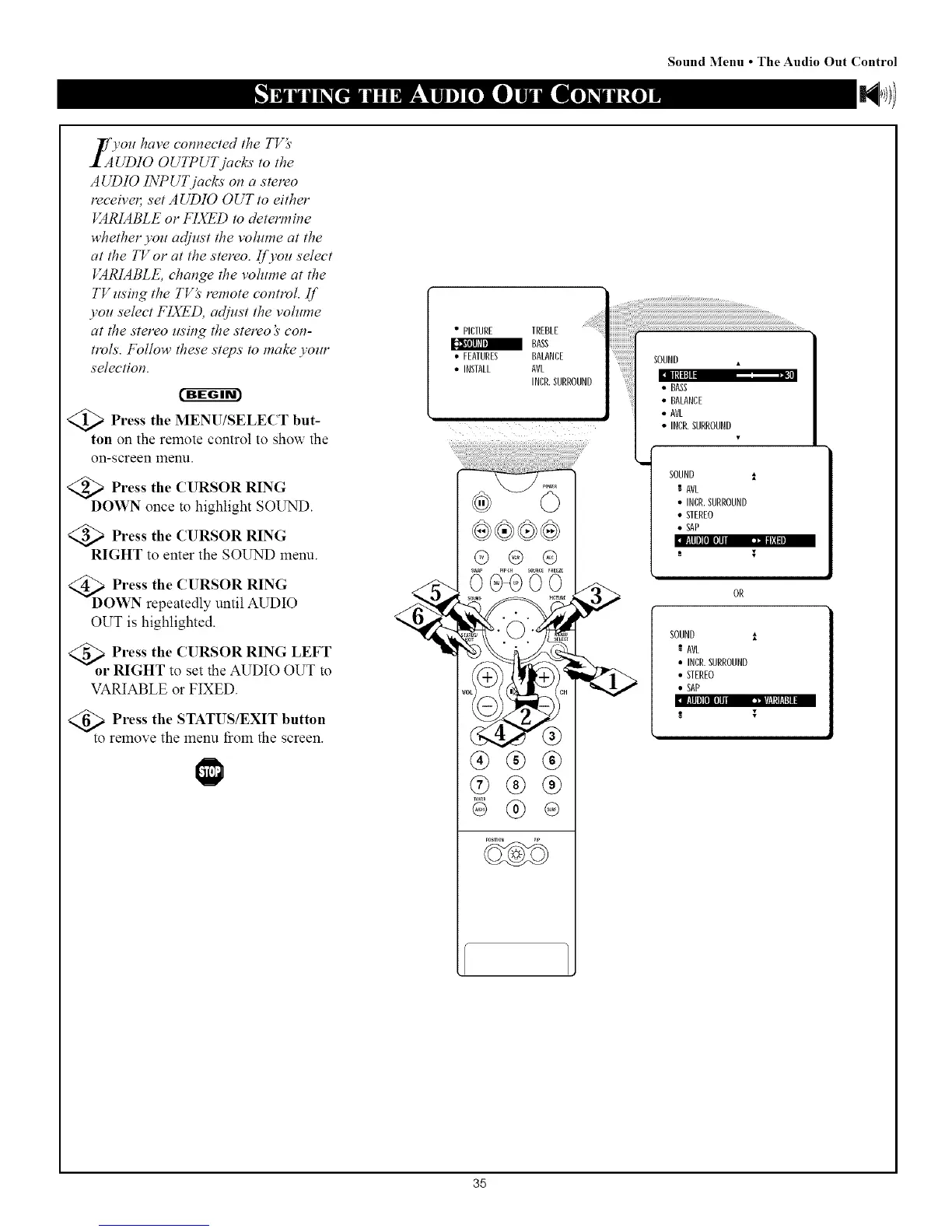
_f vou have connected the TVg'
I_A_UDIO OUTPUT jacks to the
AUDIO INPUT jacks on a stereo
receive4 set AUDIO OUT to either
VARIABLE or FIXED to determine
whether you adjust the volume at the
at the TV or at the stereo. If you select
VARIABLE, change the voh¢me at the
TV using the TV_' remote control. Ill'
you select FIXED, adjust the volume
at the stereo using the stereo _' con-
trols. Follow these steps to make your
selection.
<_ Press the MENU/SELECT but-
ton on the remote control to show the
on-screen menu.
<_ Press the CURSOR RING
DOWN once to highlight SOUND.
<_a Press the CURSOR RING
RIGHT to enter the SOUND menu.
FRIIJli0IIZ7 ,=,i_]_
<_D O]_ %:hp:a(t;eU1tSlOatit RIuNDI%
OUT is highlighted.
Press the CURSOR RING LEFT
•RIGHT to set the AUDIO OUT to
VARIABLE or FIXED.
fllllll[I][I]li _]q!l_lfil_,
<_o Press the STATUS/EXIT button
t remove the menu _iOln the screen.
• PICTURE TREBLE
_a BASS
• FEATURES BALANCE
• INSTALL AVL
INCR.SURROUND
®®®
®
ii{_}iiii!!i!ii _!_I_!!I!_I_!!I!_I_!!I!_I_!!I!_I_!!I!_I_!!I!_I_!!I!_I_!!I!_I_!!I!_I_!!I!_I_!!I!_I_!!I!_I_!!I!_I_!!I!_I_!!I!_I_!!I!_I_!!I!_I_!!I!_I_I_!!I!)_!!_>
SOUN_
[] II, ! ,m"
• BASS
• BALANCE
HI! !
• AVL
•INCR.SURROUNB
SOUND l
AVL
•INCR. SURROUND
• STEREO
• SAP
-" T
OR
SOUND i
AVI
•INCR. SURROUND
• STEREO
• SAP
35



 To Next Page