Sound Menu • The TV Speaker Control and Audio Outputs
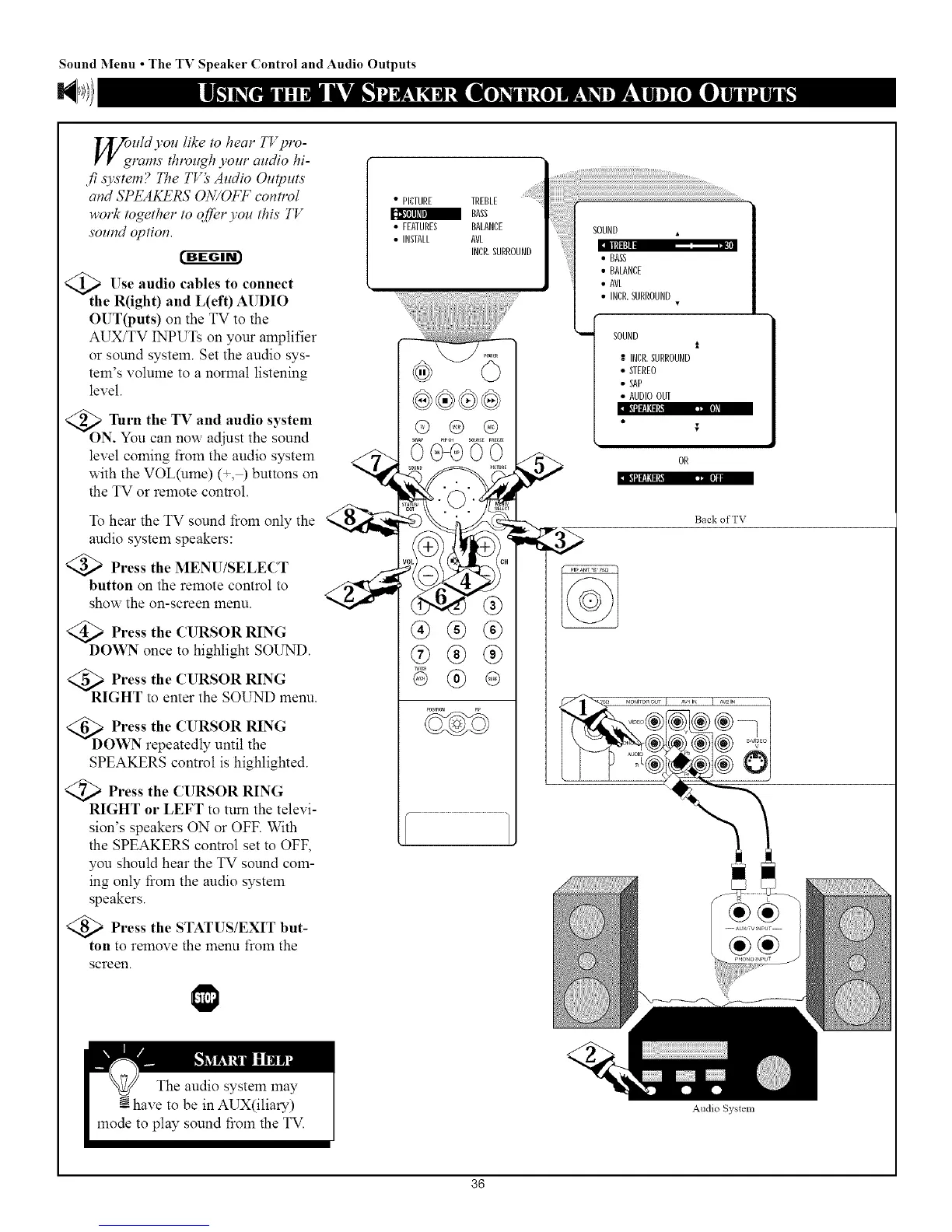
oquld you like to hear TVpro-
rams throz_@ your audio hi-
fi s3,s.tem? The TV_' Audio Outputs
and SPEAKERS ON/OFF control
work together to offer you this TV
sound option.
t'g-ggr_
Use audio cables to connect
the R(ight) and L(ef 0 AUDIO
OUT(puts) on the TV to the
AUX/TV INPUTs on your amplifier
or sound system. Set the audio sys-
tem's volume to a normal listening
level.
<_ Turn the TV and audio
system
ON. You can now adjust the sound
level coming from the audio system
with the VOL(ume) (+,½ buttons on
the TV or remote control.
To hear the TV sound fiom only the
audio system speakers:
Press the MENU/SELECT
button on the remote control to
show the on-screen menu.
Press the CURSOR RING
DOWN once to highlight SOUND.
<_RI Press the CURSOR RING
GHT to enter the SOUND menu.
<_D Press the CURSOR RING
OWN repeatedly until the
SPEAKERS control is highlighted.
)Press the CURSOR RING
RIGHT or LEFT to turn the televi-
sion's speakers ON or OFF. With
the SPEAKERS control set to OFF,
you should hear the TV sound com-
ing only ffoln the audio system
speakers.
)Press the STATUS/EXIT but-
ton to remove the menu froln the
screen.
• PICTURE TREBLE
BASS
• FEATURES BALANCE
• INSTALL AVL
INCR.SURROUND
®®®
®
SOUND
II[tlltl nm
• BASS
• BALANCE
• AVL
• INCR.SURROUND
i SOUND
INCR.SURROUND
• STEREO
• SAP
• AUDIOOUT
Back of TV
Audio System
36



 To Next Page