Remote Control • Surf, Alternate Channel, and Program List
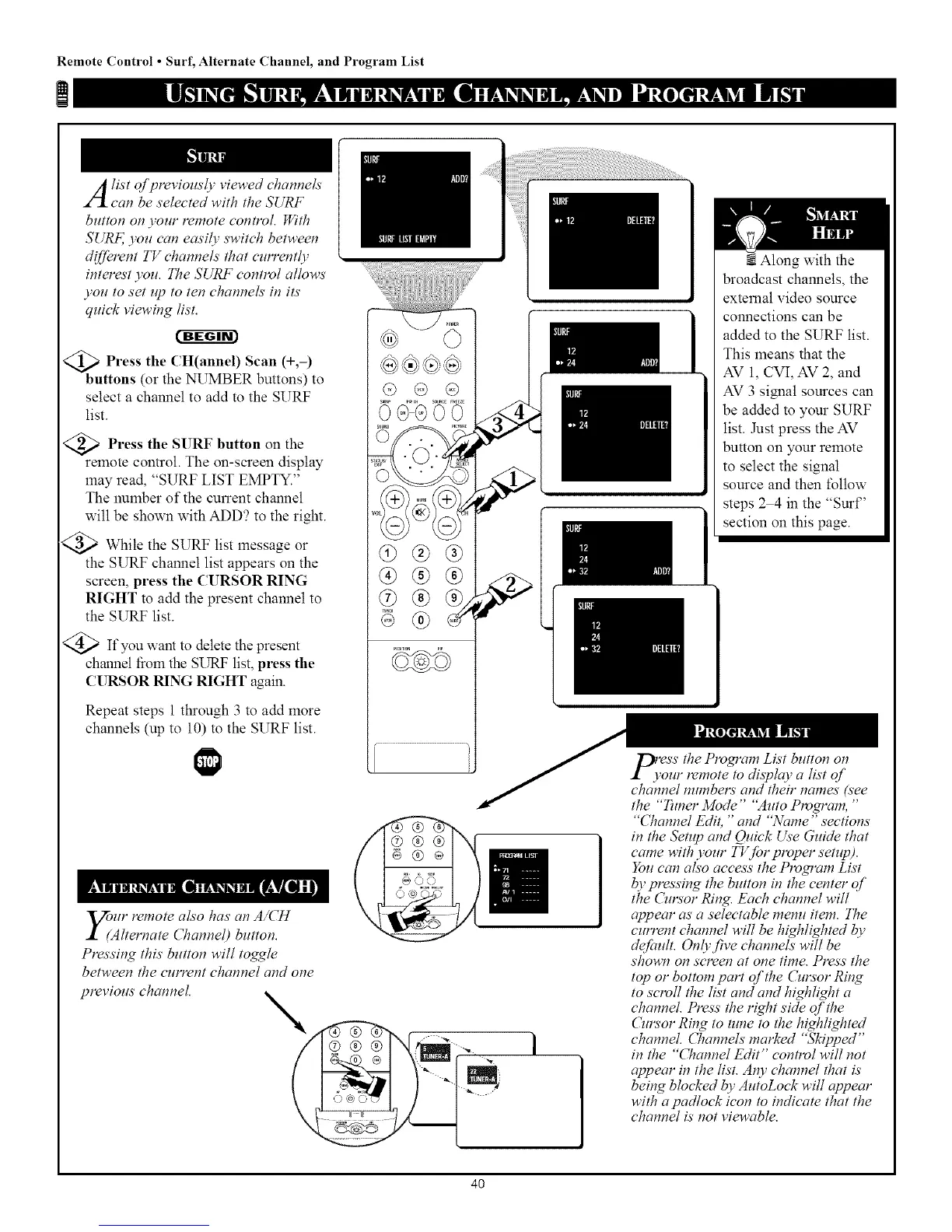
A ist of previously viewed channels
can be selected with the SURF
button on your remote control. With
SURE you can ectsily switch between
diJ]erent TV channels' that currently
interest you. The SURF control allows'
you to set up to ten channels' in its'
quick viewing list.
<_b Press CH(annel) (%-)
the Scan
uttons (or the NUMBER buttons) to
select a channel to add to the SURF
list.
<_ Press the SURF button the
on
remote control. The on-screen display
may read, "SURF LIST EMPTY."
The number of the current channel
will be shown with ADD? to the right.
<_ While the SURF list message or
the SURF channel list appears on the
screen, press the CURSOR RING
RIGHT to add the present channel to
the SURF list.
<_ If you want to delete the present
channel fiom the SURF list, press the
CURSOR RING RIGHT again.
Repeat steps 1 through 3 to add more
channels (up to 10) to the SURF list.
,Vour remote also has' an A/CH
I (Alternate Channel) button.
Pressing this' button will toggle
between the current channel and one
previous channel.
_ _I_,H SOUR,EfREEZE
OGCDO0
®®®
1
Along with the
broadcast channels, the
external video source
connections can be
added to the SURF list.
This means that the
AV 1, CVI, AV 2, and
AV 3 signal sources can
be added to your SURF
list. Just press the AV
button on your remote
to select the signal
source and then follow
steps 2 4 in the "Surf'
section on this page.
\
l(ess the Program List button on
'our remote to display a list of
channel numbers and their names' (see
the "Tuner Mode" "Auto Plvgram, "
"671annel Edit, "and "Name" sections
in the Setup and Quick Use Guide that
came with your TVJbr proper setzq)).
You can also access the Plvgram List
bv press#)g the button in the center of
the ()¢rsor Ring. Each channel will
appear as a selectable menu item. The
current channel will be highlighted by
defimIt. Only five channels' will be
shown on screen at one time. Press the
top or bottom part of the Cursor Ring
to scroll the list and and highlight a
channel. Press the right side of the
Oa_sor Ring to tune to the highlighted
channel. Channels marked "5_ipped"
in the "Channel Edit" control will not
appear in the list. Al_v channel that is'
being blocked by AutoLock will appear
with a padlock icon to indicate that the
channel is' not viewable.
4O



 To Next Page