RemoteControl•The Sleep Timer Control
__jive you ever (_llen asleep in
_ont of the T_, only to be awak-
ened in the middle of the night by the
screeching sound that accompanies
the on-screen test pattern of a station
that _' signed off? Your TV can enable
you m avoid that discomfort by auto-
maticaIly turning itself off You choose
the amount of time before the set turns
of€
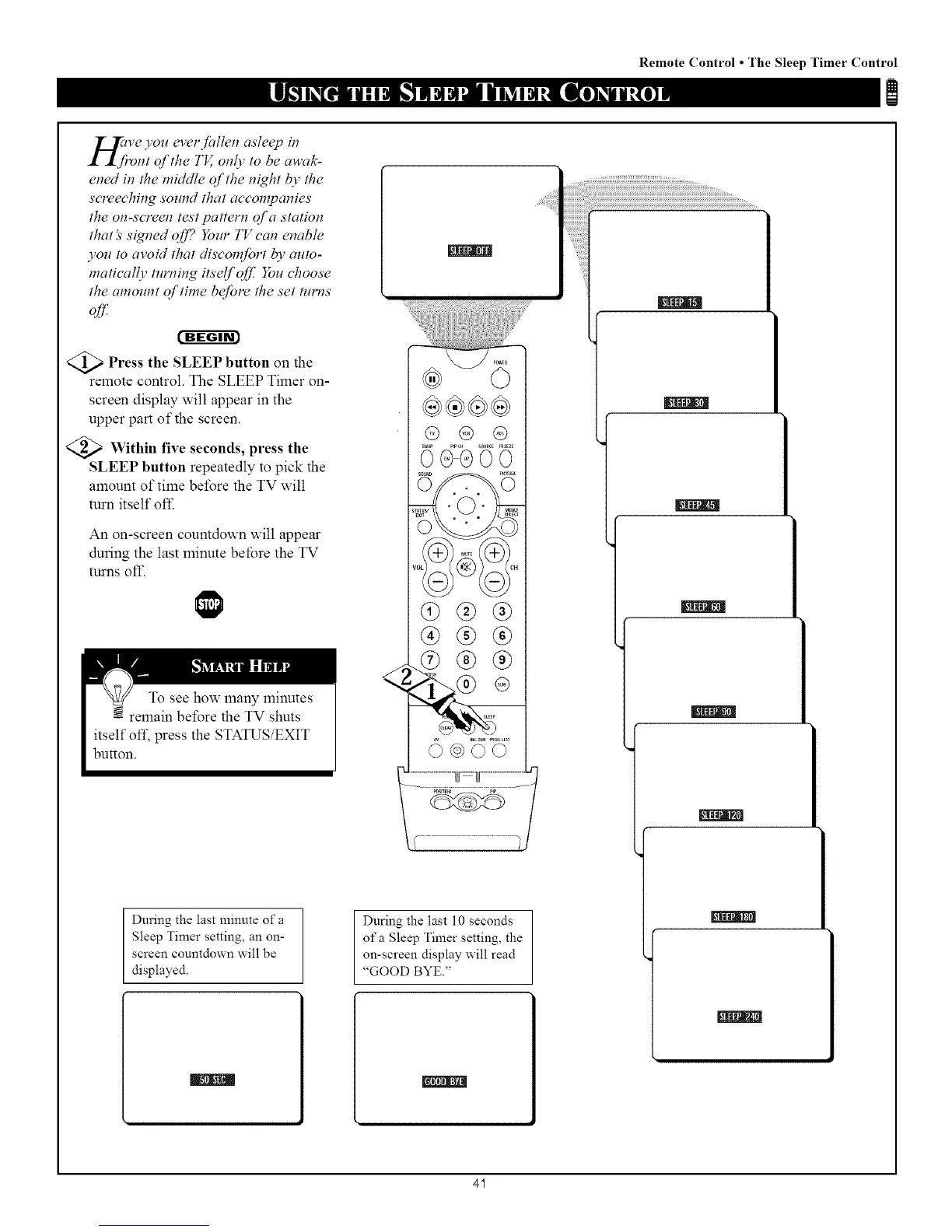
>Press the SLEEP button the
on
remote control. The SLEEP Timer on-
screen display will appear in the
upper part of the screen.
<_ Within seconds, press
five the
SLEEP button repeatedly to pick the
amount of time before the TV will
turn itself ofl_
An on-screen countdown will appear
during the last minute before the TV
turns oft'.
During the last minute of a
Sleep Timer setting, an on-
screen countdown will be
displayed.
@ @ @
@®®
®®®
During the last 10 seconds
of a Sleep Timer setting, the
on-screen display will read
"GOOD BYE."
NNNI
41



 To Next Page