Picture-in-Picture (PIP) • The Color and Tint Controls
e Picture-in-Picture (PIP)
OLOR and TINT controls allow
you to make jine-tune adjltstments to
the PIP picmre settings.
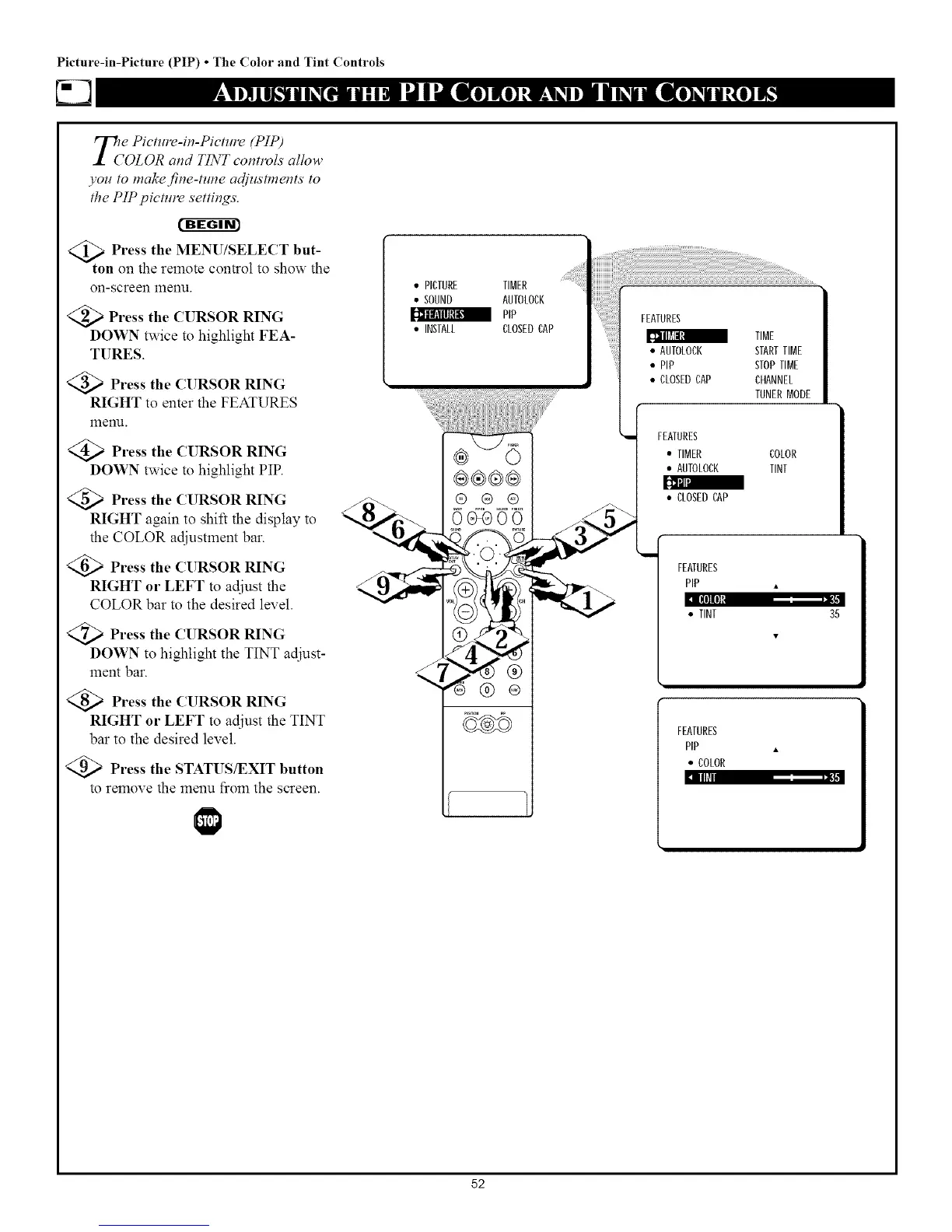
_t Press the MENU/SELECT but-
on on the remote control to show the
on-screen 1Tlenu.
<_ Press the CURSOR RING
DOWN twice to highlight FEA-
TURES.
<_ Press the CURSOR RING
RIGHT to enter the FEATURES
12qenu.
@Press the CURSOR RING
DOWN twice to highlight PIP.
@Press the CURSOR RING
RIGHT again to shift the display to
the COLOR adjustment bar.
@Press the CURSOR RING
RIGHT or LEFT to adjust the
COLOR bar to the desired level.
<Q_ Press the CURSOR RING
DOWN to highlight the TINT adjust-
ment bar.
<_ Press the CURSOR RING
RIGHT or LEFT to adjust the TINT
bar to the desired level.
<_ Press the STATUS/EXIT button
to remove the menu from the screen.
• PICTURE TIMER
• SOUND AUTOLOCK
PIP
• INSTALL CLOSEDCAP
®®®®
® ® ®
0_00
@ ®
FEATURES
TIME
• AUTOLOCK STARTTIME
• PIP STOPTIME
• CLOSEDCAP CHANNEL
TUNERMODE
FEATURES
• TIMER COLOR
• AUTOLOCK TINT
• CLOSEDCAP
FEATURES
PIP •
KKIIKII
• TINT 35
FEATURES
PIP •
• COLOR
II1_
52



 To Next Page