General Information • [sing Connection Options
iM
ecreis+an example of how)[ou
an make a cable box • I_CR •
TV connection..
r-ffggrm
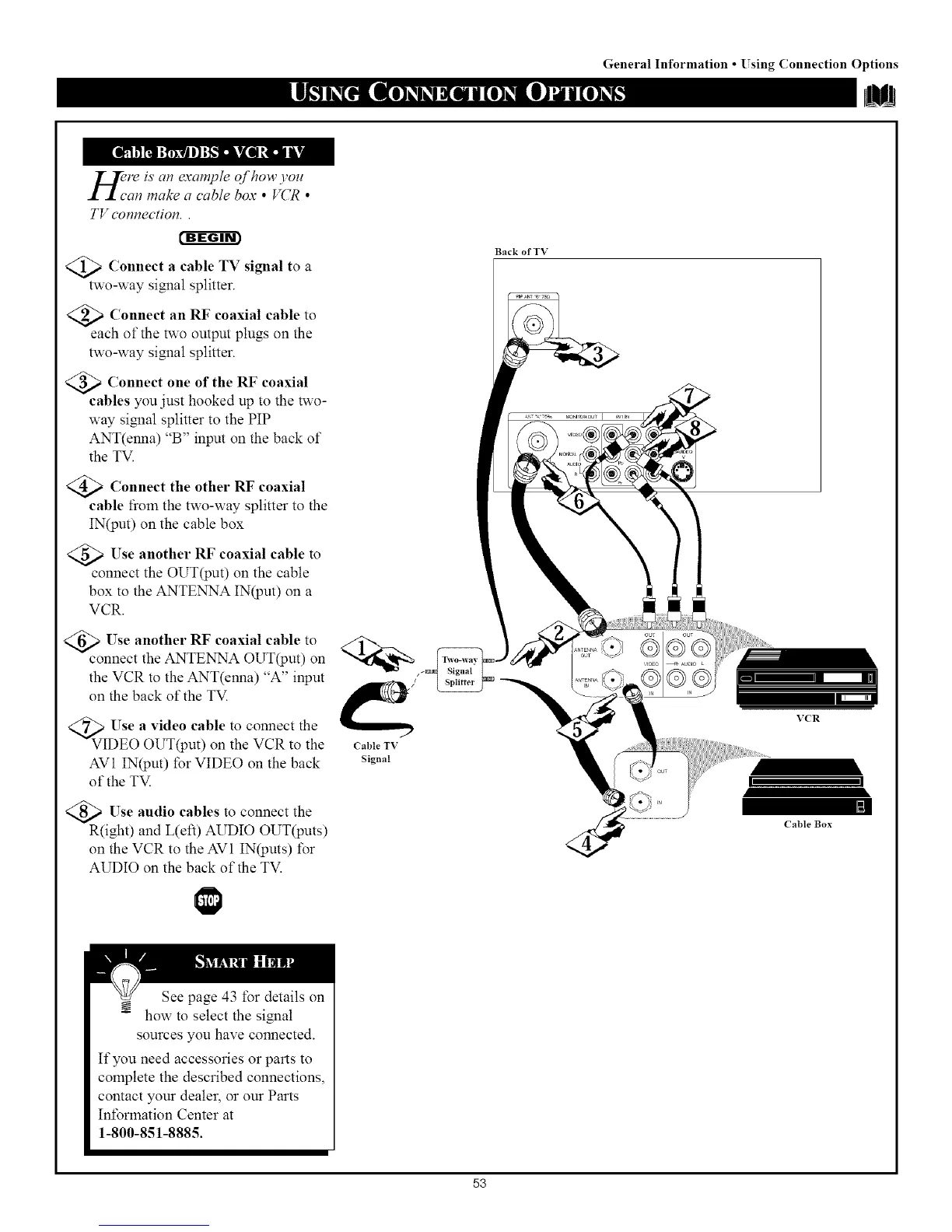
<_ Connect a signal a
cable TV to
two-way signal splitter.
_ Connect RF coaxial cable to
an
each of the two output plugs on the
two-way si_lal splitter.
_ Connect of the RF coaxial
one
cables you just hooked up to the two-
way signal splitter to the PIP
ANT(enna) "B" input on the back of
the TV.
@Connect the other RF coaxial
cable fiom the two-way splitter to the
IN(put) on the cable box
@Use another RF coaxial cable to
connect the OUT(put) on the cable
box to the ANTENNA IN(put) on a
VCR.
@:c onUn;et th°ethN TR%°AxO_ IT_ lu_)t; n
the VCR to the ANT(enna) "A" input
on the back of the TV ('
VI Use a video cable to connect the
DEO OUT(put) on the VCR to the CableTV
AV1 IN(put) for VIDEO on the back signal
of the TV
_Use audio cables to connect the
R(ight) and L(eft) AUDIO OUT(puts)
on the VCR to the AV1 IN(puts) for
AUDIO on the back of the TV.
Back of TV
VCR
I I
Cable Box
See page 43 for details on
how to select the siNmt
sources you have connected.
If you need accessories or parts to
complete the described connections,
contact your dealer, or our Parts
Int\_rlnation Center at
1-800-851-8885.
53



 To Next Page