Picture Menu • Adjusting the Picture
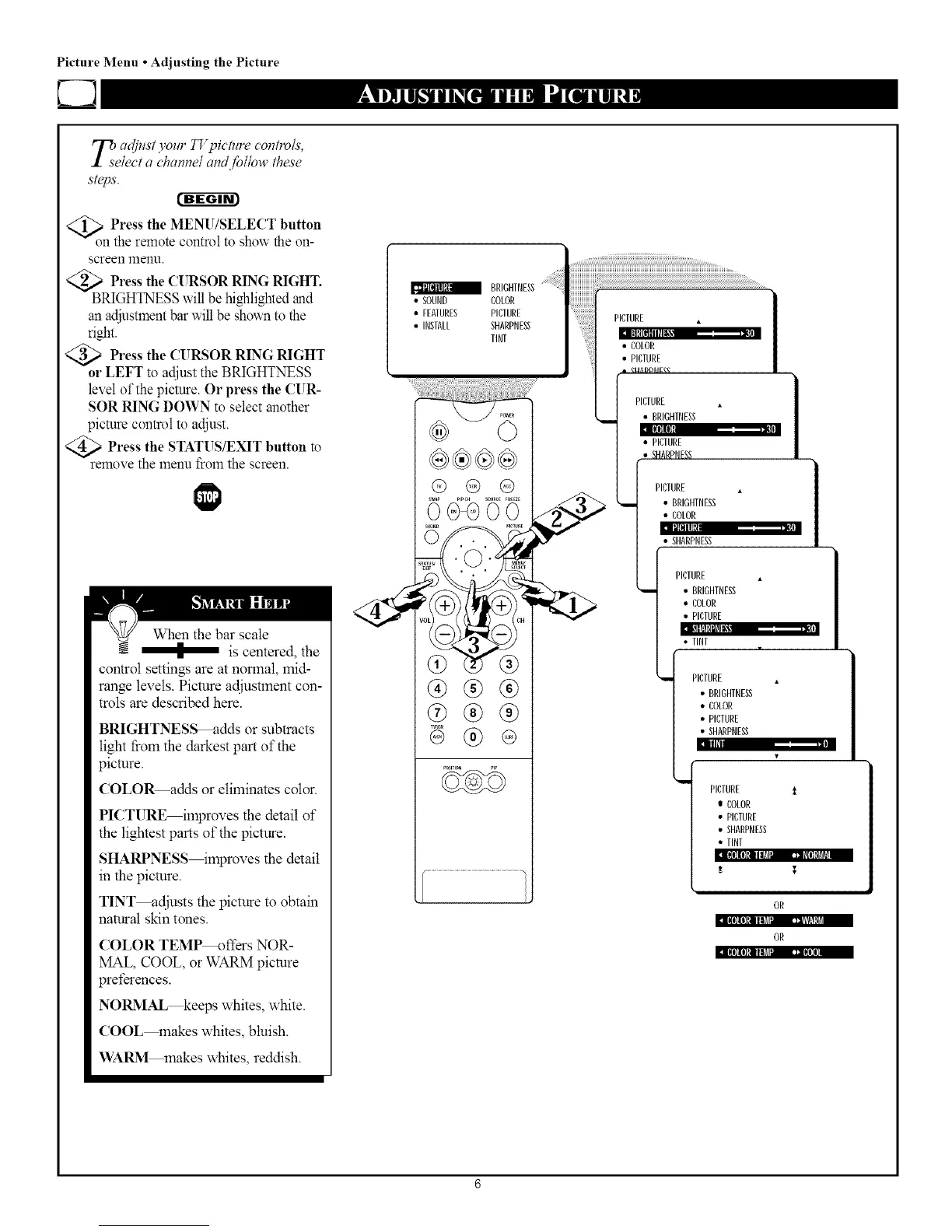
_eaclj_lst yore"TT'pict_lrecontro/s,
/ect a charade!and follow these
steps.
t'-g-ggr_
<_onPress the MENU/SELECT button
the remote control to show the on-
screen menl.1.
<_ Press the CURSOR RING RIGHT.
BRIGHTNESSwill be highlighted and
anadjustmentbar will be shown to the
right.
a Press the CURSOR RING RIGHT
or LEFT to adjust the BRIGHTNESS
level of the picture. Or press the CUR-
SOR RING DOWN to select another
picture control to adjust.
>Press the STATUS/EXIT button
to
remove the menu from the screen.
When the bar scale
------ I is centered, the
control settings are at normal, mid-
range levels. Picture adjustment con-
trols are described here.
BRIGHTNESS adds or subtracts
light Iiom the darkest part of the
picture.
COLO_adds or eliminates color.
I11111
PICTURE_ilnproves the detail of
the lightest parts of the picture.
SHARPNESS_lnproves the detail
in the picture.
TINT_djusts the picture to obtain
natural skin tones.
COLOR TEMP_ffers NOR-
MAL, COOL, or WARM picture
preferences.
NOl_lAL_eeps whites, white.
COOL makes whites, bluish.
WAI_I makes whites, reddish.
• SOUND COLOR
• FEATURES PICTURE
• INSTALL SHARPNESS
TINT
®®®
®®®
@
Eiltd[ll[ll_._, ._,
• COLOR
• PICTURE
_MADD_Ig_
PICTURE
• BRIGHTNESS
I[llli'
• PICTURE
• SHARPNFSS
PICTURE •
• BRIGHTNESS
• COLOR
I_IHII[!
SHARPNESS
PICTURE •
i I BRIGHTNESS
• COLOR
• PICTURE
• TINT
PICTURE
• BRIGHTNESS
• COLOR
• PICTURE
• SHARPNESS
n
w
PICTURE t
e COLOR
• PICTURE
• SHARPNESS
• TINT
OR
OR
I
lllll[ll!illll_ lu • '"(lI



 To Next Page